


Review: Logitech K120, Logitech K740 Illuminated, And Kensington Slim Keyboard
Posted by: Timothy Tibbetts on 06/23/17 04:26 am
[
 Comments
]
Comments
]
It seems as we get older, we like to save money. Sometimes it works out, and sometimes it costs you more. Recently, I decided to replace my Logitech K740 Illuminated keyboard with a Logitech K120 keyboard and ended up with a Kensington Slim keyboard. Rather than review just one, I figured I'd bore you with the whole story. So, here's a look at what 15, 27, and 69 dollars buys you in keyboards.
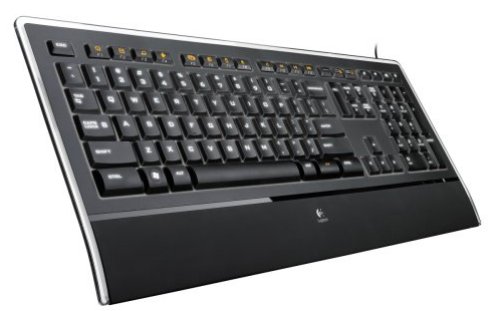
I currently have been using the Logitech K740 Illuminated keyboard, which runs close to 70 bucks but I've repeatedly had a key break off that would not go back on. This keyboard is a 5-star keyboard all day long, except for one thing; a key tends to break off after a while. It's a fairly larger keyboard width and height, but it is slim. It's comfortable, key placement is perfect, and it's backlit for a cool night time effect. Keys only need to be pressed down a little giving the keys a sort of classic look and feel, but quiet. The added length at the bottom makes it comfortable for your wrists, and I assume it's ergonomic. The K740 costs around 70 dollars and is my pick of the three.
Not that it's a complaint, a good gaming keyboard like the Razer BlackWidow Chroma V2 can run you well over 150 dollars.
Logitech K120 Keyboard
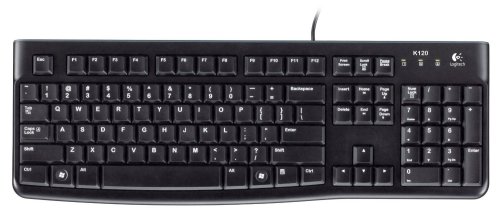
When I spotted the Logitech K120 keyboard for around 15 bucks, I decided all I needed was to type and took the plunge. It's a bit larger than the Kensington we will look at next, but it's a thick keyboard that has nothing for wrist support. The keys are noisy, and the few function keys you frequently use aren't placed all that well. I kept hitting scroll lock instead of the print screen button, for example. Typically, many keyboards have the Pause key next to the Print Screen key. For 15 dollars, you're not getting backlights and no additional function keys. For many, that's not a problem, but I frequently adjust my volume with the keyboard.
The Logitech K120 is a simplified keyboard without any bells and whistles (bells and whistles can be expensive as well). It lacks the many shortcut keys that a more expensive keyboard would have including volume, sleep, music photos, forward, backward, and more. The K120 is what it is; a no-frills keyboard for those who aren't fussy, don't type a lot or just prefer the keyboard style of old.
Kensington Slim
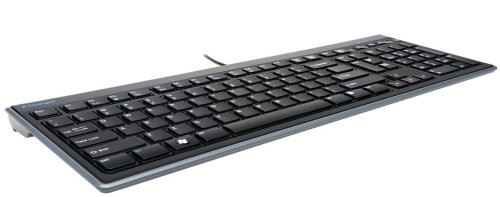
Once I realized the K120 wouldn't cut it, I spotted a cheaper alternative in the Kensington Slim. It looked very similar and was more than half the cost of the Logitech at 27 dollars. It looked very similar, and I am writing this review on it as we speak. I've adjusted to it in the time it took to write everything you've read so far. The keys are shallower by a tad and look like a small square on a larger square and are very comfortable to hit, requiring very little pressure and are very quiet although not as quiet as the K740. The Logitech has rounded edges that curve from the bottom up giving it, in my opinion, a more comfortable push down, if you like that sort of thing.
It has all the function keys you need, but there are no fancy backlights here. It also lacks the bottom extension to rest your wrists on. If you can live without those two features, this is a no-brainer for the costs saving. The shallower keys give it a more stealth look. The shiny black strip across the top also give it a little pizazz. Yes, we're discussing how attractive a keyboard is. In all seriousness, most of what looks good, works well.
Conclusion
There's an old geek rule regarding buying anything computer related. Unless you need the absolute best, then find the lowest price and the highest price and buy something in the middle. This works for most people whether it's a video card, processor, or even memory.
The best part about buying the Kensington Slim and the Logitech K120 is that I still saved about 25 dollars. What will I do on the next failure? I'm going to buy the Logitech K740 Illuminated keyboard again. It's just that good.
I currently have been using the Logitech K740 Illuminated keyboard, which runs close to 70 bucks but I've repeatedly had a key break off that would not go back on. This keyboard is a 5-star keyboard all day long, except for one thing; a key tends to break off after a while. It's a fairly larger keyboard width and height, but it is slim. It's comfortable, key placement is perfect, and it's backlit for a cool night time effect. Keys only need to be pressed down a little giving the keys a sort of classic look and feel, but quiet. The added length at the bottom makes it comfortable for your wrists, and I assume it's ergonomic. The K740 costs around 70 dollars and is my pick of the three.
Not that it's a complaint, a good gaming keyboard like the Razer BlackWidow Chroma V2 can run you well over 150 dollars.
Logitech K120 Keyboard
When I spotted the Logitech K120 keyboard for around 15 bucks, I decided all I needed was to type and took the plunge. It's a bit larger than the Kensington we will look at next, but it's a thick keyboard that has nothing for wrist support. The keys are noisy, and the few function keys you frequently use aren't placed all that well. I kept hitting scroll lock instead of the print screen button, for example. Typically, many keyboards have the Pause key next to the Print Screen key. For 15 dollars, you're not getting backlights and no additional function keys. For many, that's not a problem, but I frequently adjust my volume with the keyboard.
The Logitech K120 is a simplified keyboard without any bells and whistles (bells and whistles can be expensive as well). It lacks the many shortcut keys that a more expensive keyboard would have including volume, sleep, music photos, forward, backward, and more. The K120 is what it is; a no-frills keyboard for those who aren't fussy, don't type a lot or just prefer the keyboard style of old.
Kensington Slim
Once I realized the K120 wouldn't cut it, I spotted a cheaper alternative in the Kensington Slim. It looked very similar and was more than half the cost of the Logitech at 27 dollars. It looked very similar, and I am writing this review on it as we speak. I've adjusted to it in the time it took to write everything you've read so far. The keys are shallower by a tad and look like a small square on a larger square and are very comfortable to hit, requiring very little pressure and are very quiet although not as quiet as the K740. The Logitech has rounded edges that curve from the bottom up giving it, in my opinion, a more comfortable push down, if you like that sort of thing.
It has all the function keys you need, but there are no fancy backlights here. It also lacks the bottom extension to rest your wrists on. If you can live without those two features, this is a no-brainer for the costs saving. The shallower keys give it a more stealth look. The shiny black strip across the top also give it a little pizazz. Yes, we're discussing how attractive a keyboard is. In all seriousness, most of what looks good, works well.
Conclusion
There's an old geek rule regarding buying anything computer related. Unless you need the absolute best, then find the lowest price and the highest price and buy something in the middle. This works for most people whether it's a video card, processor, or even memory.
The best part about buying the Kensington Slim and the Logitech K120 is that I still saved about 25 dollars. What will I do on the next failure? I'm going to buy the Logitech K740 Illuminated keyboard again. It's just that good.
Comments
