


Sage Ransomware Demands $2,000
Posted by: Timothy Weaver on 01/25/2017 06:45 AM
[
 Comments
]
Comments
]
The spam that used to deliver Cerber ransomware is now serving up Sage ransomware and demanding $2,000.
 According to researchers, the spam emails that deliver Sage come without subject lines and never have a message text. The spam comes with an attachment which is a word document that requires the victim to enable macros. It may also employ a .js attachment to deliver the malware.
Two characteristics of the spam is the victim’s name in the attachment's file name and often a double zipped attachment that the victim has to open before getting to the Word document or .js file.
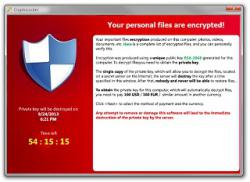
“The infected Windows host has an image of the decryption instructions as the desktop background. There's also an HTML file with the same instructions dropped to the desktop. The same HTML file is also dropped to any directory with encrypted files. ‘.sage’ is the suffix for all encrypted files,” the security researcher explains.
According to Brad Duncan, Rackspace security researcher,: “I'm not sure how widely-distributed Sage ransomware is. I've only seen it from this one malspam campaign, and I've only seen it one day so far. I'm also not sure how effective this particular campaign is. It seems these emails can easily be blocked, so few end users may have actually seen Sage 2.0. Still, Sage is another name in the wide variety of existing ransomware families. This illustrates how profitable ransomware remains for cyber criminals.”
Source: Security Week
According to researchers, the spam emails that deliver Sage come without subject lines and never have a message text. The spam comes with an attachment which is a word document that requires the victim to enable macros. It may also employ a .js attachment to deliver the malware.Two characteristics of the spam is the victim’s name in the attachment's file name and often a double zipped attachment that the victim has to open before getting to the Word document or .js file.
“The infected Windows host has an image of the decryption instructions as the desktop background. There's also an HTML file with the same instructions dropped to the desktop. The same HTML file is also dropped to any directory with encrypted files. ‘.sage’ is the suffix for all encrypted files,” the security researcher explains.
According to Brad Duncan, Rackspace security researcher,: “I'm not sure how widely-distributed Sage ransomware is. I've only seen it from this one malspam campaign, and I've only seen it one day so far. I'm also not sure how effective this particular campaign is. It seems these emails can easily be blocked, so few end users may have actually seen Sage 2.0. Still, Sage is another name in the wide variety of existing ransomware families. This illustrates how profitable ransomware remains for cyber criminals.”
Source: Security Week
Comments
