


Samsung goes up against Google Play with Galaxy App Store
Posted by: Jon Ben-Mayor on 07/11/14 01:50 am
[
 Comments
]
Comments
]
Samsung has opened the Galaxy App Store in direct competition with Google Play; this move essentially fills the void left when Samsung closed down the Samsung Apps service and touts the new store as "an improvement upon its predecessor."
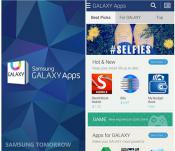 According to a Samsung blog post, Samsung Electronics launched Samsung GALAXY Apps, an app store that offers hundreds of apps exclusively available to users of Samsung Galaxy mobile devices. An improvement upon its predecessor, Samsung Apps, the new app store features apps that will allow greater customization of mobile devices and will also function as a platform to offer various promotions and discounts.
“At Samsung, we continuously strive to create value for our customers by providing differentiated solutions and services coupled with innovative devices,” said WonPyo Hong, President of the Media Solution Center at Samsung Electronics. “Samsung GALAXY Apps is an extension of that promise, as it offers our customers exclusive apps to enrich their experience.”
Samsung GALAXY Apps will eventually be available to over 130 million users across 161 countries around the world.
According to a Samsung blog post, Samsung Electronics launched Samsung GALAXY Apps, an app store that offers hundreds of apps exclusively available to users of Samsung Galaxy mobile devices. An improvement upon its predecessor, Samsung Apps, the new app store features apps that will allow greater customization of mobile devices and will also function as a platform to offer various promotions and discounts.“At Samsung, we continuously strive to create value for our customers by providing differentiated solutions and services coupled with innovative devices,” said WonPyo Hong, President of the Media Solution Center at Samsung Electronics. “Samsung GALAXY Apps is an extension of that promise, as it offers our customers exclusive apps to enrich their experience.”
Samsung GALAXY Apps will eventually be available to over 130 million users across 161 countries around the world.
Comments
