


TeslaCrypt Ransomware Disguised as USPS Email
Posted by: Timothy Weaver on 02/25/2016 05:46 AM
[
 Comments
]
Comments
]
A current TeslaCrypt Ransomware campaign, discovered by AppRiver, mimics the United States Postal Service (USPS
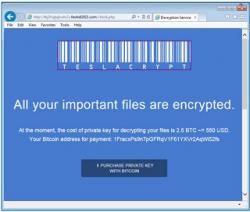 Scam emails are going out that have an attachment purporting to be a failed delivery attempt but instead delivers the malware.
The filenames being used are USPS_delivery_invoice[.]zip for the archive and within, the javascript files use the following naming convention – invoice_[random string] .js, invoice_copy_[random string] .js, or invoice_scan_[random string] .js.
The java script downloader then directs the victim to several websites including: mafiawantsyouqq[.]com, lenovowantsyouff[.]com, whereareyoumyfriendff[.]com, lenovomaybenotqq[.]com, and ikstrade.co[.]kr to pull down files such as 93[.]exe, 45[.]exe, and 26[.exe] among others using the same naming convention.
These scam emails can be particularly damaging to small and medium sized businesses. The only resource is to make sure your antivirus protection is integrated with “proactive technologies that can block ransomware”, educating users by “showing them examples of these types of fraudulent emails”, and of course making sure “software is updated in all endpoints and servers to stop infections via exploit kits.”
Source: InfoSecurity
Scam emails are going out that have an attachment purporting to be a failed delivery attempt but instead delivers the malware. The filenames being used are USPS_delivery_invoice[.]zip for the archive and within, the javascript files use the following naming convention – invoice_[random string] .js, invoice_copy_[random string] .js, or invoice_scan_[random string] .js.
The java script downloader then directs the victim to several websites including: mafiawantsyouqq[.]com, lenovowantsyouff[.]com, whereareyoumyfriendff[.]com, lenovomaybenotqq[.]com, and ikstrade.co[.]kr to pull down files such as 93[.]exe, 45[.]exe, and 26[.exe] among others using the same naming convention.
These scam emails can be particularly damaging to small and medium sized businesses. The only resource is to make sure your antivirus protection is integrated with “proactive technologies that can block ransomware”, educating users by “showing them examples of these types of fraudulent emails”, and of course making sure “software is updated in all endpoints and servers to stop infections via exploit kits.”
Source: InfoSecurity
Comments
