


The many ways you can stream Netflix to your television
Posted by: Timothy Tibbetts on 02/09/2014 03:16 AM
[
 Comments
]
Comments
]
Someone recently asked me on our MajorGeeks Facebook Page about how they could stream Netflix to a TV in their house other than the one they already had setup. There are numerous ways to do this, so here are some great options depending on your situation.
Buy a new TV
Not the cheapest way, but maybe your TV is getting old. TV’s, in the past few years, often come with apps. Check your TV remote (if your TV is newer) for an app button. If not, and buying a new TV is an option, then you want to look for a “Smart TV”. At the time of this article you are looking at roughly $400 for a decent 40” TV and just under $1,000 for a 55” TV.
Buy a Blu-Ray player
Blu-Ray players can play your old DVD’s and if you like to collect physical movies occasionally, then Blu-Ray is best. Almost all Blu-Ray players come with apps. Look for the Netflix logo on the box. You’re looking at about $99.
Buy a game console
Not the best idea unless you want to play games or you have someone who might use it. Then again if someone plays games on it a lot, good luck using it for movies. Again, most game consoles include Netflix now. When I tried using my PS3 I noticed that it runs hot and the video quality isn’t that great so I went with the next option.
Buy a Google Chromecast
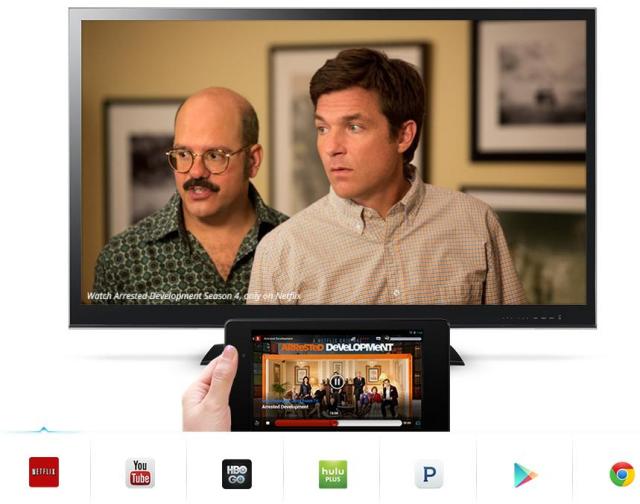
My favorite, although you need a popular tablet or a desktop or laptop nearby to use it and your TV needs a USB port. Chromecast is simply a USB drive that you plug in and connect a device to. It’s one of the easiest things to setup I have ever used. At the time of this article it supports streaming YouTube, Netflix, Hulu, HBO, Pandora, Google Play and Chrome. More apps are being added. Simply download the Chromecast app, connect to your TV, and get the Netflix app and stream. Best part is its only $35. See if your device is supported at http://www.google.com/intl/en-US/chrome/devices/chromecast/.
There are other ways as well. In this article, I tried to cover ways to do it with technology you already have or need to keep it as affordable as possible. We would like to hear from you. Pass on your ideas in the comments section below.
Not the cheapest way, but maybe your TV is getting old. TV’s, in the past few years, often come with apps. Check your TV remote (if your TV is newer) for an app button. If not, and buying a new TV is an option, then you want to look for a “Smart TV”. At the time of this article you are looking at roughly $400 for a decent 40” TV and just under $1,000 for a 55” TV.
Blu-Ray players can play your old DVD’s and if you like to collect physical movies occasionally, then Blu-Ray is best. Almost all Blu-Ray players come with apps. Look for the Netflix logo on the box. You’re looking at about $99.
Not the best idea unless you want to play games or you have someone who might use it. Then again if someone plays games on it a lot, good luck using it for movies. Again, most game consoles include Netflix now. When I tried using my PS3 I noticed that it runs hot and the video quality isn’t that great so I went with the next option.
My favorite, although you need a popular tablet or a desktop or laptop nearby to use it and your TV needs a USB port. Chromecast is simply a USB drive that you plug in and connect a device to. It’s one of the easiest things to setup I have ever used. At the time of this article it supports streaming YouTube, Netflix, Hulu, HBO, Pandora, Google Play and Chrome. More apps are being added. Simply download the Chromecast app, connect to your TV, and get the Netflix app and stream. Best part is its only $35. See if your device is supported at http://www.google.com/intl/en-US/chrome/devices/chromecast/.
There are other ways as well. In this article, I tried to cover ways to do it with technology you already have or need to keep it as affordable as possible. We would like to hear from you. Pass on your ideas in the comments section below.
Comments
