


tinyMediaManager Keeps Your Movie Collection Organized and More
Posted by: Jon Ben-Mayor on 06/07/15 05:57 am
[
 Comments
]
Comments
]
tinyMediaManager is the perfect multiple OS media management tool to help you organize your vast movie library organized.
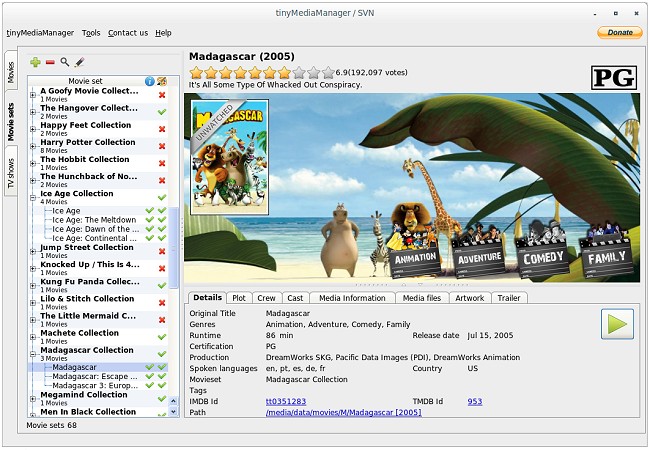
Movies can be arranged into collections called moviesets. This moviesets represents movies which have some sort of connection to each other. Simply think about the Harry Potter Collection: it includes all Harry Potter movies. tinyMediaManager helps you to organize your movies into moviesets.
In tinyMediaManager you can sort and filter movies by many criteria. This allows you a fast access to the movies you are searching for.
Fanart and Posters will be downloaded from TheMovieDB.org and Fanart.tv. Via the included image chooser you can easily select between all available images as well as choose local files for your movies. The artwork is stored in the movie folder with the filename you specified.
Get a list of available trailers for your movies through TheMovieDB.org and HD-Trailers.net. You will also have the option to directly launch the browser and watch the trailer.
Download @ http://www.majorgeeks.com/files/details/tinymediamanager.html
Movies can be arranged into collections called moviesets. This moviesets represents movies which have some sort of connection to each other. Simply think about the Harry Potter Collection: it includes all Harry Potter movies. tinyMediaManager helps you to organize your movies into moviesets.
In tinyMediaManager you can sort and filter movies by many criteria. This allows you a fast access to the movies you are searching for.
Fanart and Posters will be downloaded from TheMovieDB.org and Fanart.tv. Via the included image chooser you can easily select between all available images as well as choose local files for your movies. The artwork is stored in the movie folder with the filename you specified.
Get a list of available trailers for your movies through TheMovieDB.org and HD-Trailers.net. You will also have the option to directly launch the browser and watch the trailer.
Download @ http://www.majorgeeks.com/files/details/tinymediamanager.html
Comments
