


TrueCrypt compromised, alternative suggested
Posted by: Timothy Weaver on 05/29/14 07:08 am
[
 Comments
]
Comments
]
The website of popular drive-encryption software TrueCrypt has been compromised.
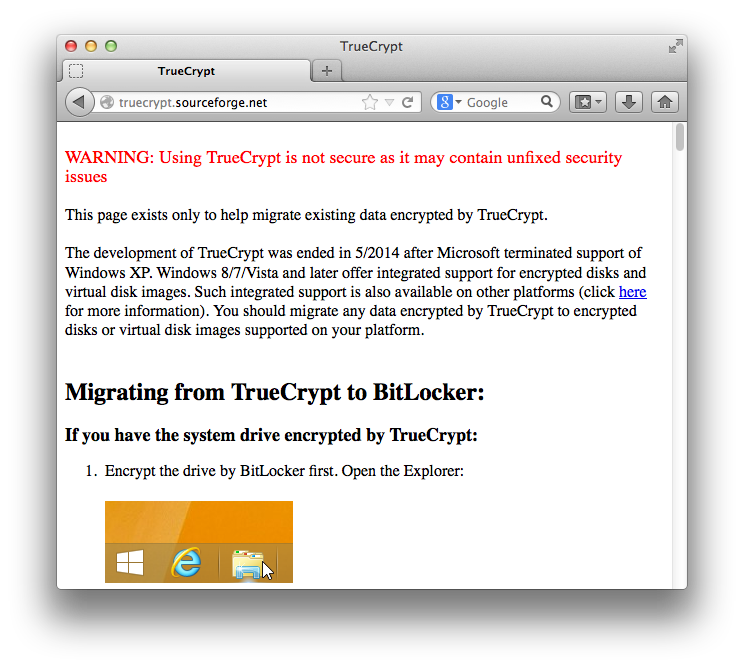
WARNING: Using TrueCrypt is not secure as it may contain unfixed security issues.
The development of TrueCrypt was ended in 5/2014 after Microsoft terminated support of Windows XP. Windows 8/7/Vista and later offer integrated support for encrypted disks and virtual disk images. Such integrated support is also available on other platforms (click here for more information). You should migrate any data encrypted by TrueCrypt to encrypted disks or virtual disk images supported on your platform.
The page goes on to specifically recommend Microsoft's BitLocker as an alternative for Windows users.
Jonathan Zdziarski @JZdziarski
Follow
If http://TrueCrypt.org is compromised, it's likely been compromised a good while. I wouldn't trust any recent downloads of the software.
2:56 PM - 28 May 2014
18 Retweets 2 favorites
Reply
Retweet
Favorite
WARNING: Using TrueCrypt is not secure as it may contain unfixed security issues.
The development of TrueCrypt was ended in 5/2014 after Microsoft terminated support of Windows XP. Windows 8/7/Vista and later offer integrated support for encrypted disks and virtual disk images. Such integrated support is also available on other platforms (click here for more information). You should migrate any data encrypted by TrueCrypt to encrypted disks or virtual disk images supported on your platform.
The page goes on to specifically recommend Microsoft's BitLocker as an alternative for Windows users.
Jonathan Zdziarski @JZdziarski
Follow
If http://TrueCrypt.org is compromised, it's likely been compromised a good while. I wouldn't trust any recent downloads of the software.
2:56 PM - 28 May 2014
18 Retweets 2 favorites
Reply
Retweet
Favorite
Comments
