


Update to the PDF Virus
Posted by: J. McMahon on 08/16/2017 01:13 PM
[
 Comments
]
Comments
]
On the 14th we wrote of a nasty little PDF virus running amok.
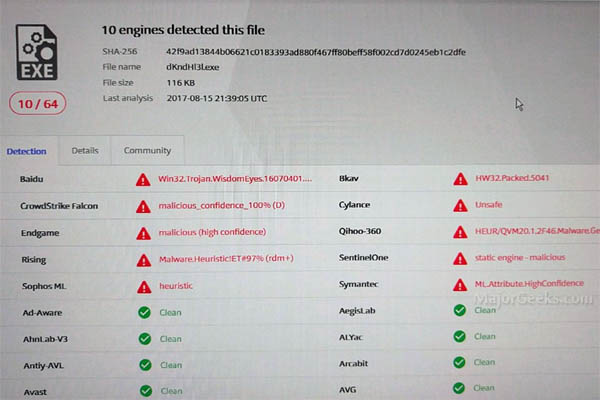
As of yesterday, only 10 antivirus apps were tagging this virus. As of right now, it is up to 28 on virus total It also looks, like Sophos was first out of the blocks with a heuristic detection - so kudos to them.
However, we also know that if the payload were to be released on a system it recreates itself as common Windows program names that you would find in your Windows directories like; Ckconfig.exe or bootcfg.exe as an example. Those files will be placed outside of the normal directories and are not being detected - probably because the names are whitelisted. With this now being a known hash - this should change soon.
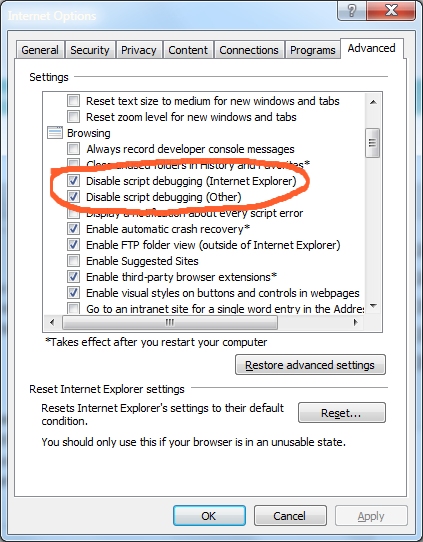
We also know that the virus is using debug.exe to keep itself alive, turning on User Account Control and using any admins shares to propagate. if you get it and want any chance of stopping it, you will need to turn off Machine debugging. In with 10 run services and look for Machine Debug Manager and stop that service. In previous Windows you have to dust off Internet Explorer got to Internet Options then click the Advanced tab and deselect the Disable script debugging check box(es). Frankly though, once this one has it's hooked in your PC you are probably looking a format.
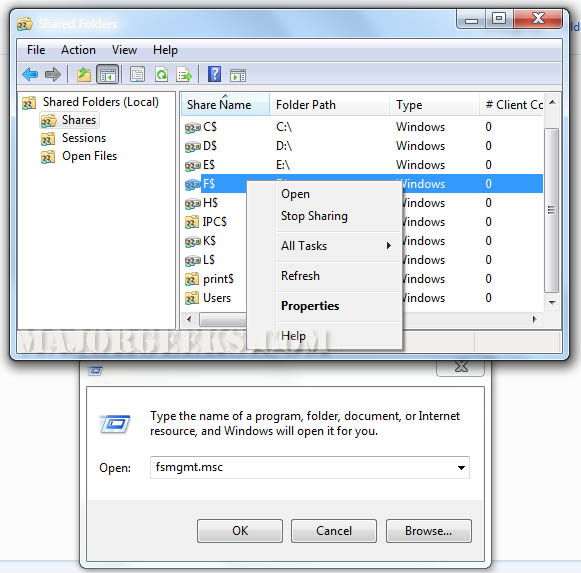
Admin shares are hidden shares created by Windows when you have computers networked together that are accessible only by admins. They are used by admins to manage the local network - back things up, configure settings, etc. If you are not on a local network - then there is nothing to worry about. However, if you do not have one of the 28 antivirus products that currently detect this PDF Virus then you may want to turn off admin shares on things like your backup drive or NAS server and other local network shares as the virus could jump to the share and encrypt that content as well. To do so is rather easy but if you do start removing admin shares, please make sure you backup up your registry before hand.
Then, just run fsmgmt.msc, click on shares and then right click the share you wish to stop and choose stop sharing.
New virii come out every day and these PDF infections seem to be the new thing. The best defense is to:
Never open an attachment from someone you do not know.
Do not open a PDF if it has a weird name to it - even if it is from someone you know.
If you open a PDF and it pops up a window asking for something like to open a file or to click "yes" - close the PDF and start a virus scan.
Most importantly - Have good, up to date backups of any data that is important. You can get a 2 TB backup drive on Amazon for less than $70.00 which is a LOT cheaper than paying a ransom.
As of yesterday, only 10 antivirus apps were tagging this virus. As of right now, it is up to 28 on virus total It also looks, like Sophos was first out of the blocks with a heuristic detection - so kudos to them.
However, we also know that if the payload were to be released on a system it recreates itself as common Windows program names that you would find in your Windows directories like; Ckconfig.exe or bootcfg.exe as an example. Those files will be placed outside of the normal directories and are not being detected - probably because the names are whitelisted. With this now being a known hash - this should change soon.
We also know that the virus is using debug.exe to keep itself alive, turning on User Account Control and using any admins shares to propagate. if you get it and want any chance of stopping it, you will need to turn off Machine debugging. In with 10 run services and look for Machine Debug Manager and stop that service. In previous Windows you have to dust off Internet Explorer got to Internet Options then click the Advanced tab and deselect the Disable script debugging check box(es). Frankly though, once this one has it's hooked in your PC you are probably looking a format.
Admin shares are hidden shares created by Windows when you have computers networked together that are accessible only by admins. They are used by admins to manage the local network - back things up, configure settings, etc. If you are not on a local network - then there is nothing to worry about. However, if you do not have one of the 28 antivirus products that currently detect this PDF Virus then you may want to turn off admin shares on things like your backup drive or NAS server and other local network shares as the virus could jump to the share and encrypt that content as well. To do so is rather easy but if you do start removing admin shares, please make sure you backup up your registry before hand.
Then, just run fsmgmt.msc, click on shares and then right click the share you wish to stop and choose stop sharing.
New virii come out every day and these PDF infections seem to be the new thing. The best defense is to:
Comments
