


Cleanmgr+ Is a Solid Disk Clean-up Tool Alternative
By Timothy Tibbettson 06/15/2023 |
Cleanmgr+ is a portable tool that builds upon the Microsoft Disk Clean-up Tool (Cleanmgr.exe) by adding additional features and deleting more junk than the Disk Clean-up Tool.
Disk Cleanup isn't immediately disappearing from your machine, but it is nearing its shelf life as far as Microsoft is concerned. It can still be used by right-clicking a drive, selecting Properties, and then click the Disk Cleanup button to launch it. And it still works the same way on Windows 10 today. You can also launch it from the Start menu or run the cleanmgr.exe program. But it was deprecated with the October 2018 update. This fact means that it has been replaced by a new tool. Windows 10 version 1803 came up with the Storage Sense functionality, and it works in relatively the same as the Disk Cleanup Tool. The downside of Storage Sense is the massive UI. This size is why Mirinsoft decided to make Cleanmgr+ to circumvent that massive UI of Storage Sense but still provide a utility that is true to the original.
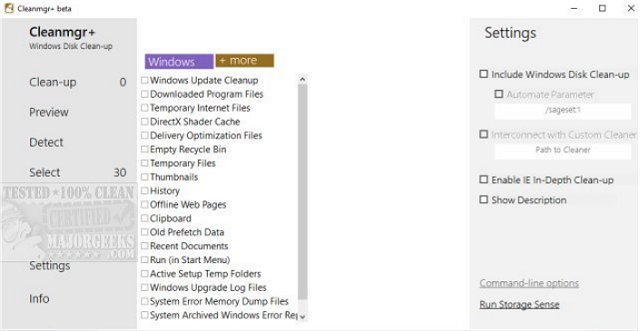
Cleanmgr+ features a slim and modern UI with an additional feature set (hence the +), such as the feeding with Custom scripts, i.e., to clean a Browser cache, etc. There are many Disk Cleaner utilities out there, but the goal with this one was to create a tool that uses Windows own resources ensuring that only system-compliant actions are performed.
Extract Cleanmgr+ to a folder, create a shortcut wherever you like and launch it directly anytime.
Cleanmrg+ does an excellent job of recreating the classic Disk Clean-up tool feel and function with all its features easily allowing users to remove files that are no longer needed or that can be safely deleted.
Download @ https://www.majorgeeks.com/files/details/cleanmgr.html
comments powered by Disqus
Disk Cleanup isn't immediately disappearing from your machine, but it is nearing its shelf life as far as Microsoft is concerned. It can still be used by right-clicking a drive, selecting Properties, and then click the Disk Cleanup button to launch it. And it still works the same way on Windows 10 today. You can also launch it from the Start menu or run the cleanmgr.exe program. But it was deprecated with the October 2018 update. This fact means that it has been replaced by a new tool. Windows 10 version 1803 came up with the Storage Sense functionality, and it works in relatively the same as the Disk Cleanup Tool. The downside of Storage Sense is the massive UI. This size is why Mirinsoft decided to make Cleanmgr+ to circumvent that massive UI of Storage Sense but still provide a utility that is true to the original.
Cleanmgr+ features a slim and modern UI with an additional feature set (hence the +), such as the feeding with Custom scripts, i.e., to clean a Browser cache, etc. There are many Disk Cleaner utilities out there, but the goal with this one was to create a tool that uses Windows own resources ensuring that only system-compliant actions are performed.
Extract Cleanmgr+ to a folder, create a shortcut wherever you like and launch it directly anytime.
Cleanmrg+ does an excellent job of recreating the classic Disk Clean-up tool feel and function with all its features easily allowing users to remove files that are no longer needed or that can be safely deleted.
Download @ https://www.majorgeeks.com/files/details/cleanmgr.html
comments powered by Disqus
