


Cleanmgr+
1.50.1300 
|
Author:
Builtbybel
Date: 01/24/22 Size: 234 KB License: Freeware Requires: 11|10|8 Downloads: 100513 times  TIP:
Click Here to Repair or
TIP:
Click Here to Repair orRestore Missing Windows Files |
 Download@MajorGeeks Download@MajorGeeks
|
MajorGeeks: Setting the standard for editor-tested, trusted, and secure downloads since 2002. |
 Avast Free Antivirus Worried about finance scams?
Get free antivirus with AI-powered online scam detection Download Free!
Cleanmgr+ is a portable freeware app that builds upon the Microsoft Disk Clean-up Tool (Cleanmgr.exe) by adding additional features and deleting more junk than the Disk Clean-up Tool.
Disk Cleanup isn't immediately disappearing from your machine, but it is nearing its shelf life as far as Microsoft is concerned. It can still be used by right-clicking a drive, selecting Properties, and then click the Disk Cleanup button to launch it. And it still works the same way on Windows 10 today. You can also launch it from the Start menu or run the cleanmgr.exe program. But it was deprecated with the October 2018 update. This fact means that it has been replaced by a new tool. Windows 10 version 1803 came up with the Storage Sense functionality, and it works relatively the same as the Disk Cleanup Tool. The downside of Storage Sense is its massive UI. This size is why Builtbybel (formerly Mirinsoft) decided to make Cleanmgr+ to circumvent that extensive UI of Storage Sense but still provide a utility that is true to the original.
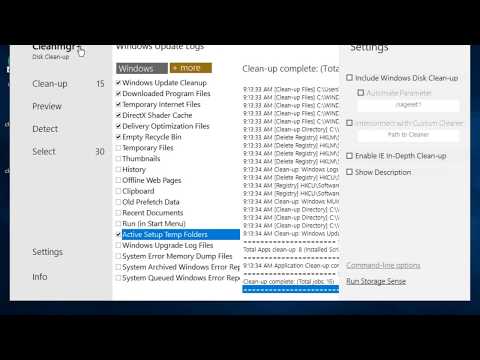
Cleanmgr+ features a slim and modern UI with an additional feature set (hence the +), such as the feeding with Custom scripts, i.e., to clean a Browser cache, etc. There are many Disk Cleaner utilities out there, but the goal was to create a tool that uses Windows' resources, ensuring that only system-compliant actions are performed.
Extract Cleanmgr+ to a folder, create a shortcut wherever you like, and launch it directly anytime.
Cleanmrg+ does an excellent job of recreating the classic Disk Cleanup tool feel and function with all its features quickly, allowing users to remove files that are no longer needed or that can be safely deleted.
Similar:
● How to Use Storage Sense to Delete Junk Files in Windows 10 Automatically
● Best Drive Cleaner? CCleaner VS Wise Disk Cleaner VS PrivaZer
● How to Turn off Storage Sense in Windows 10
● How to Securely Delete Files in Windows 10 With PowerShell and Cipher
Disk Cleanup isn't immediately disappearing from your machine, but it is nearing its shelf life as far as Microsoft is concerned. It can still be used by right-clicking a drive, selecting Properties, and then click the Disk Cleanup button to launch it. And it still works the same way on Windows 10 today. You can also launch it from the Start menu or run the cleanmgr.exe program. But it was deprecated with the October 2018 update. This fact means that it has been replaced by a new tool. Windows 10 version 1803 came up with the Storage Sense functionality, and it works relatively the same as the Disk Cleanup Tool. The downside of Storage Sense is its massive UI. This size is why Builtbybel (formerly Mirinsoft) decided to make Cleanmgr+ to circumvent that extensive UI of Storage Sense but still provide a utility that is true to the original.
▶
Cleanmgr+ features a slim and modern UI with an additional feature set (hence the +), such as the feeding with Custom scripts, i.e., to clean a Browser cache, etc. There are many Disk Cleaner utilities out there, but the goal was to create a tool that uses Windows' resources, ensuring that only system-compliant actions are performed.
Extract Cleanmgr+ to a folder, create a shortcut wherever you like, and launch it directly anytime.
Cleanmrg+ does an excellent job of recreating the classic Disk Cleanup tool feel and function with all its features quickly, allowing users to remove files that are no longer needed or that can be safely deleted.
Similar:
● How to Use Storage Sense to Delete Junk Files in Windows 10 Automatically
● Best Drive Cleaner? CCleaner VS Wise Disk Cleaner VS PrivaZer
● How to Turn off Storage Sense in Windows 10
● How to Securely Delete Files in Windows 10 With PowerShell and Cipher
 Screenshot for Cleanmgr+
Top Downloads In Drive Cleaners
 WinSysClean 23.0 [ 2026-09-21 08:49:11 | 19 MB | Freemium | 11|10|8 | 4 ] PrivaZer 4.0.127 [ 2026-10-04 08:05:26 | 28 MB | Freemium | 11|10|8|7 | 4 ] CCleaner Standard 7.13.1573.0 [ 2026-10-21 08:50:16 | Size Varies | Ad-Supported | 11|10|8|7|macOS | 5 ] CCleaner Portable 6.4.1.11567 [ 2026-06-20 15:32:10 | 78 MB | Ad-Supported | 11|10|8|7 | 5 ] CCleaner Slim 6.4.1.11567 [ 2026-06-20 15:32:09 | 81 MB | Ad-Supported | 11|10|8|7|macOS | 5 ]
 Tactical Briefings
Comment Rules & Etiquette - We welcome all comments from our readers, but any comment section requires some moderation. Some posts are auto-moderated to reduce spam, including links and swear words. When you make a post, and it does not appear, it went into moderation. We are emailed when posts are marked as spam and respond ASAP. Some posts might be deleted to reduce clutter. Examples include religion, politics, and comments about listing errors (after we fix the problem and upvote your comment). Finally, be nice. Thank you for choosing MajorGeeks.

© 2000-2026 MajorGeeks.com
Powered by Contentteller® CMS System