


Stop Windows 10 From Automatically Deleting the Thumbnail Cache
By Timothy Tibbettson 06/19/2023 |
Recently we showed you how to rebuild the Windows icon cache when thumbnails are broken, but it's also possible to stop Windows from deleting your icon cache ever again. Here's how.
We do suggest that you back up the registry before you proceed. Here's how How to Back up or Restore the Windows Registry.
All of the icons you see are stored in a file called IconCache.db and Windows deletes that file regularly and automatically. If you have a lot of photos on your drive, this can take time and waste system resources when you least expect it. It's not a problem for most people, but for those who do, here's how to stop Windows from deleting your icon cache.
Press the Windows key + R and type in regedit followed by enter. Navigate to Computer\HKEY_LOCAL_MACHINE\SOFTWARE\Microsoft\Windows\CurrentVersion\Explorer\VolumeCaches\Temporary Files. You can also copy that and paste it to the top of the registry editor to save time. You will notice there's an entry here called Autorun and by default the setting is 1, meaning it will auto delete your icon thumbnail cache. Double-click on Autorun and change the Value data from 1 to 0.
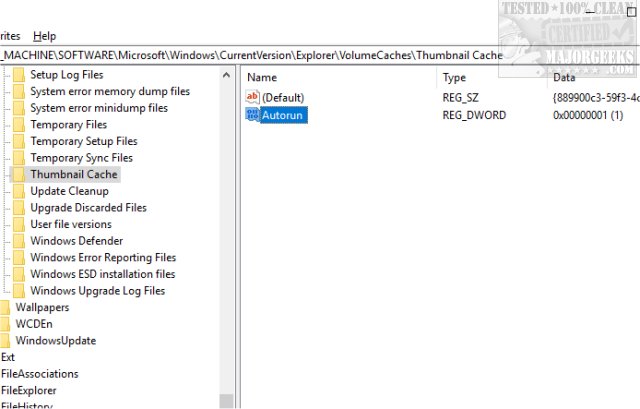
We now have to repeat the same process to another registry key. This time navigate to Computer\HKEY_LOCAL_MACHINE\SOFTWARE\WOW6432Node\Microsoft\Windows\CurrentVersion\Explorer\VolumeCaches\Thumbnail Cache and once again double-click on Autorun and change the Value data from 1 to 0.
All you need to do now is a reboot for the changes to take effect.
Those who don't want to tinker with their registry can download a registry hack to do this for you.
comments powered by Disqus
We do suggest that you back up the registry before you proceed. Here's how How to Back up or Restore the Windows Registry.
All of the icons you see are stored in a file called IconCache.db and Windows deletes that file regularly and automatically. If you have a lot of photos on your drive, this can take time and waste system resources when you least expect it. It's not a problem for most people, but for those who do, here's how to stop Windows from deleting your icon cache.
Press the Windows key + R and type in regedit followed by enter. Navigate to Computer\HKEY_LOCAL_MACHINE\SOFTWARE\Microsoft\Windows\CurrentVersion\Explorer\VolumeCaches\Temporary Files. You can also copy that and paste it to the top of the registry editor to save time. You will notice there's an entry here called Autorun and by default the setting is 1, meaning it will auto delete your icon thumbnail cache. Double-click on Autorun and change the Value data from 1 to 0.
We now have to repeat the same process to another registry key. This time navigate to Computer\HKEY_LOCAL_MACHINE\SOFTWARE\WOW6432Node\Microsoft\Windows\CurrentVersion\Explorer\VolumeCaches\Thumbnail Cache and once again double-click on Autorun and change the Value data from 1 to 0.
All you need to do now is a reboot for the changes to take effect.
Those who don't want to tinker with their registry can download a registry hack to do this for you.
comments powered by Disqus
