


How to Fix Windows Update Error 0x800f024b
By Timothy Tibbettson 06/24/2023 |
Windows Update error 0x800f024b on Windows 10 can occur when trying to download a driver. Try these steps to resolve the error.
Windows Update Error 0x800f024b - Reboot
Try to reboot and check for updates again. While it might seem simple, sometimes that's all you need.
Windows Update Error 0x800f024b - Manually Update
Check and see if your manufacturer has an updated driver.
Windows Update Error 0x800f024b - Roll Back Driver
Another easy fix would be to roll back to the previous driver.
Press the Windows Key + S, type in, and click on Device Manager.
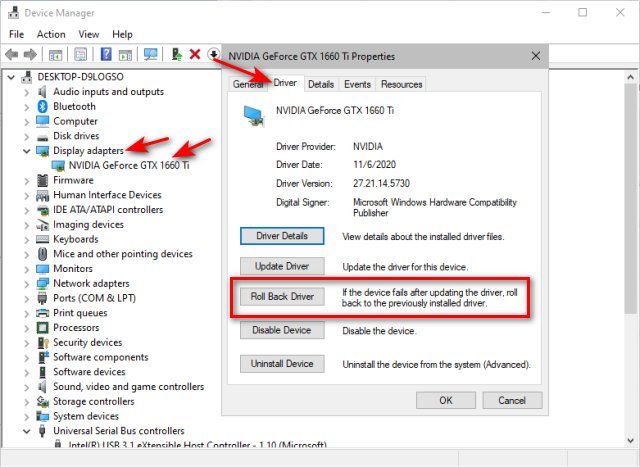
Expand the hardware giving you the problem (Display Adapter, Printers, Mice, Keyboard, etc.) Right-click on the device and click Properties.
Click on the Driver tab. Click on Roll Back Driver.
Windows Update Error 0x800f024b - Delete Driver
If you delete the device and reboot, Windows 10 will detect the device and reinstall everything.
Follow the same steps above and click on Uninstall Device.
Similar:
How to Download Drivers in Windows Update
How-To Backup and Restore Your Drivers
How-To Stop Windows Updates From Downloading Drivers on Windows 10
How to View Recently Updated Windows Drivers
comments powered by Disqus
Windows Update Error 0x800f024b - Reboot
Try to reboot and check for updates again. While it might seem simple, sometimes that's all you need.
Windows Update Error 0x800f024b - Manually Update
Check and see if your manufacturer has an updated driver.
Windows Update Error 0x800f024b - Roll Back Driver
Another easy fix would be to roll back to the previous driver.
Press the Windows Key + S, type in, and click on Device Manager.
Expand the hardware giving you the problem (Display Adapter, Printers, Mice, Keyboard, etc.) Right-click on the device and click Properties.
Click on the Driver tab. Click on Roll Back Driver.
Windows Update Error 0x800f024b - Delete Driver
If you delete the device and reboot, Windows 10 will detect the device and reinstall everything.
Follow the same steps above and click on Uninstall Device.
Similar:
comments powered by Disqus
