


How To Backup and Restore Your Drivers
By Timothy Tibbettson 06/15/2023 |
Backing up and restoring your drivers can be especially handy when you have a computer where the drivers are no longer available, to roll back when you have a problem, or for mass deployment in a work environment.
There are numerous ways that drivers can be updated, backed up, or restored in Windows. For example, you could use PowerShell or Device Manager, but they are cumbersome. Instead, we're going to focus on free apps that make backing up and restoring your device drivers simple.
We decided this list had to be freeware and portable. By doing so, we narrowed this down to a short but excellent list to make your decision easier. We're also separating backup and restore only apps from apps that can also update your drivers.
Backup and Restore Only
1: Double Driver
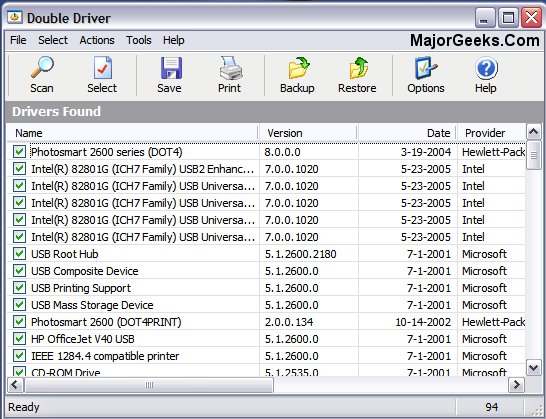
Double Driver can view all the drivers installed on your system and backup, restore, save, and print all chosen drivers and reliably. It is freeware and portable. Double Driver was not written for Windows 10, but it works.
2: Driver Collector
Driver Collector finds and collects the installed driver files for the hardware you select on your PC. After it receives the files, the program copies to your hard drive in a specific folder. Written originally for Windows 98 and Me, it still works on all operating systems we tested it on, including Windows 10. We also successfully tested Driver Collector on Windows 10 when writing this article.
3: DriverBackup!
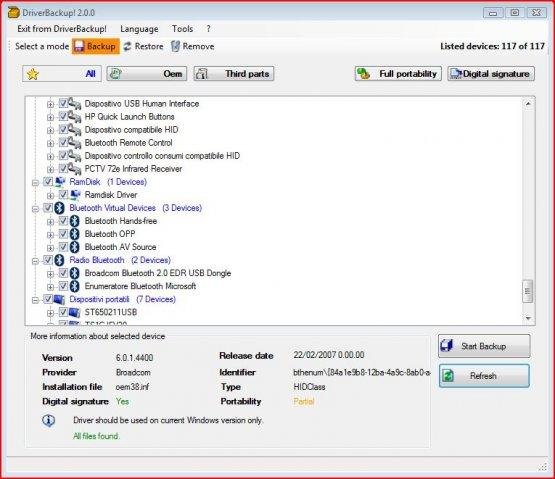
DriverBackup! promises to be a fast and user-friendly app for driver backup, restoration, and removal with command-line options, automatic recovery from CDDVD, and path formatting. DriverBackup! also includes an interactive command-line builder.
Driver Updaters That Also Backup and Restore
1: Driver Booster
Maybe we're stuck in our ways, but we use Driver Booster on our computers. If there's a downside to be had, they seem to be a bit slow finding the latest NVIDIA drivers.
Here's a video showing Driver Booster 4. It's a version or two behind, but not much has changed.
2: Wise Driver Care
Wise Driver Care can update and backup your drivers as well as identify your hardware and repair some typical driver-related issues. Wise Driver Care is "newer" than most but works well.
3: SnailDriver
SnailDriver is a slick, user-friendly driver updater that can scan, notify, and permit you to update outdated or missing as well as broken drivers. Of course, backup and restore are included.
Hopefully, you found something you like.
Similar:
How to Download the Latest Drivers for Windows
How-To Stop Windows Updates From Downloading Drivers on Windows 10
How to View Recently Updated Windows Drivers
How to Use Driver Verifier Manager to Troubleshoot Driver Issues
What is Windows Hardware Quality Labs or WHQL?
comments powered by Disqus
There are numerous ways that drivers can be updated, backed up, or restored in Windows. For example, you could use PowerShell or Device Manager, but they are cumbersome. Instead, we're going to focus on free apps that make backing up and restoring your device drivers simple.
We decided this list had to be freeware and portable. By doing so, we narrowed this down to a short but excellent list to make your decision easier. We're also separating backup and restore only apps from apps that can also update your drivers.
Backup and Restore Only
1: Double Driver
Double Driver can view all the drivers installed on your system and backup, restore, save, and print all chosen drivers and reliably. It is freeware and portable. Double Driver was not written for Windows 10, but it works.
2: Driver Collector
Driver Collector finds and collects the installed driver files for the hardware you select on your PC. After it receives the files, the program copies to your hard drive in a specific folder. Written originally for Windows 98 and Me, it still works on all operating systems we tested it on, including Windows 10. We also successfully tested Driver Collector on Windows 10 when writing this article.
3: DriverBackup!
DriverBackup! promises to be a fast and user-friendly app for driver backup, restoration, and removal with command-line options, automatic recovery from CDDVD, and path formatting. DriverBackup! also includes an interactive command-line builder.
Driver Updaters That Also Backup and Restore
1: Driver Booster
Maybe we're stuck in our ways, but we use Driver Booster on our computers. If there's a downside to be had, they seem to be a bit slow finding the latest NVIDIA drivers.
Here's a video showing Driver Booster 4. It's a version or two behind, but not much has changed.
2: Wise Driver Care
Wise Driver Care can update and backup your drivers as well as identify your hardware and repair some typical driver-related issues. Wise Driver Care is "newer" than most but works well.
3: SnailDriver
SnailDriver is a slick, user-friendly driver updater that can scan, notify, and permit you to update outdated or missing as well as broken drivers. Of course, backup and restore are included.
Hopefully, you found something you like.
Similar:
How to Download the Latest Drivers for Windows
How-To Stop Windows Updates From Downloading Drivers on Windows 10
How to View Recently Updated Windows Drivers
How to Use Driver Verifier Manager to Troubleshoot Driver Issues
What is Windows Hardware Quality Labs or WHQL?
comments powered by Disqus
