


Access Denied, Please Log in With Administrator Privileges and Try Again
By Timothy Tibbettson 06/15/2023 |
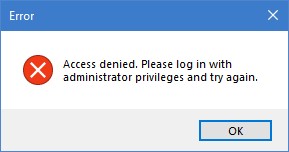
Occasionally you might face an error that read "Access denied, Please log in with administrator privileges and try again" even when you are logged in as administrator. There are a couple of possible fixes for this error.
1: Run the Application as Administrator
Let's test to see if your application requires being run as administrator every time by right-clicking on the executable and select Run as administrator. If that worked, then we want to make sure that your application always runs with administrative privileges.
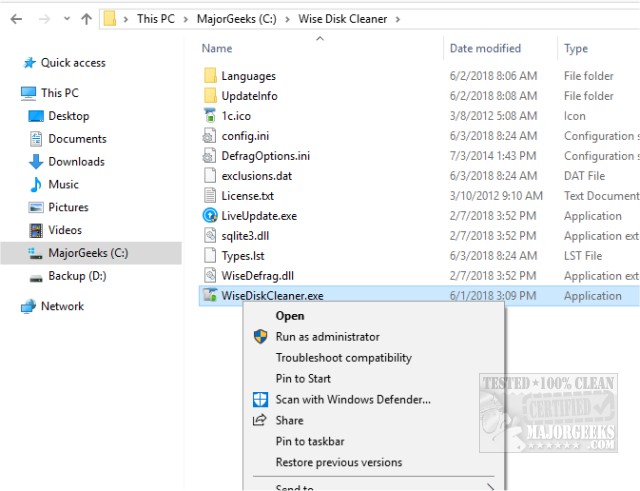
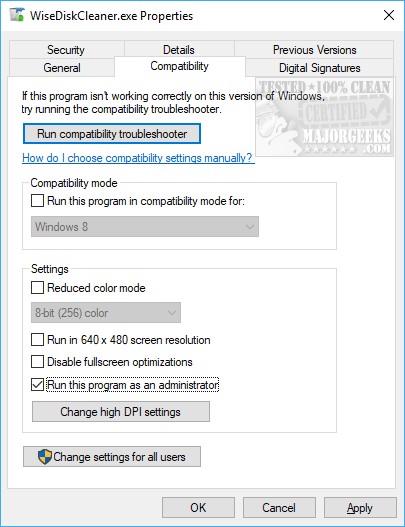
To do that, right-click on the executable, and choose Properties. Windows 10 users have File Explorer, and everyone else should have Windows Explorer.
File Explorer - Click on the compatibility tab, check Run as Administrator followed by apply and OK.
Windows Explorer - Go to the Advanced tab, check Run as Administrator followed by apply and OK.
2: Enable the Hidden Elevated Administrator Account
-=- Advertisement -=-
If running as administrator didn't work, we have one more, lesser-known solution. In Windows, there is what is known as a super administrator account or a hidden elevated administrator account and we want to be sure that this is enabled.
We need to open Command Prompt or PowerShell as administrator and enter the following text depending on what you use:
Command Prompt - net user Administrator/active: yes
PowerShell - Enable -LocalUser -Name “Administrator”
We hope this solves your problem.
comments powered by Disqus
1: Run the Application as Administrator
Let's test to see if your application requires being run as administrator every time by right-clicking on the executable and select Run as administrator. If that worked, then we want to make sure that your application always runs with administrative privileges.
To do that, right-click on the executable, and choose Properties. Windows 10 users have File Explorer, and everyone else should have Windows Explorer.
File Explorer - Click on the compatibility tab, check Run as Administrator followed by apply and OK.
Windows Explorer - Go to the Advanced tab, check Run as Administrator followed by apply and OK.
2: Enable the Hidden Elevated Administrator Account
 TIP:
TIP: If running as administrator didn't work, we have one more, lesser-known solution. In Windows, there is what is known as a super administrator account or a hidden elevated administrator account and we want to be sure that this is enabled.
We need to open Command Prompt or PowerShell as administrator and enter the following text depending on what you use:
Command Prompt - net user Administrator/active: yes
PowerShell - Enable -LocalUser -Name “Administrator”
We hope this solves your problem.
comments powered by Disqus
