


How to Fix Windows 10 Activation Error 0x80070422 & 11
By Timothy Tibbettson 02/16/2023 |
Windows 10 Activation Error 0x80070422 is commonly seen with Windows 10 Pro, and you are asking to validate Windows. Here are some possible solutions to the problem.
1: Windows 10 Activation Error 0x80070422 - The Basics
Sometimes you might need a reboot or are having internet issues. Try to reboot and verify your internet is working. Sometimes waiting is all you need to do. Try again tomorrow if that's a possibility.
2: Windows 10 Activation Error 0x80070422 - Check Services
Press the Windows Key + S, type in services.msc, and press Enter.
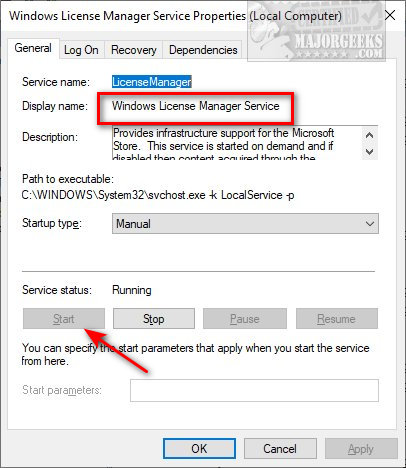
Locate Windows License Manager Service. It should be Running and Manual (Trigger Start).
If it's not running, double click Windows License Manager Service and click Start.
3: Windows 10 Activation Error 0x80070422 - Activation Troubleshooter
Activation troubleshooter is a good one to try, often diagnosing the problem and pointing you in the right direction.
Click on Start > Settings. If you see Windows isn't activated click on Troubleshoot in the lower-right.
Follow the prompts.
Note that this only appears (obviously) when Windows 10 isn't activated.
4: Windows Activation Error 0x800f0805 - Manually Change Key or Try Another Method
You might be able to activate Windows or try another method manually. You need to know what type of product key you have first.
There are numerous possibilities, including installing, uninstalling, extending, or activating your license, so here's a complete tutorial to address your specific problem -
Manually activate Windows using Slmgr.
Finally, there are 5 ways to activate Windows 10, so one of these methods might solve the problem by using a different method.
Similar:
Do Cheap Windows 10 Keys Really Work?
How to Activate After Reinstalling Windows 10
Will Windows 10 Receive Windows Updates if It's Not Activated?
How-To Delete Pending Windows Updates
How to Uninstall Windows 10 Updates
comments powered by Disqus
1: Windows 10 Activation Error 0x80070422 - The Basics
Sometimes you might need a reboot or are having internet issues. Try to reboot and verify your internet is working. Sometimes waiting is all you need to do. Try again tomorrow if that's a possibility.
2: Windows 10 Activation Error 0x80070422 - Check Services
Press the Windows Key + S, type in services.msc, and press Enter.
Locate Windows License Manager Service. It should be Running and Manual (Trigger Start).
If it's not running, double click Windows License Manager Service and click Start.
3: Windows 10 Activation Error 0x80070422 - Activation Troubleshooter
Activation troubleshooter is a good one to try, often diagnosing the problem and pointing you in the right direction.
Click on Start > Settings. If you see Windows isn't activated click on Troubleshoot in the lower-right.
Follow the prompts.
Note that this only appears (obviously) when Windows 10 isn't activated.
4: Windows Activation Error 0x800f0805 - Manually Change Key or Try Another Method
You might be able to activate Windows or try another method manually. You need to know what type of product key you have first.
There are numerous possibilities, including installing, uninstalling, extending, or activating your license, so here's a complete tutorial to address your specific problem -
Manually activate Windows using Slmgr.
Finally, there are 5 ways to activate Windows 10, so one of these methods might solve the problem by using a different method.
Similar:
comments powered by Disqus
