


Code 49 - Windows Cannot Start New Hardware Devices Because the System Hive Is Too Large (Exceeds the Registry Size Limit)
By Timothy Tibbettson 06/20/2023 |
If you're receiving the Code 49 - Windows Cannot Start New Hardware Devices Because the System Hive Is Too Large (Exceeds the Registry Size Limit) error, here's how you can fix it.
Code 49, according to Microsoft, means that the system hive has exceeded its maximum size and new devices cannot work until the size is reduced. The system hive is a permanent part of the registry associated with a set of files that contain information related to the configuration of the computer on which the operating system is installed.
The solution is to remove any devices you are no longer using, but are present in Device Manager.
1: Open a elevated command prompt.
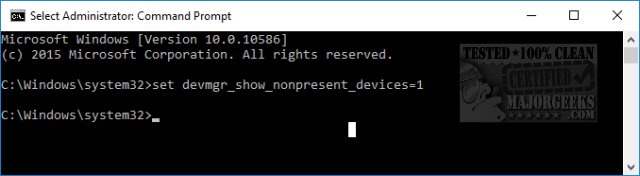
2: Type in set devmgr_show_nonpresent_devices=1 then enter. Nothing will happen on screen. That's OK, close the command prompt.
 1.jpg)
3: Open Device Manager. Press the Windows Key + S and begin typing device manager and click on Device Manager.
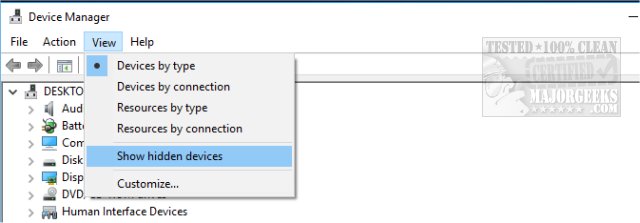
4: Click View, and then click Show hidden devices. You can now see devices that are not connected to your computer.
 2.jpg)
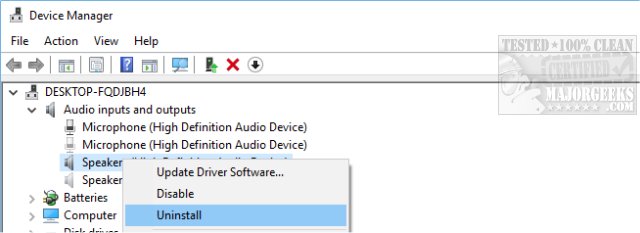
5: Select the non-present device(s) causing the problem and either select the red X in the menu bar or right-click and choose Uninstall. Repeat this step for any other non-present devices.
 3.jpg)
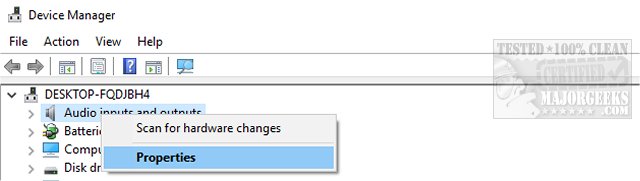
6: Now check the device Properties dialog box in Device Manager to see whether the error is resolved.
 4.jpg)
7: A reboot will be required, and the system hive problem should be gone.
If you have a different Device Manager error code, here are all the device manager error codes and solutions.
comments powered by Disqus
Code 49, according to Microsoft, means that the system hive has exceeded its maximum size and new devices cannot work until the size is reduced. The system hive is a permanent part of the registry associated with a set of files that contain information related to the configuration of the computer on which the operating system is installed.
The solution is to remove any devices you are no longer using, but are present in Device Manager.
1: Open a elevated command prompt.
2: Type in set devmgr_show_nonpresent_devices=1 then enter. Nothing will happen on screen. That's OK, close the command prompt.
3: Open Device Manager. Press the Windows Key + S and begin typing device manager and click on Device Manager.
4: Click View, and then click Show hidden devices. You can now see devices that are not connected to your computer.
5: Select the non-present device(s) causing the problem and either select the red X in the menu bar or right-click and choose Uninstall. Repeat this step for any other non-present devices.
6: Now check the device Properties dialog box in Device Manager to see whether the error is resolved.
7: A reboot will be required, and the system hive problem should be gone.
If you have a different Device Manager error code, here are all the device manager error codes and solutions.
comments powered by Disqus
