


Code 53 - This Device Has Been Reserved for Use by the Windows Kernel Debugger for the Duration of This Boot Session
By Timothy Tibbettson 06/20/2023 |
If you're receiving the Code 53 - This Device Has Been Reserved for Use by the Windows Kernel Debugger for the Duration of This Boot Session, here's how you can fix it.
Code 53 means that a device has been reserved for use by the Windows kernel debugger for the current session. We can try a reboot or disable Windows kernel debugging to allow the device to start normally.
1: Reboot
Because the issue is reserved for the current session, a reboot might just solve the problem. At least, we hope so.
2: Disable Windows Kernel Debugging
To disable Windows Kernel debugging we're going to use BCDEdit, a command-line tool for managing Boot Configuration Data. Don't worry. For our purposes, this is easier than it sounds. While BCDEdit can be complex to use we don't need to learn anything or do anything difficult here.
Open a elevated command-prompt.
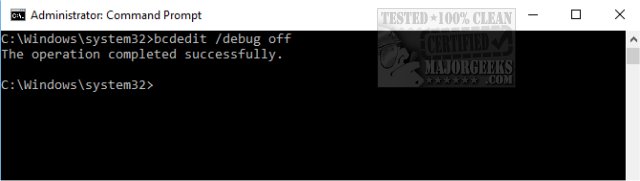
Type in bcdedit /debug off.
Reboot.
comments powered by Disqus
Code 53 means that a device has been reserved for use by the Windows kernel debugger for the current session. We can try a reboot or disable Windows kernel debugging to allow the device to start normally.
1: Reboot
Because the issue is reserved for the current session, a reboot might just solve the problem. At least, we hope so.
2: Disable Windows Kernel Debugging
To disable Windows Kernel debugging we're going to use BCDEdit, a command-line tool for managing Boot Configuration Data. Don't worry. For our purposes, this is easier than it sounds. While BCDEdit can be complex to use we don't need to learn anything or do anything difficult here.
Open a elevated command-prompt.
Type in bcdedit /debug off.
Reboot.
comments powered by Disqus
