


Disable Driver Signature Enforcement on Windows 8 and 10
By Timothy Tibbettson 06/15/2023 |
Both Windows 8 and Windows 10 include a driver security feature known as "driver signature enforcement" that only allows drivers to be installed that are digitally signed. Using the command prompt, you can quickly turn driver signature enforcement on or off. Here's how.
Before we begin, this should be done by advanced users who know what they're doing and have a reason for installing unsigned drivers. Be sure to turn on driver signature enforcement when you're finished for security reasons.
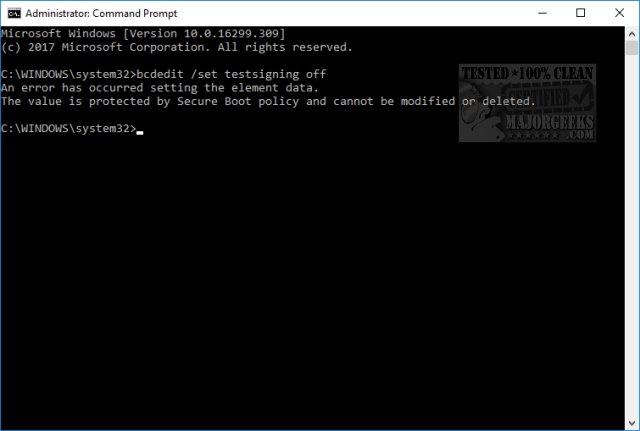
Anyone who has a UEFI BIOS will need to reboot, enter the BIOS, and look for and disable Secure Boot, typically found under System Configuration in BIOS settings. If you have a UEFI BIOS, you will be given this error.
Open an elevated command prompt, also known as running the command prompt as administrator.
Type in bcdedit /set testsigning off to disable driver signature enforcement
Install the drivers.
Type in bcdedit /set testsigning on to enable driver signature enforcement
You can also disable Driver signature enforcement in Windows however, it requires a ridiculous nine steps, so we're sticking with the simple command prompt method.
comments powered by Disqus
Before we begin, this should be done by advanced users who know what they're doing and have a reason for installing unsigned drivers. Be sure to turn on driver signature enforcement when you're finished for security reasons.
Anyone who has a UEFI BIOS will need to reboot, enter the BIOS, and look for and disable Secure Boot, typically found under System Configuration in BIOS settings. If you have a UEFI BIOS, you will be given this error.
Open an elevated command prompt, also known as running the command prompt as administrator.
Type in bcdedit /set testsigning off to disable driver signature enforcement
Install the drivers.
Type in bcdedit /set testsigning on to enable driver signature enforcement
You can also disable Driver signature enforcement in Windows however, it requires a ridiculous nine steps, so we're sticking with the simple command prompt method.
comments powered by Disqus
