


Disable the "Let's Finish Setting Up Your Device" Reminder for Good
By selma čitakovićon 08/07/2026 |
![{$insert['content_title']](/content/file/6231_image1.jpg
)
Windows just loves reminding you that there's so much more you can get out of it. It claims to help you finish setting up your device, but it's actually nudging you towards OneDrive, Microsoft Edge, a Microsoft 365 subscription... Yeah, no thanks.
The worst part is that you have to choose between "Remind me in 3 days" and "Continue." It won't take no for an answer.
Below, we'll show you how to get rid of this pop-up once and for all.
Via Settings
It's not immediately obvious, but you can disable the "Let's finish setting up your device" screen right from Settings. Here's how:
- Go to Settings > System > Notifications.
- Scroll down to find Additional Settings, and click to expand them.
- Uncheck Suggest ways to get the most out of Windows and finish setting up this device. The option may also be phrased a bit differently, such as Offer suggestions on how I can set up my device.
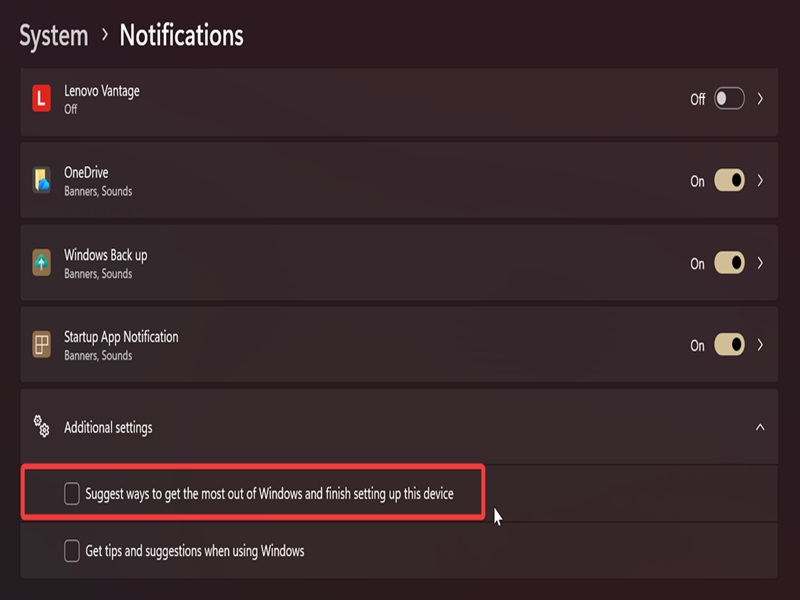
Either way, uncheck it. You should also disable Get tips and suggestions when I use Windows while you're there. It will eliminate more ads that are part of Windows 11.
Via Registry Editor
Alternatively, you can disable the DWORD value for the same setting. It's a bit more involved than the previous method, but still pretty easy. If you're not used to editing the registry, I recommend creating a system restore point first, just in case.
Here are the steps:
- Press Win + R, type regedit, and hit Enter.
- Navigate to Computer\HKEY_CURRENT_USER\Software\Microsoft\Windows\CurrentVersion\UserProfileEngagement on the left. You can also paste this in the address bar.
- While in the UserProfileEngagement folder, double-click ScoobeSystemSettingEnabled.
- Type 0 in the Value Data field, and click OK. The default value for ScoobeSystemSettingEnabled is 1.
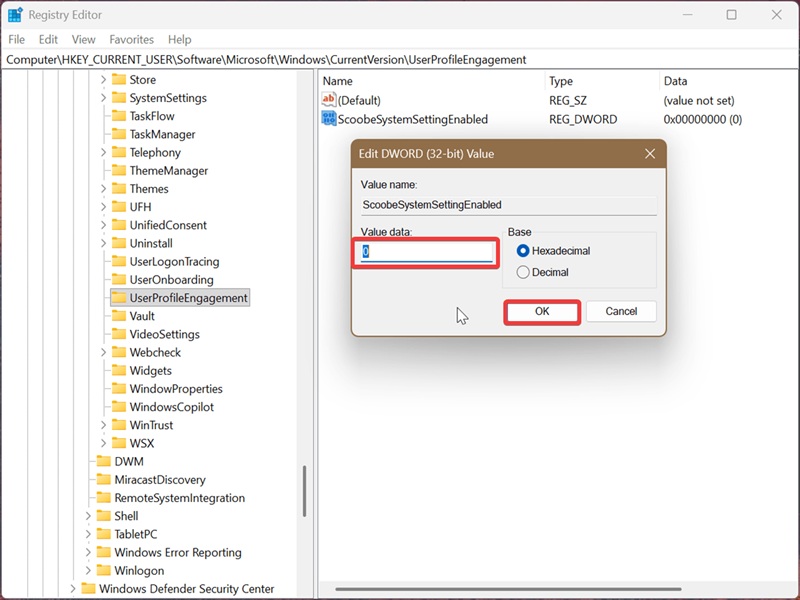
This will disable the "Let's finish setting up your device" reminders. Congrats - you'll no longer have to deal with that annoying screen again!

|
selma citakovic
Selma is a gamer, geek and gremlin hunter with a passion for cyber security and smashing Windows bugs before they bite. She’s IBM-certified, loves real freeware, despises bloatware, and powers most of her troubleshooting with an unhealthy amount of coffee. |
comments powered by Disqus
