


Disable The "Unsupported Hardware" Message in Windows Update
By Timothy Tibbettson 07/05/2023 |
Some Intel and AMD processors can give you an error message when trying to run Windows Updates on Windows 7 and 8 that says you have unsupported hardware. Here's how to get around this error and install the latest updates.
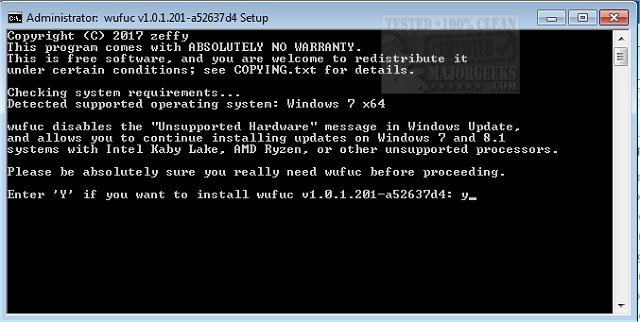
Zeffy, on Github, has released a utility for advanced users called wufuc that should disable the "Unsupported Hardware" message in Windows Update allowing you to continue installing updates.
These updates marked the implementation of a policy change they announced some time ago, where Microsoft stated that they would not be supporting Windows 7 or 8.1 on next-gen Intel, AMD and Qualcomm processors.
For anyone who decides to not upgrade to Windows 10, the above is not ideal, to say the least, and it is especially unfortunate considering the extended support periods for Windows 7 and 8.1 won't be ending until January 4, 2020, and January 10, 2023, respectively.
Some people with older Intel and AMD processors are also affected. The word is that all of the following CPUs are being blocked from receiving updates:
-Intel Atom Z530
-Intel Atom D525
-Intel Core i5-M 560
-Intel Core i5-4300M
-Intel Core i7-4930K
-Intel Pentium B940
-AMD FX-6300
-AMD FX-8350
-AMD Turion 64 Mobile Technology ML-34
wufuc Features:
-Enables Windows Update on PCs with unsupported processors.
-Written in C, the best programming language.
-Completely free (as in freedom) software.
-Does not modify any system files.
-Byte pattern-based patching, which means it will usually keep working even after new updates come out.
How wufuc works:
The tl;dr version is basically:
-Inside a system file called wuaueng.dll, there are two functions responsible for the CPU check: IsDeviceServiceable and IsCPUSupported.
-IsDeviceServiceable simply calls IsCPUSupported once, and then saves the result and re-uses it on subsequent calls.
-wufuc takes advantage of this behavior by patching the saved result so that it is always TRUE, or supported.
Download wufuc at https://www.majorgeeks.com/files/details/wufuc.html. Be sure to create a System Restore point first.
Similar:
How-To Delete Pending Windows Updates
Getting Windows Ready, Don’t Turn off Your Computer
How-To Stop Windows Updates From Downloading Drivers on Windows 10
Some Updates Were Canceled When Running Windows Update
Configure When and How Windows Updates Are Delivered
How-to Change Rollback Days for Windows 10 Feature Upgrades
Limit the Bandwidth Windows Updates Uses in Windows 10
Windows Update Failed to Install With Error 0x80070643
Potential Windows Update Database Error Detected
Windows Update Error Code 0x8024402f in Windows 10
comments powered by Disqus
Zeffy, on Github, has released a utility for advanced users called wufuc that should disable the "Unsupported Hardware" message in Windows Update allowing you to continue installing updates.
These updates marked the implementation of a policy change they announced some time ago, where Microsoft stated that they would not be supporting Windows 7 or 8.1 on next-gen Intel, AMD and Qualcomm processors.
For anyone who decides to not upgrade to Windows 10, the above is not ideal, to say the least, and it is especially unfortunate considering the extended support periods for Windows 7 and 8.1 won't be ending until January 4, 2020, and January 10, 2023, respectively.
Some people with older Intel and AMD processors are also affected. The word is that all of the following CPUs are being blocked from receiving updates:
-Intel Atom Z530
-Intel Atom D525
-Intel Core i5-M 560
-Intel Core i5-4300M
-Intel Core i7-4930K
-Intel Pentium B940
-AMD FX-6300
-AMD FX-8350
-AMD Turion 64 Mobile Technology ML-34
wufuc Features:
-Enables Windows Update on PCs with unsupported processors.
-Written in C, the best programming language.
-Completely free (as in freedom) software.
-Does not modify any system files.
-Byte pattern-based patching, which means it will usually keep working even after new updates come out.
How wufuc works:
The tl;dr version is basically:
-Inside a system file called wuaueng.dll, there are two functions responsible for the CPU check: IsDeviceServiceable and IsCPUSupported.
-IsDeviceServiceable simply calls IsCPUSupported once, and then saves the result and re-uses it on subsequent calls.
-wufuc takes advantage of this behavior by patching the saved result so that it is always TRUE, or supported.
Download wufuc at https://www.majorgeeks.com/files/details/wufuc.html. Be sure to create a System Restore point first.
Similar:
How-To Delete Pending Windows Updates
Getting Windows Ready, Don’t Turn off Your Computer
How-To Stop Windows Updates From Downloading Drivers on Windows 10
Some Updates Were Canceled When Running Windows Update
Configure When and How Windows Updates Are Delivered
How-to Change Rollback Days for Windows 10 Feature Upgrades
Limit the Bandwidth Windows Updates Uses in Windows 10
Windows Update Failed to Install With Error 0x80070643
Potential Windows Update Database Error Detected
Windows Update Error Code 0x8024402f in Windows 10
comments powered by Disqus
