


Disney Plus Account Notice Scam
By Timothy Tibbettson 06/15/2023 |
Disney+ has proven popular enough for scammers to try and trick you into getting your account information and more. An email is making the rounds using the subject of "Account Notice."
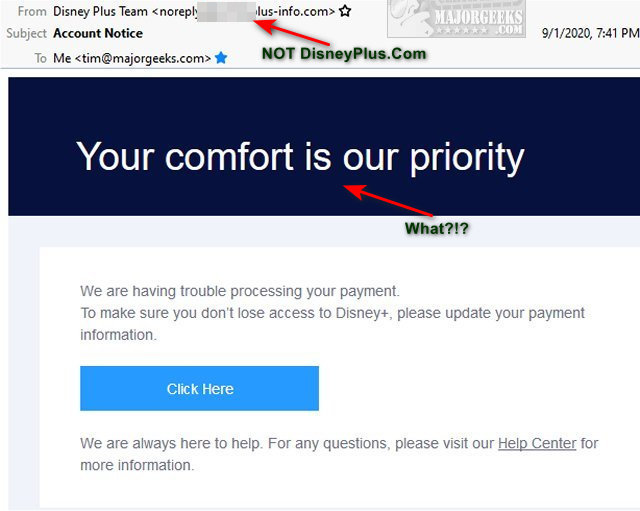
When you look at the email, you are told that:
We are having trouble processing your payment.
To make sure you don't lose access to Disney+, please update your payment information.
Click Here
We are always here to help. For any questions, please visit our Help Center for more information.
The email has a legit appearance with plenty of links to make sure you can resolve your "account problem." The links contain the word dportal, giving it an almost legitimate look at a glance. Even the street address for New Your City is correct.
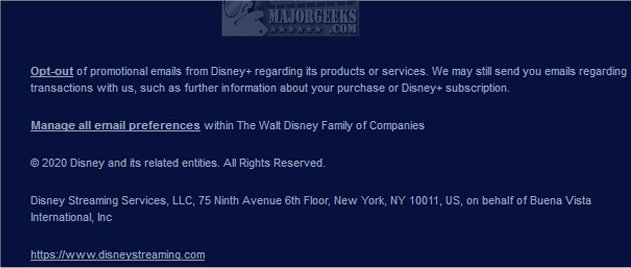
When we see numerous legitimate-looking links inside a spam email, we know someone put a lot of effort into the email - enough to trick some people. Surprisingly, considering the effort, they did make one mistake, and they did so using the largest font found in this email, making it ironically the most obvious indication that the email is a fake:
Your comfort is our priority.
The Disney Plus email does a good job of tricking people by using the most basic of ideas - a sense of urgency to resolve a problem.
As always, MajorGeeks recommends that you always bookmark and log in to any account you have and never click a link in an email.
Similar:
Coronavirus or COVID-19 Scams to Avoid
Your Phone was Hacked Extortion Scam
Extortion Scam Claims to Have Recorded You on Adult Websites
How to Report Online Scams, Spam Emails and More
How to Avoid Craigslist PayPal Scams
comments powered by Disqus
When you look at the email, you are told that:
We are having trouble processing your payment.
To make sure you don't lose access to Disney+, please update your payment information.
Click Here
We are always here to help. For any questions, please visit our Help Center for more information.
The email has a legit appearance with plenty of links to make sure you can resolve your "account problem." The links contain the word dportal, giving it an almost legitimate look at a glance. Even the street address for New Your City is correct.
When we see numerous legitimate-looking links inside a spam email, we know someone put a lot of effort into the email - enough to trick some people. Surprisingly, considering the effort, they did make one mistake, and they did so using the largest font found in this email, making it ironically the most obvious indication that the email is a fake:
Your comfort is our priority.
The Disney Plus email does a good job of tricking people by using the most basic of ideas - a sense of urgency to resolve a problem.
As always, MajorGeeks recommends that you always bookmark and log in to any account you have and never click a link in an email.
Similar:
Coronavirus or COVID-19 Scams to Avoid
Your Phone was Hacked Extortion Scam
Extortion Scam Claims to Have Recorded You on Adult Websites
How to Report Online Scams, Spam Emails and More
How to Avoid Craigslist PayPal Scams
comments powered by Disqus
