


How to Avoid Craigslist PayPal Scams
By Timothy Tibbettson 06/19/2023 |
Craigslist scammers have been using PayPal to trick sellers for years. Here's the one trick you need to use to avoid being scammed.
We've been using Craigslist quite a bit in the past year, and we are almost amused at the attempts to scam us. Typically, you'll get a text message asking if your item is still available. Often, the text message will have something odd about it. The area code of the text message will usually be from far away. Living in Florida, seeing many different area codes is common here with all the transplants, but one recent text message was from California. Twice. They asked if my boat was still available. But it's a jet ski. One plus one equals two, and we knew this was a scam attempt. Here's how you respond to any text message if your item is still available:
Yes, cash, in person only
That's it. You won't hear from the scammer again because they don't have cash, and they rarely will meet you in person. We've seen people make other suggestions, including asking the potential buyer to call. There's no point in starting a dialogue with these thieves. Yes, cash, in person only.
Here are some of the ways you can spot these PayPal scammers who use the same tricks over and over:
They might offer you a check or money order. Always a bad idea.
They offer to send you a link to set up a PayPal account if you don't have one.
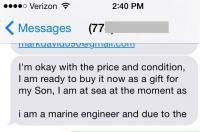
They claim to be overseas. In this one, they usually claim that they or a family member is abroad, and they need your email to send you that bogus PayPal link we mentioned. Often they claim to be in the military.
They ask you to email themselves or a relative to complete the deal. Once again, they need your email to send you that bogus PayPal link.
They offer to pay you more than the item is worth for your troubles. It's Craigslist, no one overpays. We don't see this much anymore.
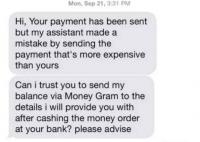
They mistakingly sent you too much money in your PayPal account and asked you to wire transfer back the difference.
They will often ask a lot of questions about the item that is already covered in the ad.
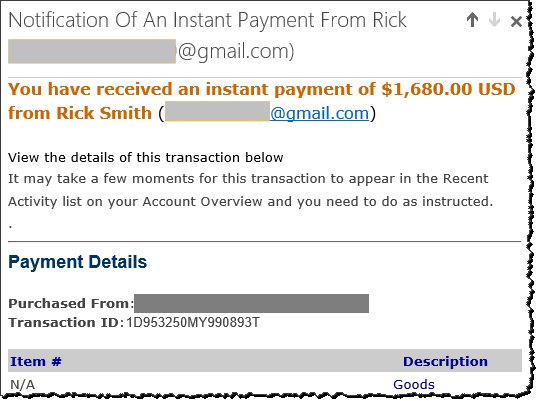
So, how does this PayPal scam work? The buyer will claim to have sent you the money through PayPal. You'll get a confirmation email, but it's bogus. If you log into your account directly (and you always should), the funds won't be there, and the seller will claim it's an invisible transfer, something that does not exist on PayPal. If you click on the email link to PayPal that the buyer sent you, it will be a fake phishing website, and now the "buyer" has your PayPal information. Should you not check your real PayPal account and shipped the item, you have no recourse. Since PayPal wasn't involved, there's no buyer and seller protection and no one to complain to.
These scams used to be used only on big tickets items like cars. That no longer applies. It won't matter if your item is $1 or $10,000 if they have your PayPal login.
So always remember, insist on cash, in person. Most Craigslist buyers are local, and that's how it should be.
We prefer to do our deals at a safe location. It is often suggested to check with your local Police station to see if they have a secure lot. We always insist they meet us at our local bank. This way, the transaction is on camera, and you can deposit the money immediately, especially with big-ticket items.
While Craigslist still remains popular, many people now use Facebook Marketplace instead.
Similar:
Coronavirus or COVID-19 Scams to Avoid
Your Phone was Hacked Extortion Scam
Extortion Scam Claims to Have Recorded You on Adult Websites
Disney Plus Account Notice Scam
How to Report Online Scams, Spam Emails and More
comments powered by Disqus
We've been using Craigslist quite a bit in the past year, and we are almost amused at the attempts to scam us. Typically, you'll get a text message asking if your item is still available. Often, the text message will have something odd about it. The area code of the text message will usually be from far away. Living in Florida, seeing many different area codes is common here with all the transplants, but one recent text message was from California. Twice. They asked if my boat was still available. But it's a jet ski. One plus one equals two, and we knew this was a scam attempt. Here's how you respond to any text message if your item is still available:
Yes, cash, in person only
That's it. You won't hear from the scammer again because they don't have cash, and they rarely will meet you in person. We've seen people make other suggestions, including asking the potential buyer to call. There's no point in starting a dialogue with these thieves. Yes, cash, in person only.
Here are some of the ways you can spot these PayPal scammers who use the same tricks over and over:
They might offer you a check or money order. Always a bad idea.
They offer to send you a link to set up a PayPal account if you don't have one.
They claim to be overseas. In this one, they usually claim that they or a family member is abroad, and they need your email to send you that bogus PayPal link we mentioned. Often they claim to be in the military.
They ask you to email themselves or a relative to complete the deal. Once again, they need your email to send you that bogus PayPal link.
They offer to pay you more than the item is worth for your troubles. It's Craigslist, no one overpays. We don't see this much anymore.
They mistakingly sent you too much money in your PayPal account and asked you to wire transfer back the difference.
They will often ask a lot of questions about the item that is already covered in the ad.
So, how does this PayPal scam work? The buyer will claim to have sent you the money through PayPal. You'll get a confirmation email, but it's bogus. If you log into your account directly (and you always should), the funds won't be there, and the seller will claim it's an invisible transfer, something that does not exist on PayPal. If you click on the email link to PayPal that the buyer sent you, it will be a fake phishing website, and now the "buyer" has your PayPal information. Should you not check your real PayPal account and shipped the item, you have no recourse. Since PayPal wasn't involved, there's no buyer and seller protection and no one to complain to.
These scams used to be used only on big tickets items like cars. That no longer applies. It won't matter if your item is $1 or $10,000 if they have your PayPal login.
So always remember, insist on cash, in person. Most Craigslist buyers are local, and that's how it should be.
We prefer to do our deals at a safe location. It is often suggested to check with your local Police station to see if they have a secure lot. We always insist they meet us at our local bank. This way, the transaction is on camera, and you can deposit the money immediately, especially with big-ticket items.
While Craigslist still remains popular, many people now use Facebook Marketplace instead.
Similar:
Coronavirus or COVID-19 Scams to Avoid
Your Phone was Hacked Extortion Scam
Extortion Scam Claims to Have Recorded You on Adult Websites
Disney Plus Account Notice Scam
How to Report Online Scams, Spam Emails and More
comments powered by Disqus
