


How to Download the Latest Windows 10 & 11 ISO Images Directly in Microsoft Edge
By Timothy Tibbettson 07/13/2023 |
Microsoft updates its downloadable ISO images of Windows 10 for every major update. You can download these using the Media Creation Tool. However, here's a neat hack to download the latest ISO images directly using the Chromium-based Microsoft Edge.
1: Open Microsoft Edge and go to the Windows 10 or Windows 11 download page.
2: Press f12 to open Developer Tools.
3: Click on the Mobile Device icon, which will toggle the device toolbar.
4: Click on the Responsive dropdown and select iPad Pro.
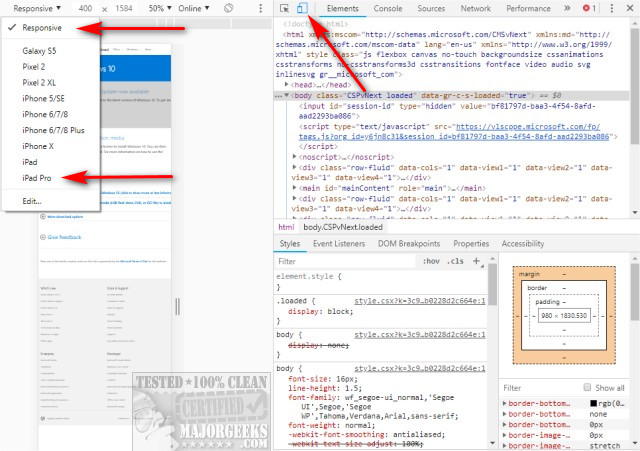
5: Press F5 or the refresh icon to reload the page.
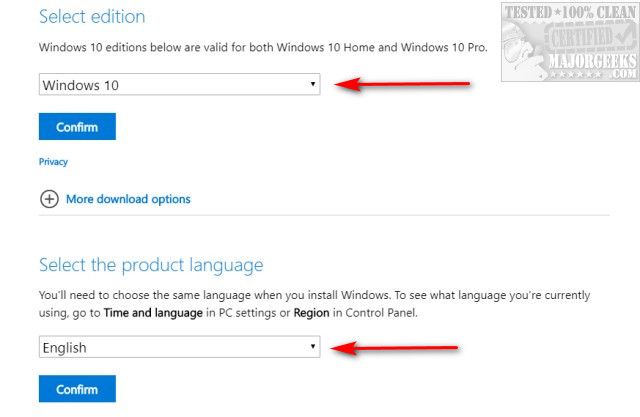
6: Choose the edition you want and the language. Note that you can close Developer tools (F12) if you're on a device with a smaller screen where it's hard to see.
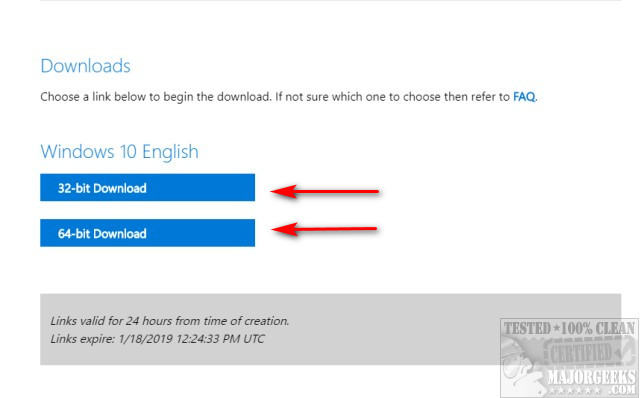
32-Bit and 64-Bit direct links will now be provided and expire in 24 hours. Click and download.
Note: If you don't see the latest edition (typically the last two versions are available for download), then there's a chance Microsoft has pulled the most recent update due to bugs, and that includes the ISO images. You'll have to check back later when Microsoft makes the latest ISO available on their servers.
Sometimes a 404 appears, or the page sticks while loading. This isn't the fault of this guide. Try again in a few minutes.
Similar:
How to Download the Latest Windows 10 ISO Images Directly in Mozilla Firefox
How to Download the Latest Windows 10 ISO Images Directly in Google Chrome
Download the Latest Stable Chromium-Based Microsoft Edge
comments powered by Disqus
1: Open Microsoft Edge and go to the Windows 10 or Windows 11 download page.
2: Press f12 to open Developer Tools.
3: Click on the Mobile Device icon, which will toggle the device toolbar.
4: Click on the Responsive dropdown and select iPad Pro.
5: Press F5 or the refresh icon to reload the page.
6: Choose the edition you want and the language. Note that you can close Developer tools (F12) if you're on a device with a smaller screen where it's hard to see.
32-Bit and 64-Bit direct links will now be provided and expire in 24 hours. Click and download.
Note: If you don't see the latest edition (typically the last two versions are available for download), then there's a chance Microsoft has pulled the most recent update due to bugs, and that includes the ISO images. You'll have to check back later when Microsoft makes the latest ISO available on their servers.
Sometimes a 404 appears, or the page sticks while loading. This isn't the fault of this guide. Try again in a few minutes.
Similar:
comments powered by Disqus
