


How to Find the Serial Number of Your Windows PC
By Timothy Tibbettson 06/30/2023 |
Most computers have a unique Original Equipment Manufacturer (OEM) serial number that can help the manufacturer identify your Windows computer if you need support. In this tutorial, we show you how to receive your serial number.
Video tutorial:
1: Find the Serial Number of Your Windows PC Physically
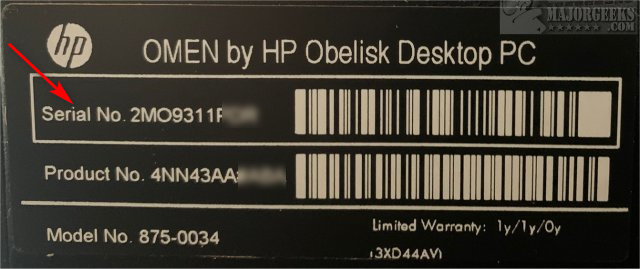
Most computers have a sticker with a serial, model, and product number. Look for bar codes.
Laptop users can flip it over and look for a sticker. If you don't see it, try removing the battery and look for the sticker.
Desktop users should check all sides of their computer, or even inside the case for the sticker.
2: Find the Serial Number of Your Windows PC in Command Prompt or PowerShell
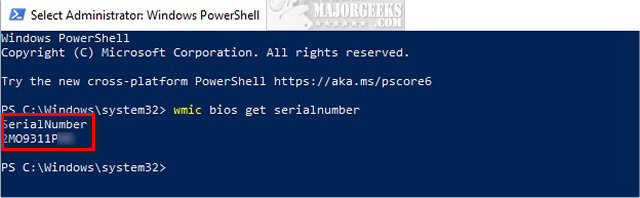
Assuming the manufacturer embedded the serial number in the BIOS or UEFI firmware, using the Command Prompt or PowerShell is quick and easy.
Command Prompt:
wmic bios get serialnumber
or
wmic csproduct get identifyingnumber
PowerShell:
Get-WmiObject win32_bios | Format-List SerialNumber
or
gwmi win32_bios | fl SerialNumber
3: Find the Serial Number of Your Windows PC in Your Microsoft Account
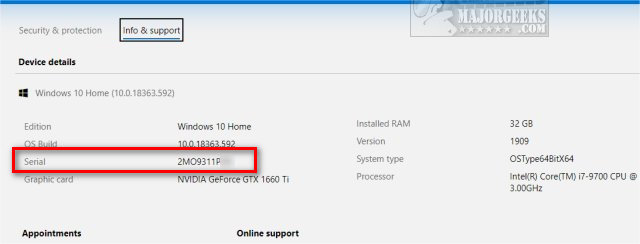
Many people aren't aware Microsoft keeps a list of your devices and information in your account.
Log in to https://account.microsoft.com/devices/
Find your computer and click Manage. Click on Info & Support.
4: Find the Serial Number of Your Windows PC in Your BIOS
You can find your serial number in the BIOS or UEFI Firmware, but it's just as easy to use the Command Prompt or PowerShell mentioned in Step 2.
Every BIOS is different; however, your serial number should be easy to find.
Boot into your BIOS or UEFI firmware and look under Main or System Information.
Similar:
How to Check if Your Windows License is Retail, OEM, or Volume
Retrieve Your Windows and Office Product Keys with These Free Apps
How-To Retrieve an Embedded Windows Key
Do Cheap Windows 10 Keys Really Work?
Should You Try and Fix Your Own Computer?
How to Check Your BIOS Version
comments powered by Disqus
1: Find the Serial Number of Your Windows PC Physically
Most computers have a sticker with a serial, model, and product number. Look for bar codes.
Laptop users can flip it over and look for a sticker. If you don't see it, try removing the battery and look for the sticker.
Desktop users should check all sides of their computer, or even inside the case for the sticker.
2: Find the Serial Number of Your Windows PC in Command Prompt or PowerShell
Assuming the manufacturer embedded the serial number in the BIOS or UEFI firmware, using the Command Prompt or PowerShell is quick and easy.
Command Prompt:
wmic bios get serialnumber
or
wmic csproduct get identifyingnumber
PowerShell:
Get-WmiObject win32_bios | Format-List SerialNumber
or
gwmi win32_bios | fl SerialNumber
3: Find the Serial Number of Your Windows PC in Your Microsoft Account
Many people aren't aware Microsoft keeps a list of your devices and information in your account.
Log in to https://account.microsoft.com/devices/
Find your computer and click Manage. Click on Info & Support.
4: Find the Serial Number of Your Windows PC in Your BIOS
You can find your serial number in the BIOS or UEFI Firmware, but it's just as easy to use the Command Prompt or PowerShell mentioned in Step 2.
Every BIOS is different; however, your serial number should be easy to find.
Boot into your BIOS or UEFI firmware and look under Main or System Information.
Similar:
comments powered by Disqus
