


How to Fix You’ll Need a New App to Open This MS-Windows-Store
By Timothy Tibbettson 04/17/2025 |
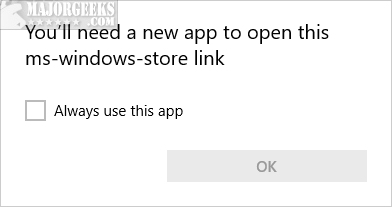
If you receive an error that reads "You’ll Need a New App to Open This MS-Windows-Store," then there's a problem with the Windows Store not working.
We'll begin the guide with the easier to run steps and then look at some possibilities using PowerShell.

1: Reset Windows Store in Settings
Let's begin by resetting the Windows Store.
Go to Start > Settings > Apps.
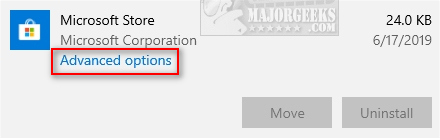
Scroll down to Windows Store and click on that. Click on Advanced options.
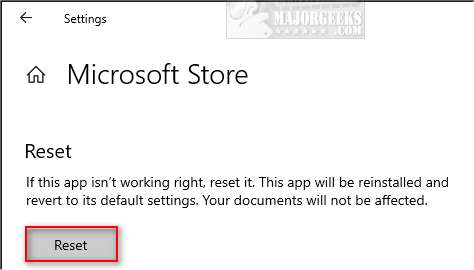
Scroll down, find and click on Reset.
Reboot your PC.
2: Run the Windows Store App Troubleshooter
Click on Start > Settings > Update & Security > Troubleshoot. Scroll down and click on Windows Store Apps, then Run the troubleshooter.
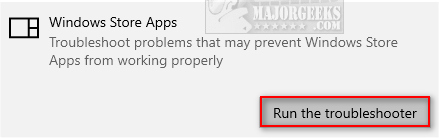
You will be notified if problems were found and fixed.
3: Re-register the Windows Store apps With PowerShell
Open PowerShell and type in
Get-AppXPackage -AllUsers | Foreach {Add-AppxPackage -DisableDevelopmentMode -Register "$($_.InstallLocation)AppXManifest.xml"}
Restart Your PC.
4: Reset the Windows Store Cache With PowerShell
Open PowerShell and type in WSRest or WSRest.exe.
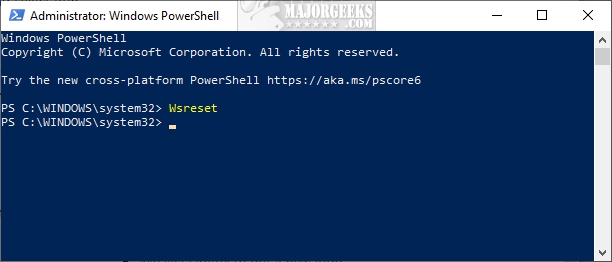
You might need to wait a few minutes before anything appear on your screen, so be patient.
5: Reinstall the Windows Store With PowerShell
Reinstalling the Windows Store is easy if you think you might have deleted the Store with a privacy app, for example. If so, you might run that app again to enable the store.
Open PowerShell and type in
Get-AppXPackage -AllUsers | Foreach {Add-AppxPackage -DisableDevelopmentMode -Register “$($_.InstallLocation)AppXManifest.xml”}
It's normal to see some errors in red text.
Reboot your PC.
comments powered by Disqus
We'll begin the guide with the easier to run steps and then look at some possibilities using PowerShell.
▶
1: Reset Windows Store in Settings
Let's begin by resetting the Windows Store.
Go to Start > Settings > Apps.
Scroll down to Windows Store and click on that. Click on Advanced options.
Scroll down, find and click on Reset.
Reboot your PC.
2: Run the Windows Store App Troubleshooter
Click on Start > Settings > Update & Security > Troubleshoot. Scroll down and click on Windows Store Apps, then Run the troubleshooter.
You will be notified if problems were found and fixed.
3: Re-register the Windows Store apps With PowerShell
Open PowerShell and type in
Get-AppXPackage -AllUsers | Foreach {Add-AppxPackage -DisableDevelopmentMode -Register "$($_.InstallLocation)AppXManifest.xml"}
Restart Your PC.
4: Reset the Windows Store Cache With PowerShell
Open PowerShell and type in WSRest or WSRest.exe.
You might need to wait a few minutes before anything appear on your screen, so be patient.
5: Reinstall the Windows Store With PowerShell
Reinstalling the Windows Store is easy if you think you might have deleted the Store with a privacy app, for example. If so, you might run that app again to enable the store.
Open PowerShell and type in
Get-AppXPackage -AllUsers | Foreach {Add-AppxPackage -DisableDevelopmentMode -Register “$($_.InstallLocation)AppXManifest.xml”}
It's normal to see some errors in red text.
Reboot your PC.
comments powered by Disqus
