


How to Install the Latest Version of DirectX
By Timothy Tibbettson 06/20/2023 |
If your games are giving you trouble, you may need to update to the latest version of DirectX. It's simple to check what version you have and update your DirectX. Here's how.
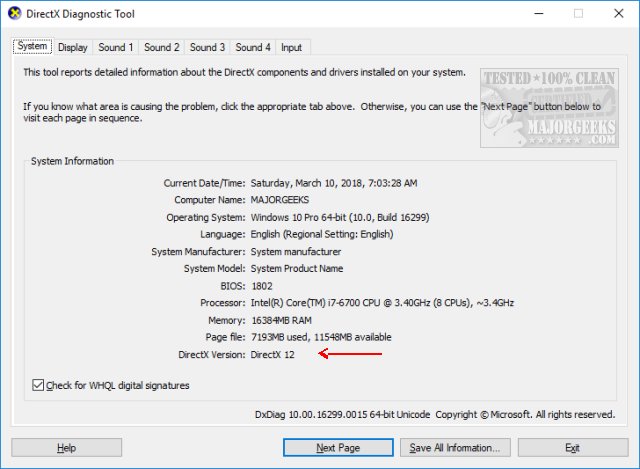
To check what version you have press the Windows Key + R and type in dxdiag. This brings up the DirectX Diagnostic Tool (dxdiag). Under the System tab, there's a System Information section. At the bottom of that, you'll see DirectX Version listed.
Windows 10 and Server 2016
Windows 10 and Server 2016 should have the latest DirectX (11.x or 12.x) included and updated through *Windows Updates. There is no standalone download for 11.x or 12.x.
Windows 8, 8.1, RT 8.1, and Server 2012
Once again, Windows 8, 8.1, RT 8.1, and even server 2012 comes with DirectX 11.x. You should have the latest DirectX included and updated through Windows Updates. There is no standalone download for 11.x.
Windows 7 or 2008 Server
Windows 7 and 2008 comes with DirectX 11.x. You need to have installed Service Pack 1, at least, to be updated to the latest DirectX. There is no standalone *download for 11.x.
Windows Vista
Windows Vista comes with DirectX 10.x. If you have *SP1 installed, you have DirectX 10.1, and if you installed SP2, you have DirectX 11.x. There is no standalone download for 10.x or 11.x.
Windows XP
Windows XP users have DirectX 9.0 installed. You can also download the latest DirectX 9.0 here. Windows XP has a more recent version installed, and if you have a game that won't run due to a The program can't start because d3dx9_35.dll is missing from your computer error, you will need to reinstall the game or application.
* If all else fails, you could try to install all the 32-Bit and 64-Bit versions of DirectX with DX Installer. It's always a good idea to create a restore point before using DX Installer.
Similar:
Restore a Missing DirectX DLL File
How to Find a DLL File in the DirectX Redistributable Download
comments powered by Disqus
To check what version you have press the Windows Key + R and type in dxdiag. This brings up the DirectX Diagnostic Tool (dxdiag). Under the System tab, there's a System Information section. At the bottom of that, you'll see DirectX Version listed.
Windows 10 and Server 2016
Windows 10 and Server 2016 should have the latest DirectX (11.x or 12.x) included and updated through *Windows Updates. There is no standalone download for 11.x or 12.x.
Windows 8, 8.1, RT 8.1, and Server 2012
Once again, Windows 8, 8.1, RT 8.1, and even server 2012 comes with DirectX 11.x. You should have the latest DirectX included and updated through Windows Updates. There is no standalone download for 11.x.
Windows 7 or 2008 Server
Windows 7 and 2008 comes with DirectX 11.x. You need to have installed Service Pack 1, at least, to be updated to the latest DirectX. There is no standalone *download for 11.x.
Windows Vista
Windows Vista comes with DirectX 10.x. If you have *SP1 installed, you have DirectX 10.1, and if you installed SP2, you have DirectX 11.x. There is no standalone download for 10.x or 11.x.
Windows XP
Windows XP users have DirectX 9.0 installed. You can also download the latest DirectX 9.0 here. Windows XP has a more recent version installed, and if you have a game that won't run due to a The program can't start because d3dx9_35.dll is missing from your computer error, you will need to reinstall the game or application.
* If all else fails, you could try to install all the 32-Bit and 64-Bit versions of DirectX with DX Installer. It's always a good idea to create a restore point before using DX Installer.
Similar:
comments powered by Disqus
