


How To: MPPN Ransomware Removal
By Corporal Punishmenton 12/07/2022 |
MPPN malware, also known as MPPN ransomware, is malicious software that can encrypt data on your computer or network and deny you access until a ransom is paid. MPPN ransomware is spread through email attachments, malicious links, infected websites, cracked software, or drive-by downloads.
To protect your data from MPPN malware, it is essential to implement a comprehensive security strategy. This should include antivirus software and firewall protection; regular monitoring of your systems for any suspicious activity; and ensuring that all operating systems, applications, and data are regularly updated with the latest patches. Additionally, it is crucial to back up data on an external storage device or offsite in case of infection. I use Drive. You can buy it for 90% off here, just because you are reading this.
IF MPNN infects your computer, you will get a text file warning you to pay between 980.00 and 500.00 in ransom to release your encrypted files. First, DONT PANIC! If you are a regular reader - you have backups. If not, let this be a lesson to you. I hate to be that guy, but....... There it is.
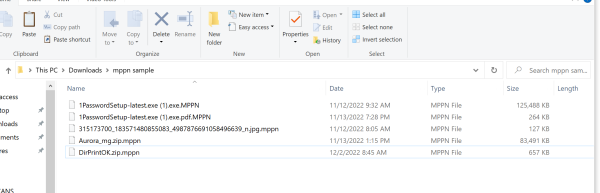
The malware will then start the remaining files on your system as .mppn file extensions indicating the file has been encrypted and can no longer be accessed without a password.
Current reports show that MPPN is a version of the DJVU encryption, so Emsisoft's DJVU Decryptor should get your files back quickly. Also, you could - but probably should not - pay the ransom. Let's face it; these are criminals, so the odds of you getting the decryption key are minimal. However, either decrypting or paying will not clear the infection. It would be best if you did that first.
If MPPN malware has already infected your system, there are several steps you can take to remove it. First and foremost, you should immediately disconnect your computer from the internet and other connected networks. If you have an ethernet cable, disconnect it to turn off your WiFi. That should do it.
You will require some antimalware software or appropriate antivirus software to scan for MPPN ransomware and delete any malicious files that have been identified. As of writing, our choice would be to use either Hitman Pro or Malwarebytes. If your infection is really stubborn, try RougeKiller.
If these programs are not already on your system, download them to a thumb drive on another system - then run/install them on the infected system.
Then, reboot into safe mode and run the antimalware. After you are done, run the above decryption to decrypt the files, and you should be fine.
If you feel some data was deleted, which does happen in some cases, try Stellar Data Recovery. That software has pulled me out of the fire more than once.
In conclusion, MPPN malware is becoming increasingly prevalent and can cause significant damage if not removed quickly and efficiently. It is, therefore, important to be aware of the risks associated with MPPN ransomware and take steps to protect yourself. This includes using antivirus protection, regularly monitoring your systems for suspicious activity, and backing up data externally. These measures will ensure that MPPN ransomware does not have a chance to wreak havoc on your system or steal sensitive data.
Shout out to Saeed for asking this question.
comments powered by Disqus
To protect your data from MPPN malware, it is essential to implement a comprehensive security strategy. This should include antivirus software and firewall protection; regular monitoring of your systems for any suspicious activity; and ensuring that all operating systems, applications, and data are regularly updated with the latest patches. Additionally, it is crucial to back up data on an external storage device or offsite in case of infection. I use Drive. You can buy it for 90% off here, just because you are reading this.
IF MPNN infects your computer, you will get a text file warning you to pay between 980.00 and 500.00 in ransom to release your encrypted files. First, DONT PANIC! If you are a regular reader - you have backups. If not, let this be a lesson to you. I hate to be that guy, but....... There it is.
The malware will then start the remaining files on your system as .mppn file extensions indicating the file has been encrypted and can no longer be accessed without a password.
Current reports show that MPPN is a version of the DJVU encryption, so Emsisoft's DJVU Decryptor should get your files back quickly. Also, you could - but probably should not - pay the ransom. Let's face it; these are criminals, so the odds of you getting the decryption key are minimal. However, either decrypting or paying will not clear the infection. It would be best if you did that first.
If MPPN malware has already infected your system, there are several steps you can take to remove it. First and foremost, you should immediately disconnect your computer from the internet and other connected networks. If you have an ethernet cable, disconnect it to turn off your WiFi. That should do it.
You will require some antimalware software or appropriate antivirus software to scan for MPPN ransomware and delete any malicious files that have been identified. As of writing, our choice would be to use either Hitman Pro or Malwarebytes. If your infection is really stubborn, try RougeKiller.
If these programs are not already on your system, download them to a thumb drive on another system - then run/install them on the infected system.
Then, reboot into safe mode and run the antimalware. After you are done, run the above decryption to decrypt the files, and you should be fine.
If you feel some data was deleted, which does happen in some cases, try Stellar Data Recovery. That software has pulled me out of the fire more than once.
In conclusion, MPPN malware is becoming increasingly prevalent and can cause significant damage if not removed quickly and efficiently. It is, therefore, important to be aware of the risks associated with MPPN ransomware and take steps to protect yourself. This includes using antivirus protection, regularly monitoring your systems for suspicious activity, and backing up data externally. These measures will ensure that MPPN ransomware does not have a chance to wreak havoc on your system or steal sensitive data.
Shout out to Saeed for asking this question.
comments powered by Disqus
