


What Is the rundll32.exe Process?
By Timothy Tibbettson 07/21/2023 |
rundll32.exe is a legitimate Windows process, but many websites use rundll32.exe as a scare tactic for viruses and malware. Here's what you need to know.
Rundll32.exe executes DLL’s and places their libraries into the memory so that they can be used more efficiently by applications.
You can stop the service, but there's no good reason to do that.
Make no mistake; there is some known rundll malware out there. Back in the day, the rundll32.exe would be located in your Windows DLL folder, and if you found it anywhere else, then malware was a possibility.
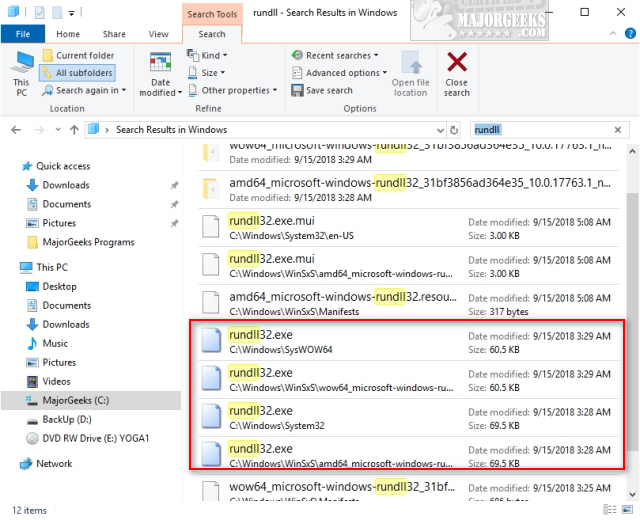
With Windows 10, however, the rundll32.exe process can be running in four different places that we know about. Most websites claiming that multiple rundll32.exe processes are malware have not updated those guides since Windows 7 leaving this disinformation out there.
When in doubt, do a complete system scan or scan with Malwarebytes.
As always, we welcome your comments.
Similar:
Here Are All the Rundll32 Commands for Windows 10
What Is the rundll32.exe Process?
How to Create a Shortcut to Any Windows Settings
comments powered by Disqus
Rundll32.exe executes DLL’s and places their libraries into the memory so that they can be used more efficiently by applications.
You can stop the service, but there's no good reason to do that.
Make no mistake; there is some known rundll malware out there. Back in the day, the rundll32.exe would be located in your Windows DLL folder, and if you found it anywhere else, then malware was a possibility.
With Windows 10, however, the rundll32.exe process can be running in four different places that we know about. Most websites claiming that multiple rundll32.exe processes are malware have not updated those guides since Windows 7 leaving this disinformation out there.
When in doubt, do a complete system scan or scan with Malwarebytes.
As always, we welcome your comments.
Similar:
comments powered by Disqus
