


Why You Shouldn't Share Giveaways on Facebook
By Timothy Tibbettson 06/15/2023 |
You've seen the posts on Facebook. Win this car! Win this tiny house! Win this car or SUV! Win free airline tickets! Like and share to enter! Let's talk about the deal with these "giveaways," why you shouldn't share them, and the one simple tip to spot a fake contest or promotion.
You wouldn't answer a phone call you don't recognize, so why share a Facebook page that you don't recognize?
I've repeatedly mentioned to friends that these pages are a scam, and I always get one of two responses.
1: It's My Page. With friends like you, who needs enemies? But, seriously, we answer that question next.
2: I Figured, Why Not? Because you're not only putting yourself at risk but all of your friends and everyone who shares and likes the post.
They are looking to gather information, and every Like and Share gives them what they want.
Many of these pages look legitimate, but they're easy to spot.
How to Spot Fake Facebook Giveaways
Follow this one simple rule:
Facebook has rules about running a promotion.
Asking followers to share a post violates the Facebook promotion guidelines.
If any page requires you to share a post to enter, odds are it's a scam. Anyone company running a legitimate promotion wouldn't risk losing their account by asking you to share the post.
Here's an example of a fake giveaway with pointers on spotting a scam.
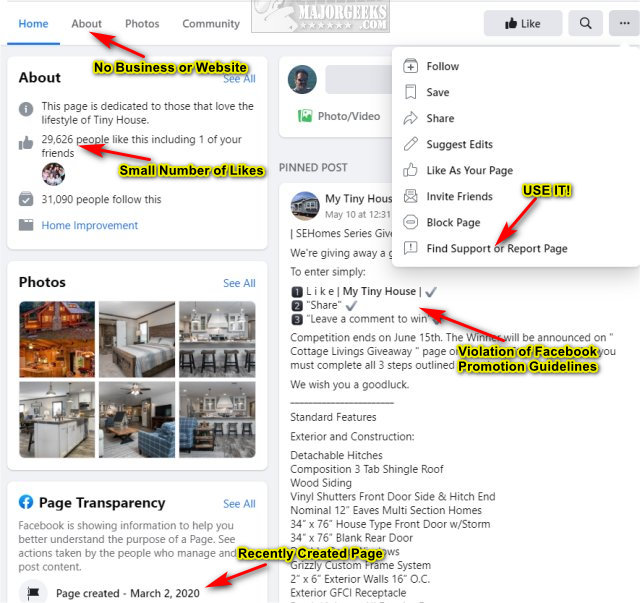
Remember that sharing these giveaways is the same as getting a phone call scam and giving them all your contacts.
Similar:
How to View and Delete Your Off-Facebook Activity
How to Secure Your Facebook Account
https://www.majorgeeks.com/content/page/how_to_stop_facebook' facebook’s_targeted_advertising.html" onclick="window.open(this.href);return false;">HowFacebook'sacebook’s Targeted Advertising
How to Delete or Remove Third-Party Facebook Applications and Websites
comments powered by Disqus
You wouldn't answer a phone call you don't recognize, so why share a Facebook page that you don't recognize?
I've repeatedly mentioned to friends that these pages are a scam, and I always get one of two responses.
1: It's My Page. With friends like you, who needs enemies? But, seriously, we answer that question next.
2: I Figured, Why Not? Because you're not only putting yourself at risk but all of your friends and everyone who shares and likes the post.
They are looking to gather information, and every Like and Share gives them what they want.
Many of these pages look legitimate, but they're easy to spot.
How to Spot Fake Facebook Giveaways
Follow this one simple rule:
Facebook has rules about running a promotion.
Asking followers to share a post violates the Facebook promotion guidelines.
If any page requires you to share a post to enter, odds are it's a scam. Anyone company running a legitimate promotion wouldn't risk losing their account by asking you to share the post.
Here's an example of a fake giveaway with pointers on spotting a scam.
Remember that sharing these giveaways is the same as getting a phone call scam and giving them all your contacts.
Similar:
https://www.majorgeeks.com/content/page/how_to_stop_facebook' facebook’s_targeted_advertising.html" onclick="window.open(this.href);return false;">HowFacebook'sacebook’s Targeted Advertising
comments powered by Disqus
