


Audio Tag Manager 2.1
|
Author:
TkoSoft
Date: 08/20/26 Size: 6 MB License: Freeware Requires: 11|10 Downloads: 862 times  TIP:
Click Here to Repair or
TIP:
Click Here to Repair orRestore Missing Windows Files |
 Download (EXE) Download@MajorGeeks Download@MajorGeeks
|
MajorGeeks: Setting the standard for editor-tested, trusted, and secure downloads since 2002. |
 Avast Free Antivirus Worried about finance scams?
Get free antivirus with AI-powered online scam detection Download Free!
Audio Tag Manager is a free audio tag editor that lets you efficiently edit, organize, clean, and rename your music files. This versatile tool supports a variety of audio formats, including MP3, FLAC, OGG, APE, M4A, WMA, and WAV, making it a comprehensive solution for managing your music collection.
Audio Tag Manager is designed to enhance and manage important music metadata effectively. With this application, you have the ability to edit crucial metadata fields, including but not limited to Title, Artist, Album, Album Artist, Year, Track Number, Genre, Composer, Comment, Beats Per Minute (BPM), Copyright information, URL, Encoded By, and Lyrics. This functionality enables users to customize and improve the information associated with their audio files, either on an individual basis or by applying mass updates to multiple selected files simultaneously, making it a time-efficient choice for music library management.
In addition to metadata editing, Audio Tag Manager provides robust file renaming capabilities. Users can rename audio files using tag-based patterns, which allows for a more organized music library. Options for renaming include utilizing information such as artist names, song titles, album titles, track numbers, release years, genres, or even applying automatic numbering. This feature is particularly beneficial for organizing files with inconsistent or unclear naming conventions, helping create a polished and systematic music collection.
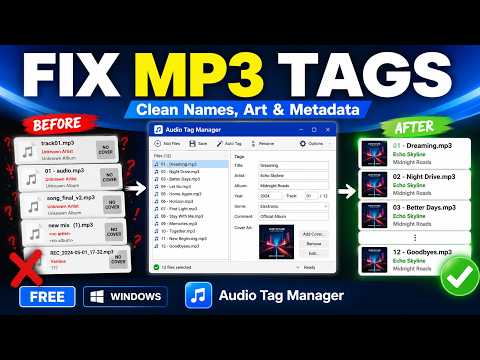
A standout feature of Audio Tag Manager is its Auto-Tag capability, which allows users to search for music metadata online via MusicBrainz, a community-driven music database. This feature is invaluable for identifying and retrieving accurate metadata for audio files that may be incomplete or poorly tagged. By connecting to MusicBrainz, users can discover potential matches and seamlessly apply essential details such as the correct song title, artist, album, album artist, and release year to their audio files.
Audio Tag Manager Features
● Supports MP3, FLAC, OGG, APE, M4A, WMA, and WAV
● Edit common tags: title, artist, album, year, track, genre, and comment
● Edit extended metadata: album artist, composer, BPM, URL, copyright, encoded by, and lyrics
● Manage album cover art: load, replace, or clear embedded cover images
● Batch edit tags for multiple audio files
● Rename files using metadata-based patterns
● Auto-Tag music files using MusicBrainz online metadata
● Built-in presets for common tag-cleaning actions
● Create custom presets for your own cleanup workflows
The software also includes a highly flexible Presets system designed for common tag-cleaning tasks. You can take advantage of built-in presets that offer features such as trimming excess spaces, correcting case issues, replacing unwanted characters, copying values between fields, and cleaning up file names. Common preset options include quick clean, title-case formatting, and scene-style cleanup, along with the option to create custom presets tailored to individual preferences and needs.
Audio Tag Manager supports cover art management, enabling you to load, replace, or remove album artwork for various supported audio file formats. This option ensures that both the visual aspects and the metadata of a music library are maintained. Combined with extensive tag-editing capabilities, batch-renaming options, versatile presets, and powerful Auto-Tag functionality, Audio Tag Manager offers a user-friendly, effective freeware solution for maintaining an accurate, clean, and well-organized music collection on Windows.
If you're seeking a powerful yet user-friendly audio editing solution, look no further than Audio Tag Manager. This compact app is expertly crafted to simplify managing your song metadata, making it the perfect choice for anyone who wants to optimize their audio track properties. With its intuitive audio tag editing features, you can quickly and easily make the adjustments you need. Plus, the ability to save predefined actions is a game-changer, significantly boosting your efficiency—especially when dealing with large collections of songs.
What Exactly Does Audio Tag Manager Do?
Audio Tag Manager is designed to enhance and manage important music metadata effectively. With this application, you have the ability to edit crucial metadata fields, including but not limited to Title, Artist, Album, Album Artist, Year, Track Number, Genre, Composer, Comment, Beats Per Minute (BPM), Copyright information, URL, Encoded By, and Lyrics. This functionality enables users to customize and improve the information associated with their audio files, either on an individual basis or by applying mass updates to multiple selected files simultaneously, making it a time-efficient choice for music library management.
Not Just for Metadata Editing...
In addition to metadata editing, Audio Tag Manager provides robust file renaming capabilities. Users can rename audio files using tag-based patterns, which allows for a more organized music library. Options for renaming include utilizing information such as artist names, song titles, album titles, track numbers, release years, genres, or even applying automatic numbering. This feature is particularly beneficial for organizing files with inconsistent or unclear naming conventions, helping create a polished and systematic music collection.
▶
Highlighted Feature: Auto-Tag Music Files Via MusicBrainz Online metadata
A standout feature of Audio Tag Manager is its Auto-Tag capability, which allows users to search for music metadata online via MusicBrainz, a community-driven music database. This feature is invaluable for identifying and retrieving accurate metadata for audio files that may be incomplete or poorly tagged. By connecting to MusicBrainz, users can discover potential matches and seamlessly apply essential details such as the correct song title, artist, album, album artist, and release year to their audio files.
Audio Tag Manager Features
● Supports MP3, FLAC, OGG, APE, M4A, WMA, and WAV
● Edit common tags: title, artist, album, year, track, genre, and comment
● Edit extended metadata: album artist, composer, BPM, URL, copyright, encoded by, and lyrics
● Manage album cover art: load, replace, or clear embedded cover images
● Batch edit tags for multiple audio files
● Rename files using metadata-based patterns
● Auto-Tag music files using MusicBrainz online metadata
● Built-in presets for common tag-cleaning actions
● Create custom presets for your own cleanup workflows
Flexible Built-in Presets
The software also includes a highly flexible Presets system designed for common tag-cleaning tasks. You can take advantage of built-in presets that offer features such as trimming excess spaces, correcting case issues, replacing unwanted characters, copying values between fields, and cleaning up file names. Common preset options include quick clean, title-case formatting, and scene-style cleanup, along with the option to create custom presets tailored to individual preferences and needs.
Manage Your Cover Art with Ease
Audio Tag Manager supports cover art management, enabling you to load, replace, or remove album artwork for various supported audio file formats. This option ensures that both the visual aspects and the metadata of a music library are maintained. Combined with extensive tag-editing capabilities, batch-renaming options, versatile presets, and powerful Auto-Tag functionality, Audio Tag Manager offers a user-friendly, effective freeware solution for maintaining an accurate, clean, and well-organized music collection on Windows.
Geek Verdict
If you're seeking a powerful yet user-friendly audio editing solution, look no further than Audio Tag Manager. This compact app is expertly crafted to simplify managing your song metadata, making it the perfect choice for anyone who wants to optimize their audio track properties. With its intuitive audio tag editing features, you can quickly and easily make the adjustments you need. Plus, the ability to save predefined actions is a game-changer, significantly boosting your efficiency—especially when dealing with large collections of songs.
Version History for Audio Tag Manager:
● Supported new tags. Improved interface
 Screenshot for Audio Tag Manager
Top Downloads In Audio Tools
 mp3DirectCut 2.40 [ 2026-03-30 04:12:27 | 324 KB | Freeware | 11|10|8|7|Android | 5 ] YamiPod 1.8 [ 2009-01-05 10:45:45 | 4.65 MB | Freeware | Win7/Vista/XP | 5 ] Mp3tag 3.36.1 [ 2026-08-29 09:51:55 | 6 MB | Freeware | 11|10|8|7 | 5 ] DarkWave Studio 5.9.4 [ 2020-11-16 10:14:35 | 2.13 MB | Freeware | 10|8|7 | 4 ] SoundFont Midi Player 5.7 [ 2019-04-28 09:25:11 | 1.64 MB+ | Freeware | Win 10 / 8 / 7 / Vista / XP | 5 ]
 Tactical Briefings
Comment Rules & Etiquette - We welcome all comments from our readers, but any comment section requires some moderation. Some posts are auto-moderated to reduce spam, including links and swear words. When you make a post, and it does not appear, it went into moderation. We are emailed when posts are marked as spam and respond ASAP. Some posts might be deleted to reduce clutter. Examples include religion, politics, and comments about listing errors (after we fix the problem and upvote your comment). Finally, be nice. Thank you for choosing MajorGeeks.

© 2000-2026 MajorGeeks.com
Powered by Contentteller® CMS System