


NextDiff 2.3
|
Author:
TkoSoft
Date: 10/06/26 Size: 4 MB License: Freemium / Ad-Supported Requires: 11|10 Downloads: 725 times  TIP:
Click Here to Repair or
TIP:
Click Here to Repair orRestore Missing Windows Files |
 Download (EXE)
|
MajorGeeks: Setting the standard for editor-tested, trusted, and secure downloads since 2002. |
 Avast Free Antivirus Worried about finance scams?
Get free antivirus with AI-powered online scam detection Download Free!
NextDiff is a free comparison tool for Windows that allows users to easily identify differences between two files, whether they are text documents, source code files, or entire folders.
NextDiff is a helpful solution that automatically detects differences between two specified files. It supports a range of formats, including basic text files and more complex ones like .PDF, .DOCX, and .PPTX, using Apache Tika. This makes NextDiff suitable for various file types.
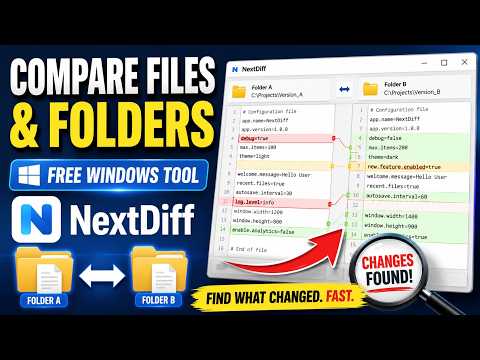
The process of checking for differences is quick and efficient, taking place almost instantly. After the analysis is complete, the program presents a summary dialog that quantifies the number of matching and differing lines. Differences in text or paragraphs are highlighted, making it easy to identify inconsistencies between the documents.
NextDiff is a useful utility that offers automatic highlighting to help you easily identify discrepancies between files and folders at a glance. Its user-friendly interface simplifies the comparison process, making it an efficient tool for anyone seeking a quick and effective solution for file comparison tasks.
NextDiff Features:
● Side-by-side text file comparison
● Line-by-line and in-line changed text highlighting
● Compare source code, logs, scripts, configuration files, and documents
● Compare folders and subfolders
● Detect files that exist only on one side
● Mark newer files during folder comparison
● Copy differences from left to right or right to left
● Edit text directly inside the comparison view
● Undo recent merge or edit actions
● Navigate to first, previous, next, and last difference
● Ignore case, whitespace, leading/trailing spaces, and blank lines
● Supports ANSI, ASCII, UTF-8, UTF-8 BOM, and UTF-16 text files
● Free for personal and commercial use
Diff checker tools can be extremely beneficial, and NextDiff stands out for its user-friendly interface, making it accessible even for those with limited experience. The tool prioritizes usability and practicality. You simply need to select the files you wish to analyze and hit compare to get started.
While it can handle many text-based files, the integration with Tika allows NextDiff to effectively process more intricate formats, such as .PDF and .DOCX. It is important to note that the Java Development Kit (JDK) is a prerequisite for Tika to function correctly, so users should ensure it is installed beforehand.
For anyone in search of a free, user-friendly tool to compare files, text, and folders on Windows, NextDiff stands out as an excellent option thanks to its intuitive interface and straightforward functionality.
What Does it Do?
NextDiff is a helpful solution that automatically detects differences between two specified files. It supports a range of formats, including basic text files and more complex ones like .PDF, .DOCX, and .PPTX, using Apache Tika. This makes NextDiff suitable for various file types.
The process of checking for differences is quick and efficient, taking place almost instantly. After the analysis is complete, the program presents a summary dialog that quantifies the number of matching and differing lines. Differences in text or paragraphs are highlighted, making it easy to identify inconsistencies between the documents.
User-Friendly UI with Auto-Highlighting and More!
NextDiff is a useful utility that offers automatic highlighting to help you easily identify discrepancies between files and folders at a glance. Its user-friendly interface simplifies the comparison process, making it an efficient tool for anyone seeking a quick and effective solution for file comparison tasks.
NextDiff Features:
● Side-by-side text file comparison
● Line-by-line and in-line changed text highlighting
● Compare source code, logs, scripts, configuration files, and documents
● Compare folders and subfolders
● Detect files that exist only on one side
● Mark newer files during folder comparison
● Copy differences from left to right or right to left
● Edit text directly inside the comparison view
● Undo recent merge or edit actions
● Navigate to first, previous, next, and last difference
● Ignore case, whitespace, leading/trailing spaces, and blank lines
● Supports ANSI, ASCII, UTF-8, UTF-8 BOM, and UTF-16 text files
● Free for personal and commercial use
Usability and Practicality
Diff checker tools can be extremely beneficial, and NextDiff stands out for its user-friendly interface, making it accessible even for those with limited experience. The tool prioritizes usability and practicality. You simply need to select the files you wish to analyze and hit compare to get started.
▶
Tika Integration for Better Processing
While it can handle many text-based files, the integration with Tika allows NextDiff to effectively process more intricate formats, such as .PDF and .DOCX. It is important to note that the Java Development Kit (JDK) is a prerequisite for Tika to function correctly, so users should ensure it is installed beforehand.
Geek Verdict
For anyone in search of a free, user-friendly tool to compare files, text, and folders on Windows, NextDiff stands out as an excellent option thanks to its intuitive interface and straightforward functionality.
Version History for NextDiff:
● New settings in Folders comparison.
Limitations:
For $29.00, you get a lifetime license, Lifetime free updates, an instant activation license key via email, no trial limitations, no nag screen, and no ads.
Editor's Note:
NextDiff does get a hit on VirusTotal, and you may get a warning from your antivirus that the file isn't commonly downloaded.
 Screenshot for NextDiff
Top Downloads In File Managers
 Unlocker 1.9.2 [ 2013-05-17 10:34:40 | 1 MB | Ad-Supported | 11|10|8|7 | 5 ] IObit Unlocker 1.3.0.12 [ 2026-04-30 11:58:50 | 3 MB | Freeware | 11|10|8|7|Vista|XP | 5 ] Files 4.3 [ 2026-10-09 16:43:52 | Size Varies | Open Source | 11|10 | 3 ] Q-Dir 12.79 [ 2026-10-11 13:57:27 | 2 MB | Freeware | 11|10|8|7 | 5 ] Tablacus Explorer 26.9.20 [ 2026-10-04 01:42:57 | 938 KB | Open Source | 11|10|8|7 | 5 ]
 Tactical Briefings
Comment Rules & Etiquette - We welcome all comments from our readers, but any comment section requires some moderation. Some posts are auto-moderated to reduce spam, including links and swear words. When you make a post, and it does not appear, it went into moderation. We are emailed when posts are marked as spam and respond ASAP. Some posts might be deleted to reduce clutter. Examples include religion, politics, and comments about listing errors (after we fix the problem and upvote your comment). Finally, be nice. Thank you for choosing MajorGeeks.

© 2000-2026 MajorGeeks.com
Powered by Contentteller® CMS System