Providing Free and Editor Tested Software Downloads
< HOME | TUTORIALS | GEEK-CADE| WEB TOOLS | YOUTUBE | NEWSLETTER | DEALS! | FORUMS | >

MajorGeeks.com - Gettin' Geeky with it.

Software Categories

All In One Tweaks
Android
Antivirus & Malware
Appearance
Back Up
Browsers
CD\DVD\Blu-Ray
Covert Ops
Drivers
Drives (SSD, HDD, USB)
Games
Graphics & Photos
Internet Tools
Linux Distros
MajorGeeks Windows Tweaks
Multimedia
Networking
Office & Productivity
System Tools

Other news

· How To and Tutorials
· Life Hacks and Reviews
· Way Off Base
· MajorGeeks Deals
· News
· Off Base
· Reviews


IObit Black Friday Sale

spread the word

· YouTube
· Facebook
· Instagram
· Twitter
· Pintrest
· RSS/XML Feeds
· News Blur
· Yahoo
· Symbaloo

about

· Top Freeware Picks
· Malware Removal
· Geektionary
· Useful Links
· About Us
· Copyright
· Privacy
· Terms of Service
· How to Uninstall

top downloads

1. GS Auto Clicker
2. Macrium Reflect FREE Edition
3. MusicBee
4. Microsoft Visual C++ 2015-2022 Redistributable Package
5. Sergei Strelec's WinPE
6. PrivaZer
7. Paint.NET
8. Visual C++ Redistributable Runtimes AIO Repack
9. Format Factory
10. HiBit Uninstaller
More >>

top reads

Star 10 File Explorer Tips To Work Smarter

Star How To Disable (or Uninstall) OneDrive

Star Quick Machine Recovery Explained: What It Is and How To Enable It

Star How to Auto-Switch Between Light and Dark Mode With PowerToys

Star How To Automatically Lock Your PC in Windows 11

Star What To Do When Microsoft Flags Unusual Sign-in Activity on Your Account

Star How To Remove the Windows 11 Updated Start Menu

Star How To Disable Drag Tray

Star How To Permanently Delete Files Without Sending Them to the Recycle Bin in Windows 11

Star How To Repair Install Windows 11, and Keep All Your Files and Apps


MajorGeeks.Com » News » January 2023 » Microsoft Begins Adding Tabs to Notepad

Microsoft Begins Adding Tabs to Notepad


Posted by: Corporal Punishment on 01/20/2023 09:10 AM [ comments Comments ]


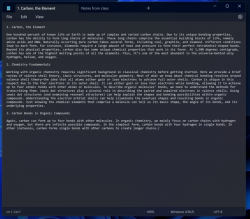
A new feature is currently rolling out to Windows Insiders and will soon be available to all Windows users - Notepad with Tabs.

Notepad was first introduced in MS-DOSS 40 years ago in 1983 and has been in every iteration of Windows. It's always been as stripped down as possible by nature, but leading people to use programs that were a little more robust, like Notepad++. Tabs for web browsers was brought to popularity in 2003 by Mozilla, so why it took 20 years to add this to such a useful program like Notepad is anyone's guess.

With Notepad tabs, you can have multiple Notepad documents open at once right within one app window. This will make using the programs easier to organize and manage your text files, switch between different projects or compare texts side-by-side. You can also drag and drop to move texts between tabs or use shortcuts like Ctrl+Tab to switch between them quickly. And with the new search box at the top of each
tab, you'll be able to find just what you need without having to dig through your whole document.

Get the new feature now by downloading the Windows Insiders build, or wait for it to become available more broadly in upcoming Windows updates.


« Windows 11 Insider Preview Build 25281 released · Microsoft Begins Adding Tabs to Notepad · Random Photo: Caturday TV »


Comments
comments powered by Disqus

MajorGeeks.Com » News » January 2023 » Microsoft Begins Adding Tabs to Notepad

© 2000-2026 MajorGeeks.com
Powered by Contentteller® Business Edition