


Question of the day: What computer manufacturer does best keeping drivers up to date years later?
Posted by: Timothy Tibbetts on 03/09/2015 04:06 AM
[
 Comments
]
Comments
]
Taylor asks "Which laptop manufacturer does best in keeping their drivers up to date years afterward and is it true that if drivers are a concern its best to avoid consumer models and purchase business models?"
The short and simple answer; none of them. Most computer manufacturers offer driver updates for about a year. After that they move on to new models and repeat that cycle. Consumer models and business models usually use similar hardware so that is not a factor. That said, you might find computers being used by a business simply update their drivers rarely, if ever, for fear of problems that could arise.
If you didn’t know, the manufacturer is using hardware from OEM companies to build your computer. This means that while your computer might be a Hewlett Packard, Lenovo, Compaq, Gateway or whatever the hardware is from companies like Nvidia, Realtek, AMD and Intel who actually provide the drivers. All of your hardware communicates from the motherboard so when you update a driver you want to make sure that motherboard drivers are up to date as well.
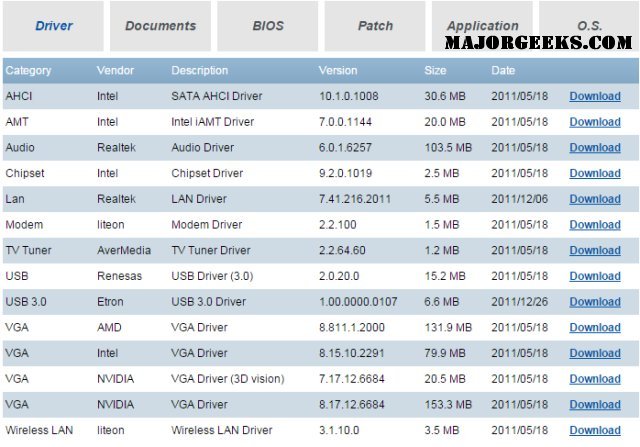
So, to make my point I decided this story needed a screenshot. That took longer than writing the entire article. I went to Hewlett Packard and got frustrated finding missing pages, drivers not only outdated by a year but also using totally different version numbers than the OEM further confusing things. So, I went to Gateway, as I own a Gateway, selected my country then went to the auto detect. That returned me to select my country so I had to give up on the OEM’s “simple way” and just randomly chose a computer. As you can see below the drivers here have not been updated in almost 4 years. This means your 4-5 year old computer now has what the OEM tells you are the “latest” drivers. Not good.
So your best bet nowadays is to use a driver updater. They work better than ever and almost always offer the latest driver faster than you would get them if you did it manually. The current better choices at the time of this article are Driver Booster or SlimDrivers. As always, just watch out for any third party software and opt out.
So when it comes to drivers, this is rarely a consideration when buying a new computer. You want to get the best and latest hardware at the best price so do your research in that area instead.
Driver Booster is currently the most popular choice and you can download it at http://www.majorgeeks.com/files/details/iobit_driver_booster.html
Once you have all your drivers updated, consider backing them all up so you can restore if and when needed without donwloading them all. Double Driver is a 5 star rated free program to do that for you. Download at http://www.majorgeeks.com/files/details/double_driver.html.
Have a question you would like MajorGeeks to possibly answer for you? Send an email to tim at majorgeeks.com
The short and simple answer; none of them. Most computer manufacturers offer driver updates for about a year. After that they move on to new models and repeat that cycle. Consumer models and business models usually use similar hardware so that is not a factor. That said, you might find computers being used by a business simply update their drivers rarely, if ever, for fear of problems that could arise.
If you didn’t know, the manufacturer is using hardware from OEM companies to build your computer. This means that while your computer might be a Hewlett Packard, Lenovo, Compaq, Gateway or whatever the hardware is from companies like Nvidia, Realtek, AMD and Intel who actually provide the drivers. All of your hardware communicates from the motherboard so when you update a driver you want to make sure that motherboard drivers are up to date as well.
So, to make my point I decided this story needed a screenshot. That took longer than writing the entire article. I went to Hewlett Packard and got frustrated finding missing pages, drivers not only outdated by a year but also using totally different version numbers than the OEM further confusing things. So, I went to Gateway, as I own a Gateway, selected my country then went to the auto detect. That returned me to select my country so I had to give up on the OEM’s “simple way” and just randomly chose a computer. As you can see below the drivers here have not been updated in almost 4 years. This means your 4-5 year old computer now has what the OEM tells you are the “latest” drivers. Not good.
So your best bet nowadays is to use a driver updater. They work better than ever and almost always offer the latest driver faster than you would get them if you did it manually. The current better choices at the time of this article are Driver Booster or SlimDrivers. As always, just watch out for any third party software and opt out.
So when it comes to drivers, this is rarely a consideration when buying a new computer. You want to get the best and latest hardware at the best price so do your research in that area instead.
Driver Booster is currently the most popular choice and you can download it at http://www.majorgeeks.com/files/details/iobit_driver_booster.html
Once you have all your drivers updated, consider backing them all up so you can restore if and when needed without donwloading them all. Double Driver is a 5 star rated free program to do that for you. Download at http://www.majorgeeks.com/files/details/double_driver.html.
Have a question you would like MajorGeeks to possibly answer for you? Send an email to tim at majorgeeks.com
Comments
