


Say Goodbye to goo.gl: Google's URL Shortener is Biting the Dust
Posted by: Corporal Punishment on 07/19/2024 09:31 AM
[
 Comments
]
Comments
]
 Hey geeks! Remember when Google rolled out goo.gl back in 2009? Yup, it was that long ago. Other than Bit.ly, it was the go-to tool for turning those ridiculously long URLs into neat, tiny links. Fast-forward 15 years, and Google's decided it's time to pull the plug on goo.gl. So, what does this mean for you, me, and the entire internet? Let's dive in.
Why People Use URL Shorteners
People use URL shorteners to create clean links because no one wants to share ugly, lengthy URLs. Shortened links also allow users to measure the performance of their links through click tracking. Additionally, compact links are more accessible to share on social media and in emails. So, for example, a URL that looks like https:// www.majorgeeks.com/this/is/the/url/to/somethig/that/I/want/you/to/read.html can be shortened to https:// goo.gl/readthis . I haven't seen any data on this, but I would wager 95% of all shortened urls are used to RickRoll someone.
When goo.gl launched, it was a godsend for anyone tired of sharing mile-long URLs. With millions of links shortened over the years, it became a staple for casual users and professionals. Further, web admins and marketers could easily track their links by who was clicking them or how many times a link was clicked -- which added hefty Java scripts to do the work. But now, Google is waving Goodbye to goo.gl, leaving many to scramble for alternatives - much like what they did with Universal Analytics moving to G4A and deleting all the old data.
Why Google is Killing Goo.gl
Google isn't just being a jerk – well, maybe they are - but there's a method to the madness. And, in all fairness, they did warn people about this day coming for some time. / URL shorteners can also be a playground for malicious activities, and Google's aiming for a safer internet experience by retiring goo.gl. Also, they want to push more advanced tools, like Firebase Dynamic Links (FDL), which offer features like deep linking and better integration with mobile apps.
Challenges for Users and Webmasters
If you've been relying on goo.gl, brace yourself for a bit of chaos, broken links, and late-night coffee-fueled copy-paste sessions.
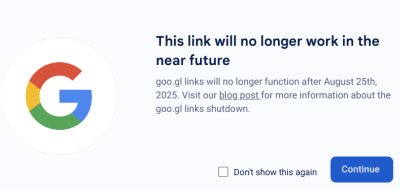
Starting August 23, 2024, goo.gl links will display an interstitial page for some existing links, informing users that the link will no longer be supported after August 25, 2025, before redirecting them to the original target page, which gives you only about a month to find, redo, and
Once goo.gl goes offline on August 25, 2025, your shortened links will stop working, leading to a ton of broken links. Straight-up 404s. Not only do the links break, but click tracking stops, and you will have to say goodbye to that data since you no longer have access to the console to export your links.
Firebase Dynamic Links
Google is nudging us , not so subtly, towards Firebase Dynamic Links. So, what's the deal with FDL? Firebase Dynamic Links offer deep linking, which means links can open specific content in your app, even if the app isn't installed. These links work seamlessly across different devices and platforms, and FDL provides detailed tracking and analytics. However, these advanced features mean a steeper learning curve, and moving from goo.gl to FDL isn't always a straightforward swap. Again, much like their conversion form universal analytics to G4A - which sucks.
Can You Directly Convert from goo.gl to another service?
Unfortunately, there's no magic button to convert all your goo.gl links to Firebase Dynamic Links or any other service we could find. At least since they closed access to the dashboard. You'll need to manually transition and set up your new links. That could be a royal pain if you have a lot of links.
If you are not interested in Firebase, Don't panic; you're not out of options. There are plenty of other choices out there, some free and some freemium, with all the options you need. here's the top 5.
Bitly: bitly.com
TinyURL: tinyurl.com
Rebrandly: rebrandly.com
T2M: t2mio.com
BL.INK: blink.to
If you are opposed to a service, check out Reduced.to, which is a free open-source shortener.
Or, if you have a sense of humor, try RROLL.to, which is a free shortener, with a 50/50 shot of RickRolling your friends.

The demise of goo.gl marks the end of another era this year. It again shows the arbitrary hand of Google and its willingness to trash your data for "progress". Probably just another good reason to consider distancing yourself from their products. But change is part of the internet, and although for some this will be a pain, for most, it won't be too much of a hassle as likely; you have already started a move to something else to keep your links short, sweet, and functional.
But, if not - here's your warning. So get crackin'!
Stay geeky, and keep those links tidy!
Comments
