


How to Speed up That Slow Hard Drive
By Timothy Tibbettson 06/16/2023 |
If you find that your computer is running slower over time, upgrading, cleaning, or optimizing your hard drive, which is the single largest bottleneck on your computer, can make a big difference.
1: Get an SSD Hard Drive
If you have a Desktop, the best move is to buy an SSD hard drive and use your current drive as a backup. SSD drives are faster, and most companies include data migration software. In other words, you clone your existing hard drive to the SSD drive, swap drives, wipe your original drive and back up to it. Imagine booting in 10 seconds and having everything run fast.
We've sworn by Western Digital SSD drives because we like the data migration software. 500GB drives are approaching $50, while 1TB drives are under $100.
2: Free up Space
The more files you have, the slower your drive will run. It's that simple. So, let's get rid of some junk.
Check out this video for our top three picks in drive cleaners:
CCleaner is best for conservative use and the average computer user.
Wise Disk Cleaner gets more junk out and is safe to use.
Privazer is hardcore and best suited for knowledgeable users. Privazer will get more junk than the other two.
Next, uninstall apps you don't use. Go to Start > Settings > Apps and uninstall any apps you don't use, including Windows 10 included apps. If you're not sure what it is, leave it alone.
3: Defragment Your Hard Drive
Now that you have fewer files on your drive, defragmenting your hard drive can place the most accessed files where they can be accessed quickly. Did we mention SSD drives never need defragmenting?
Press the Windows Key + S, type in Defrag, and click on Defragment and optimize drives.
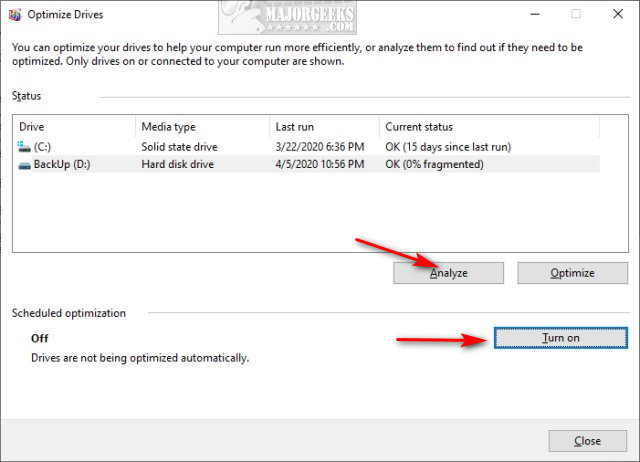
Make sure that your drives are on and click Analyze or Optimize. Windows 10 shows the level of defragmentation and should be running on a schedule, but since you (hopefully) just freed up some drive spaces, you'll want to optimize them now.
Similar:
Best Drive Cleaner? CCleaner VS Wise Disk Cleaner VS PrivaZer
How to Use Storage Sense to Delete Junk Files in Windows 10 Automatically
Remove Windows 10, 8 and 8.1 Built-In Apps Using PowerShell
What Is the $Windows.~Bt Folder and Can I Delete It?
What Is the $SysReset Folder and Can I Delete It in Windows 10?
What Are the $GetCurrent and $WINDOWS.~BT Folders and How to Delete Them
comments powered by Disqus
1: Get an SSD Hard Drive
If you have a Desktop, the best move is to buy an SSD hard drive and use your current drive as a backup. SSD drives are faster, and most companies include data migration software. In other words, you clone your existing hard drive to the SSD drive, swap drives, wipe your original drive and back up to it. Imagine booting in 10 seconds and having everything run fast.
We've sworn by Western Digital SSD drives because we like the data migration software. 500GB drives are approaching $50, while 1TB drives are under $100.
* As an Amazon Associate, we earn a commission if you purchase an item using our affiliate links
2: Free up Space
The more files you have, the slower your drive will run. It's that simple. So, let's get rid of some junk.
Check out this video for our top three picks in drive cleaners:
CCleaner is best for conservative use and the average computer user.
Wise Disk Cleaner gets more junk out and is safe to use.
Privazer is hardcore and best suited for knowledgeable users. Privazer will get more junk than the other two.
Next, uninstall apps you don't use. Go to Start > Settings > Apps and uninstall any apps you don't use, including Windows 10 included apps. If you're not sure what it is, leave it alone.
3: Defragment Your Hard Drive
Now that you have fewer files on your drive, defragmenting your hard drive can place the most accessed files where they can be accessed quickly. Did we mention SSD drives never need defragmenting?
Press the Windows Key + S, type in Defrag, and click on Defragment and optimize drives.
Make sure that your drives are on and click Analyze or Optimize. Windows 10 shows the level of defragmentation and should be running on a schedule, but since you (hopefully) just freed up some drive spaces, you'll want to optimize them now.
Similar:
Best Drive Cleaner? CCleaner VS Wise Disk Cleaner VS PrivaZer
How to Use Storage Sense to Delete Junk Files in Windows 10 Automatically
Remove Windows 10, 8 and 8.1 Built-In Apps Using PowerShell
What Is the $Windows.~Bt Folder and Can I Delete It?
What Is the $SysReset Folder and Can I Delete It in Windows 10?
What Are the $GetCurrent and $WINDOWS.~BT Folders and How to Delete Them
comments powered by Disqus
