


Steam Library Manager Helps Manage Large Steam Game Libraries
By Timothy Tibbettson 06/15/2023 |
Steam Library Manager allows you to backup, restore, move your Steam games and will be especially useful for users with large game libraries.
If you are an avid gamer, you have probably amassed a large assortment of games. Steam Library Manager gives you the option forgo deleting games but instead offers you an alternative and easy way to manage them. You can sort games by name, ID size on disk to name a few of the available filters.
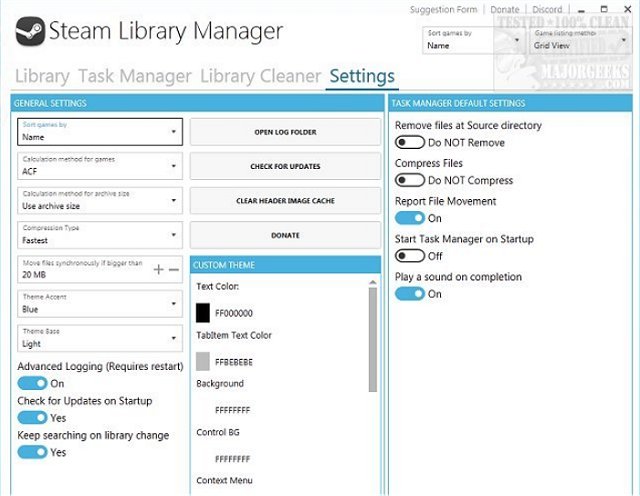
Using Steam Library Manager is relatively simple, it is presented in an intuitive interface with all options readily in reach. It displays all your current games from the home page and will also allow you to view the possible installation paths. In backup mode, Steam Library Manager compresses your game files to save space (it does offer compression type options), but the trade-off for space is this process can be time-consuming especially with larger game files.
Steam Library Manager will help to manage your Steam libraries, and the intuitive interface lends itself to easy copying, moving or backing up of your games between Steam and the Steam Library Manager's (backup) libraries.
Download @ https://www.majorgeeks.com/files/details/steam_library_manager.html
Similar:
How to Fix 'Update Queued' in Steam
How to Fix Steam Missing or Unavailable Content Manifest Errors
Download Steam for Windows and Android
comments powered by Disqus
If you are an avid gamer, you have probably amassed a large assortment of games. Steam Library Manager gives you the option forgo deleting games but instead offers you an alternative and easy way to manage them. You can sort games by name, ID size on disk to name a few of the available filters.
Using Steam Library Manager is relatively simple, it is presented in an intuitive interface with all options readily in reach. It displays all your current games from the home page and will also allow you to view the possible installation paths. In backup mode, Steam Library Manager compresses your game files to save space (it does offer compression type options), but the trade-off for space is this process can be time-consuming especially with larger game files.
Steam Library Manager will help to manage your Steam libraries, and the intuitive interface lends itself to easy copying, moving or backing up of your games between Steam and the Steam Library Manager's (backup) libraries.
Download @ https://www.majorgeeks.com/files/details/steam_library_manager.html
Similar:
comments powered by Disqus
