


Windows Media Creation Tool Error 0x80072F76
By Timothy Tibbettson 06/30/2023 |
Error code 0x80072F76-0x20017 appears for some when they downloaded and ran the Windows 10 Media Creation Tool. The entire message reads 'There was a problem running this tool. We’re not sure what happened, but we’re unable to run this tool on your PC. If you continue experiencing problems, reference the error code when contacting customer support. Error code: 0x80072F76 – 0x20017.' This is a simple fix. Here's how.

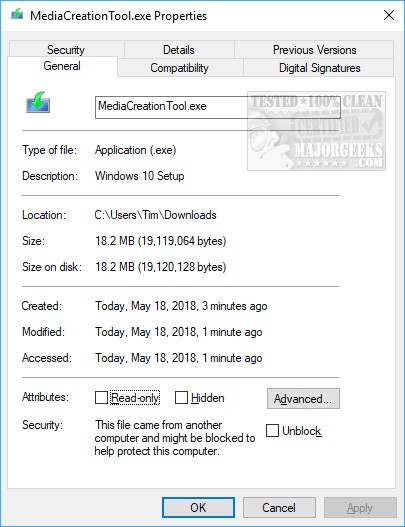
Find the file you downloaded, most likely named MediaCreationTool.exe. It should be in your Downloads folder. Right-click on it and choose Properties. There are multiple tabs, and you should already be at the General tab. At the bottom you should see Security: This file came from another computer and might be blocked to help protect this computer. Check the box next to Unblock and click OK.
You should no longer get the error message, and the message above in bold will now be gone. Ironically, we received this error message when downloading directly from Microsoft.
Similar:
Create a Windows 10 Bootable USB Flash Drive With Windows 10 Media Creation Tool
How to Fix Microsoft Windows 10 Media Creation Tool Errors
How to Download the Latest Windows 10 ISO Images Directly in Google Chrome
How to Download the Latest Windows 10 ISO Images Directly in Mozilla Firefox.
comments powered by Disqus
Find the file you downloaded, most likely named MediaCreationTool.exe. It should be in your Downloads folder. Right-click on it and choose Properties. There are multiple tabs, and you should already be at the General tab. At the bottom you should see Security: This file came from another computer and might be blocked to help protect this computer. Check the box next to Unblock and click OK.
You should no longer get the error message, and the message above in bold will now be gone. Ironically, we received this error message when downloading directly from Microsoft.
Similar:
comments powered by Disqus
