


BCUninstaller (Bulk Crap Uninstaller) 6.3
|
Author:
Klocman Software
Date: 09/07/26 Size: 9-100 MB License: Freeware Requires: 11|10|8|7 Downloads: 128339 times  TIP:
Click Here to Repair or
TIP:
Click Here to Repair orRestore Missing Windows Files |
 Download (Portable 7z) Download@MajorGeeks Download@MajorGeeks
|
MajorGeeks: Setting the standard for editor-tested, trusted, and secure downloads since 2002. |
 Avast Free Antivirus Worried about finance scams?
Get free antivirus with AI-powered online scam detection Download Free!
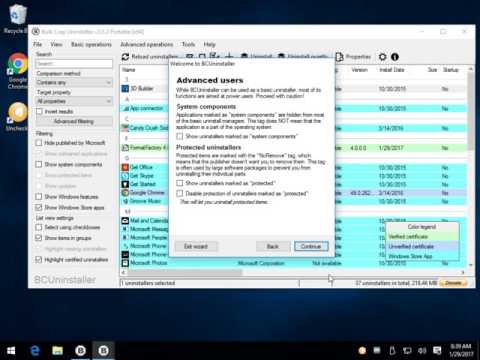
BCUninstaller (Bulk Crap Uninstaller) is a free uninstaller program focused on removing large amounts of applications at once in a short amount of time. Video tutorial available.
BCUninstaller is a powerful tool designed to efficiently remove multiple applications with minimal user intervention. It offers features such as cleaning up leftover files, identifying orphaned applications, and executing uninstallers based on preconfigured lists. While BCUninstaller was originally developed with IT professionals in mind, its user-friendly default settings make it accessible for anyone looking to manage their software installations effectively.
BCUninstaller offers broad compatibility with a variety of platforms, including Windows Store Apps and Steam. It also supports key Windows Features and is designed with specialized functionality to handle numerous uninstalling systems like NSIS, InnoSetup, Msiexec, and many others. This makes it a versatile tool for managing software installations and uninstalls effectively.
BCUninstaller is an exceptional tool for effortlessly removing large numbers of unwanted applications at once. Ideal for those seeking a free and open-source solution, it boasts advanced features that effectively clean up leftover files and registry entries. System administrators, in particular, find it invaluable thanks to its bulk uninstalling capabilities and ability to tackle even the most stubborn programs with minimal user input. Whether you're streamlining your system or reclaiming precious space, BCUninstaller makes the process smooth and efficient.
BCUninstaller Features:
● Uninstall any number of programs at once
● Quiet (unattended) uninstall of many programs
● Intelligent ordering of uninstallers in large tasks
● Detection and clean up of leftovers after uninstalling applications
● Uninstall lists (automatically select uninstallers from the list, can be edited in a text editor)
● Advanced grouping and sorting
● Filtering and searching
● Editing tools and visibility of protected and invalid entries
● Automatic error reporting and updating
● And many more time-saving features...
Similar:
● How to Use Storage Sense to Delete Junk Files in Windows 10/11 Automatically
● How to Securely Delete Files in Windows 10/11 With PowerShell and Cipher
● How-to Run Check Disk or Format a Drive From the Command Prompt
● What Are the $GetCurrent and $WINDOWS.~BT Folders and How to Delete Them
What is BCUninstaller?
BCUninstaller is a powerful tool designed to efficiently remove multiple applications with minimal user intervention. It offers features such as cleaning up leftover files, identifying orphaned applications, and executing uninstallers based on preconfigured lists. While BCUninstaller was originally developed with IT professionals in mind, its user-friendly default settings make it accessible for anyone looking to manage their software installations effectively.
Versatility and Compatibility
BCUninstaller offers broad compatibility with a variety of platforms, including Windows Store Apps and Steam. It also supports key Windows Features and is designed with specialized functionality to handle numerous uninstalling systems like NSIS, InnoSetup, Msiexec, and many others. This makes it a versatile tool for managing software installations and uninstalls effectively.
Geek Verdict
BCUninstaller is an exceptional tool for effortlessly removing large numbers of unwanted applications at once. Ideal for those seeking a free and open-source solution, it boasts advanced features that effectively clean up leftover files and registry entries. System administrators, in particular, find it invaluable thanks to its bulk uninstalling capabilities and ability to tackle even the most stubborn programs with minimal user input. Whether you're streamlining your system or reclaiming precious space, BCUninstaller makes the process smooth and efficient.
BCUninstaller Features:
● Uninstall any number of programs at once
● Quiet (unattended) uninstall of many programs
● Intelligent ordering of uninstallers in large tasks
● Detection and clean up of leftovers after uninstalling applications
● Uninstall lists (automatically select uninstallers from the list, can be edited in a text editor)
● Advanced grouping and sorting
● Filtering and searching
● Editing tools and visibility of protected and invalid entries
● Automatic error reporting and updating
● And many more time-saving features...
▶
Similar:
● How to Use Storage Sense to Delete Junk Files in Windows 10/11 Automatically
● How to Securely Delete Files in Windows 10/11 With PowerShell and Cipher
● How-to Run Check Disk or Format a Drive From the Command Prompt
● What Are the $GetCurrent and $WINDOWS.~BT Folders and How to Delete Them
Version History for BCUninstaller (Bulk Crap Uninstaller):
https://github.com/Klocman/Bulk-Crap-Uninstaller/releases
 Screenshot for BCUninstaller (Bulk Crap Uninstaller)
Top Downloads In Uninstallers
 IObit Uninstaller 16.0.0.34 [ 2026-09-14 11:00:00 | 32 MB | Freeware | 11|10|8|7 | 5 ] Windows Installer CleanUp Utility 7.2 [ 2016-10-16 09:26:05 | 351 KB | Freeware | Win 10 / 8 / 7 / Vista / XP | 5 ] Revo Uninstaller 5.5.4 Pro / 2.7.0 Free [ 2026-09-23 08:51:12 | 18 MB | Freemium | 11|10|8|7|Android | 5 ] Geek Uninstaller 1.5.5.185 [ 2026-09-22 09:56:40 | 3 MB | Freemium | 11|10|8|7 | 5 ] Wise Program Uninstaller 3.2.9.275 [ 2026-05-09 03:16:50 | 13 MB | Freeware | 11|10|8|7 | 4 ]
 Tactical Briefings
Comment Rules & Etiquette - We welcome all comments from our readers, but any comment section requires some moderation. Some posts are auto-moderated to reduce spam, including links and swear words. When you make a post, and it does not appear, it went into moderation. We are emailed when posts are marked as spam and respond ASAP. Some posts might be deleted to reduce clutter. Examples include religion, politics, and comments about listing errors (after we fix the problem and upvote your comment). Finally, be nice. Thank you for choosing MajorGeeks.

© 2000-2026 MajorGeeks.com
Powered by Contentteller® CMS System