


Adjust How Long Notifications Stay on Screen in Windows 11
By selma čitakovićon 09/26/2026 |
![{$insert['content_title']](/content/file/6427_image3.jpg
)
You've probably noticed notifications popping up in the lower-right corner of your screen. They're not exactly subtle. By default, they linger there for five seconds before they're automatically dismissed. If this is too brief for your liking, you can change it.
Thankfully, it's pretty easy to do. Here are the steps!
Via Settings
You can change how long notifications stay open right here:
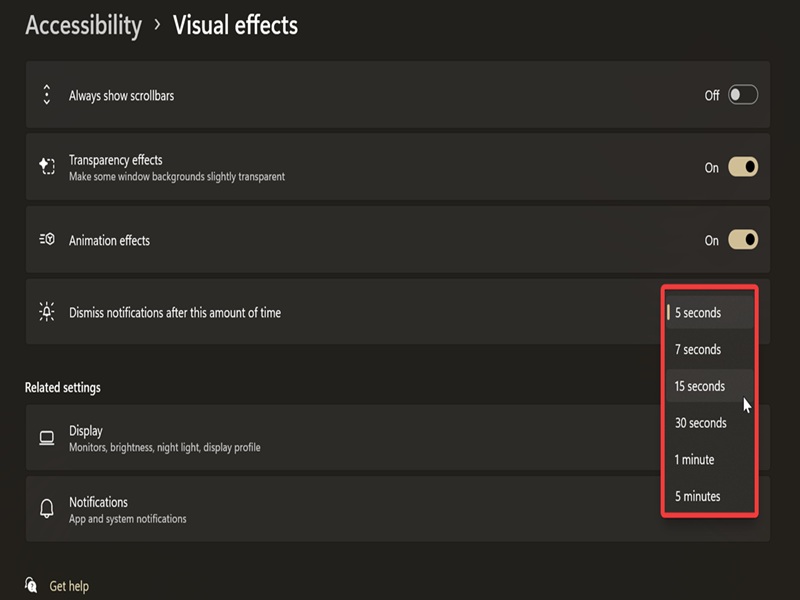
- Go to Settings > Accessibility > Visual effects.
- Select the time you want next to Dismiss notifications after this amount of time.
- The options are 5 seconds, 7 seconds, 15 seconds, 30 seconds, 1 minute, and 5 minutes.
Via Control Panel
Or you can achieve the same results with the legacy Control Panel:
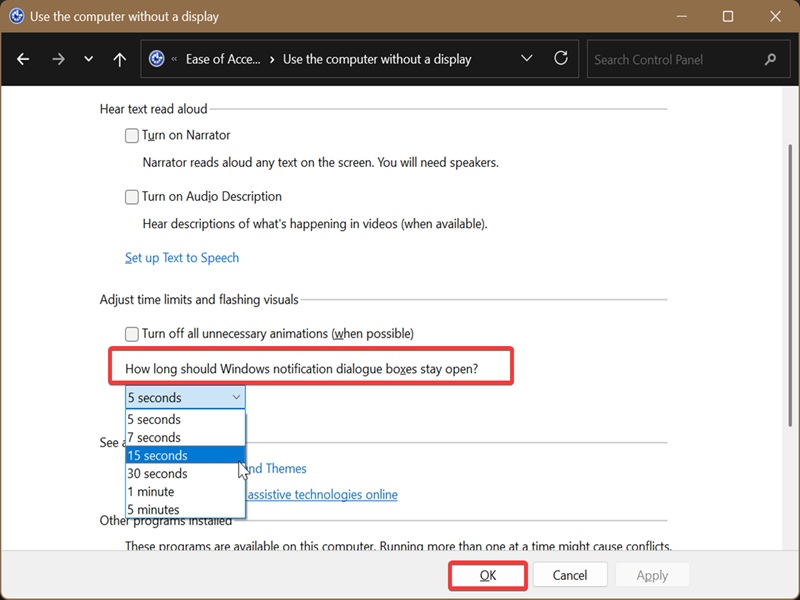
- Type Control Panel in Windows Search and open it.
- Go to Ease of Access Center. If you can't find it, switch to Small icons or Large icons view in the top right.
- Select Use the computer without a display.
- In the Adjust time limits and flashing visuals section, you'll see the How long should Windows notification dialog boxes stay open? option. Select a duration in the drop-down menu.
- Click OK to apply the changes.
Via Registry Editor
Lastly, if you somehow can't access Settings or Control Panel, there's always the registry. Before making any changes to it, we recommend you create a system restore point just in case.
Here's how to edit the registry:
- Press Win + R, type regedit, and hit Enter.
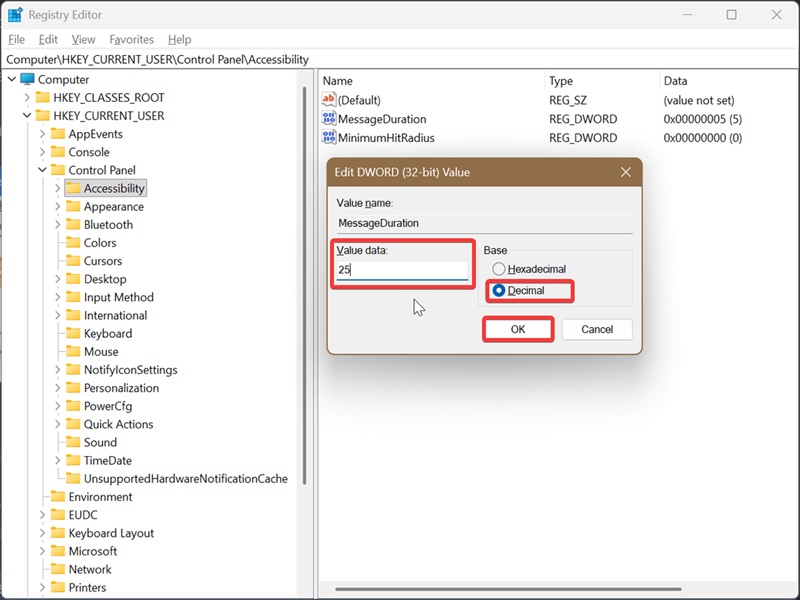
- On the left side, navigate to HKEY_CURRENT_USER\Control Panel\Accessibility.
- While in Accessibility, double-click MessageDuration.
- Select Decimal. In the Value Data field, type how many seconds you want the notifications to stay. (The lowest possible value is 5.) Click OK.
- Restart to apply the changes.
And that's it! If you miss any pop-ups, you can find them in the Notification Center later.

|
selma citakovic
Selma is a gamer, geek and gremlin hunter with a passion for cyber security and smashing Windows bugs before they bite. She’s IBM-certified, loves real freeware, despises bloatware, and powers most of her troubleshooting with an unhealthy amount of coffee. |
comments powered by Disqus
