


Cancel a Pending Restart or Shutdown With a Shortcut
By selma čitakovićon 09/13/2026 |
![{$insert['content_title']](/content/file/6332_image1.jpg
)
Sometimes, Windows will notify you when you’re about to be signed out for a scheduled restart or shutdown. You’ll see a message saying something like: “Windows will shut down in less than a minute.”
One way to cancel the forced shutdown timer is to quickly open Command Prompt and type shutdown /a. It will work if you time it right! Still, there’s an easier way if you’re ever in a hurry. You can create a shortcut and pin it where it’s convenient.
Here’s how!
Create a shortcut
Follow these steps:
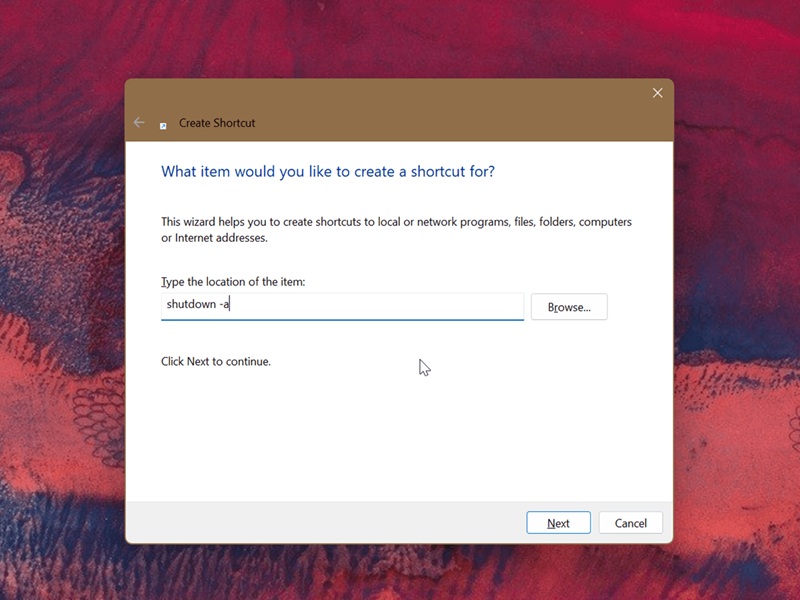
- Right-click an empty spot on your desktop and select New > Shortcut.
- Type this in the text field for the location: shutdown -a
- Click Next.
- You can name it Cancel, Abort, or whatever you like.
- Click the Finish button.
- Now, right-click your new shortcut and go to Properties.
- Click the Change icon button.
- Confirm by clicking OK.
- Choose an icon you like from the list, and click OK.
- Click OK again.
You can then right-click it, select Show more options, and then click Pin to Start or Pin to taskbar. You can even assign a keyboard shortcut to it, or just keep it somewhere on your desktop where it’s easy to reach. As long as you don’t forget where you put it, it’s good.

|
selma citakovic
Selma is a gamer, geek and gremlin hunter with a passion for cyber security and smashing Windows bugs before they bite. She’s IBM-certified, loves real freeware, despises bloatware, and powers most of her troubleshooting with an unhealthy amount of coffee. |
comments powered by Disqus
