


CatRoot and catroot2 Folders Explained
By Timothy Tibbettson 06/15/2023 |
CatRoot and catroot2 are two folders found in C:\Windows\System32. In this tutorial, we explain what these two folders are and how to delete (one of) them if needed.
Catroot and Catroot2 are Windows system folders required for Windows Updates. The folders contain numerous files and folders, including signatures of the Windows Update package.
Deleting the contents of the Catroot2 folder has been known to fix Windows Update errors or problems.
Deleting the Catroot and Catroot2 is for Advanced Users Only. If you remove the Catroot folder, your computer won't boot. If you delete Catroot2, the folder is automatically created when you reboot. We spent hours testing this and found that removing the Catroot folder consistently rendered our computer unbootable.
Video tutorial:
To delete the folders, open File Explorer and go to C:\Windows\System32.
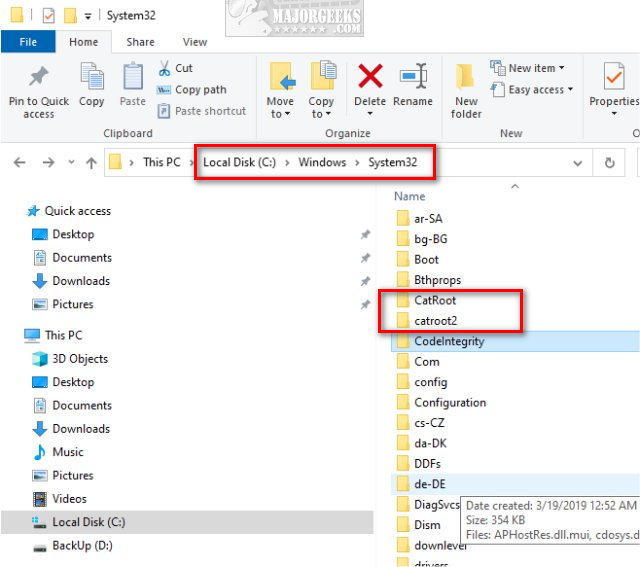
Catroot2:
Double-click on the catroot2 folder.
Open PowerShell as Admin.
Press Ctrl + A to highlight all files and folders and press Delete.
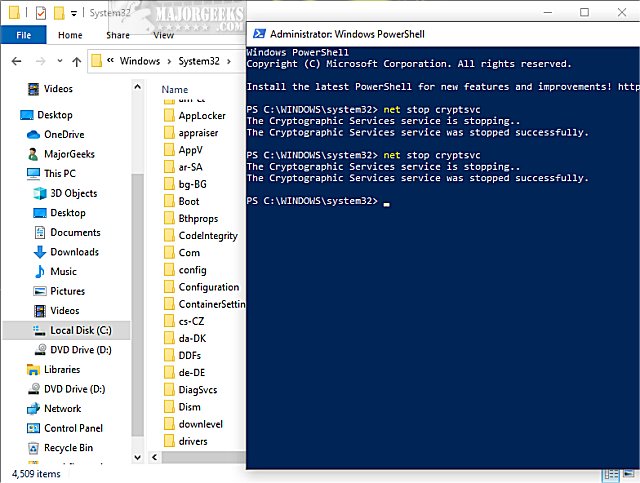
When you see the Folder in use error switch back to Powershell and type in net stop cryptsvc
Switch back to File Explorer and continue deleting by pressing Try Again.
You will need to press Continue multiple times.
CatRoot (Not Recommended):
Stop! Deleting the CatRoot folder will cause your computer to not boot. The folder is intentionally difficult to delete. This information is for advanced users and informational purposes.
If you were to delete the CatRoot folder, you'd follow the same steps for the catroot1 folder.
Similar:
How to Delete the Windows.old Folder from Windows 10
What Is the $Windows.~Bt Folder and Can I Delete It?
What Is the $SysReset Folder and Can I Delete It in Windows 10?
What Are the $GetCurrent and $WINDOWS.~BT Folders and How to Delete Them
What Is the $WinREAgent Folder and Can I Delete It?
How-To Delete Pending Windows Updates
comments powered by Disqus
Catroot and Catroot2 are Windows system folders required for Windows Updates. The folders contain numerous files and folders, including signatures of the Windows Update package.
Deleting the contents of the Catroot2 folder has been known to fix Windows Update errors or problems.
Deleting the Catroot and Catroot2 is for Advanced Users Only. If you remove the Catroot folder, your computer won't boot. If you delete Catroot2, the folder is automatically created when you reboot. We spent hours testing this and found that removing the Catroot folder consistently rendered our computer unbootable.
To delete the folders, open File Explorer and go to C:\Windows\System32.
Catroot2:
Double-click on the catroot2 folder.
Open PowerShell as Admin.
Press Ctrl + A to highlight all files and folders and press Delete.
When you see the Folder in use error switch back to Powershell and type in net stop cryptsvc
Switch back to File Explorer and continue deleting by pressing Try Again.
You will need to press Continue multiple times.
CatRoot (Not Recommended):
Stop! Deleting the CatRoot folder will cause your computer to not boot. The folder is intentionally difficult to delete. This information is for advanced users and informational purposes.
If you were to delete the CatRoot folder, you'd follow the same steps for the catroot1 folder.
Similar:
comments powered by Disqus
