


Cortana 'Ask Me Anything' Not Working
By Timothy Tibbettson 06/30/2023 |
Cortana has a known bug that randomly occurs when using "Ask Me Anything." There are a few troubleshooting steps that you can take to try and resolve this error.
1: Reboot or Restart Cortana
We can restart Cortana, but if you can reboot, save yourself the trouble and do that. If you can't reboot, then we can try to end the Cortana process and start it back up.
Press CTRL SHIFT + ESC to open Task Manager. If you only see a handful of processes, then click More Details.
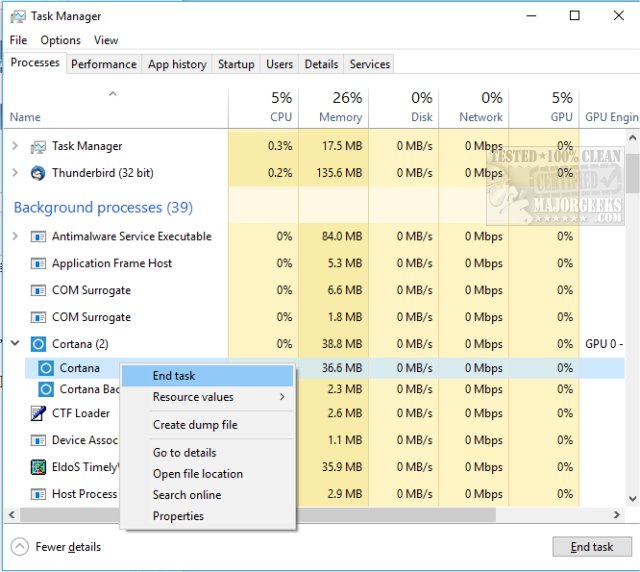
Find Cortana which should have two or three processes underneath including Cortana and Cortana Background Task Host. Right-click on each and choose End Task. Remember which tasks you have ended because they will automatically restart.
If that didn't work you can scroll further down, find Windows Explorer, right-click and end that task. Odds are your taskbar will disappear, so press the Windows key to get it back.
2: Re-register Cortana
Open an elevated command-prompt and type in:
Get-AppXPackage -Name Microsoft.Windows.Cortana | Foreach {Add-AppxPackage -DisableDevelopmentMo
de -Register “$($_.InstallLocation)AppXManifest.xml”}
If that didn't work, you can try:
Get-AppXPackage -AllUsers | Foreach {Add-AppxPackage -DisableDevelopmentMode -Register "$($_.InstallLocation)AppXManifest.xml"}
3: Make Sure Windows Updates are Current
Bugs like this are often addressed in Windows Updates, which you should be receiving automatically. Verify you're up to date by going to your Control Panel, Update & Security, Windows Update, Check for updates.
4: Run Start Menu Troubleshooter
Download the Microsoft Start Menu Troubleshooter. That will download startmenu.diagcab. Double-click on that and follow the prompts. While the app is named Start Menu Troubleshooter, in reality, it also checks for taskbar problems including search.
Similar:
How to Disable Cortana in Windows 10
How to Uninstall or Reinstall Cortana in Windows 10
comments powered by Disqus
1: Reboot or Restart Cortana
We can restart Cortana, but if you can reboot, save yourself the trouble and do that. If you can't reboot, then we can try to end the Cortana process and start it back up.
Press CTRL SHIFT + ESC to open Task Manager. If you only see a handful of processes, then click More Details.
Find Cortana which should have two or three processes underneath including Cortana and Cortana Background Task Host. Right-click on each and choose End Task. Remember which tasks you have ended because they will automatically restart.
If that didn't work you can scroll further down, find Windows Explorer, right-click and end that task. Odds are your taskbar will disappear, so press the Windows key to get it back.
2: Re-register Cortana
Open an elevated command-prompt and type in:
Get-AppXPackage -Name Microsoft.Windows.Cortana | Foreach {Add-AppxPackage -DisableDevelopmentMo
de -Register “$($_.InstallLocation)AppXManifest.xml”}
If that didn't work, you can try:
Get-AppXPackage -AllUsers | Foreach {Add-AppxPackage -DisableDevelopmentMode -Register "$($_.InstallLocation)AppXManifest.xml"}
3: Make Sure Windows Updates are Current
Bugs like this are often addressed in Windows Updates, which you should be receiving automatically. Verify you're up to date by going to your Control Panel, Update & Security, Windows Update, Check for updates.
4: Run Start Menu Troubleshooter
Download the Microsoft Start Menu Troubleshooter. That will download startmenu.diagcab. Double-click on that and follow the prompts. While the app is named Start Menu Troubleshooter, in reality, it also checks for taskbar problems including search.
Similar:
How to Disable Cortana in Windows 10
How to Uninstall or Reinstall Cortana in Windows 10
comments powered by Disqus
