


How To Remove OneDrive From the Navigation Pane in File Explorer
By selma čitakovićon 04/11/2026 |
![{$insert['content_title']](/content/file/5906_image2.png
)
Yes, you can get rid of OneDrive in your navigation pane in File Explorer. It occupies the top-left spot, next to Home and Gallery. Luckily, you can safely remove it without deleting your built-in OneDrive folder. This also won't disable or uninstall the app in general.
However, it's not as simple as going to the Settings and toggling it off. You'll have to change a value in the registry. I'll show you how below, so read on.
Registry Editor
This is a quick edit that will only take a couple of minutes. Still, if you're worried about messing around with the registry, you can create a system restore point to revert any changes. But as long as you closely follow these steps, everything should be fine:
- Press Win + R, type regedit, and press Enter.
- Go to Computer\HKEY_CURRENT_USER\Software\Classes\CLSID\{018D5C66-4533-4307-9B53-224DE2ED1FE6}. You can paste this in the address bar at the top to speed up your search.
- While in the {018D5C66-4533-4307-9B53-224DE2ED1FE6} sub-key (that's a mouthful!), double-click System.IsPinnedToNameSpaceTree on the right side.
- In the Value data field, type 0 and click on OK to remove OneDrive from the navigation pane.
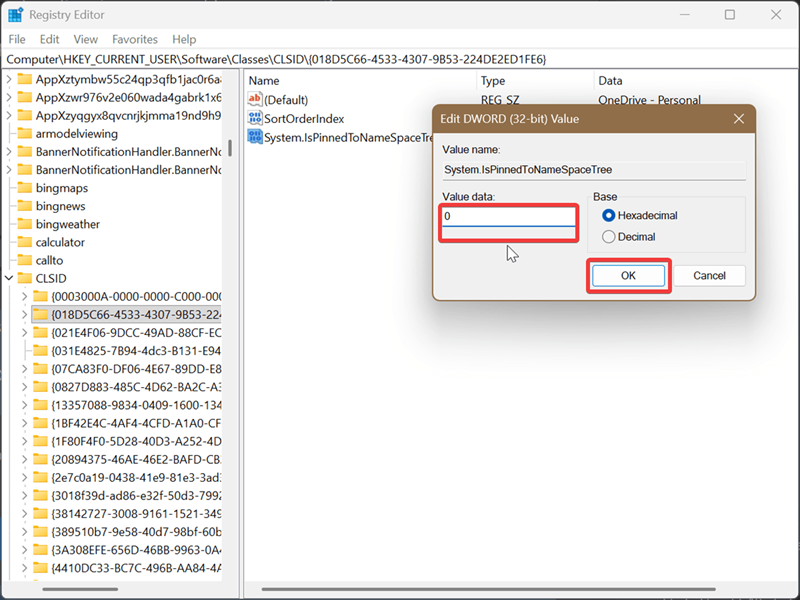
Finally, close File Explorer (if it was open) and reopen it. You should notice the change right after that.
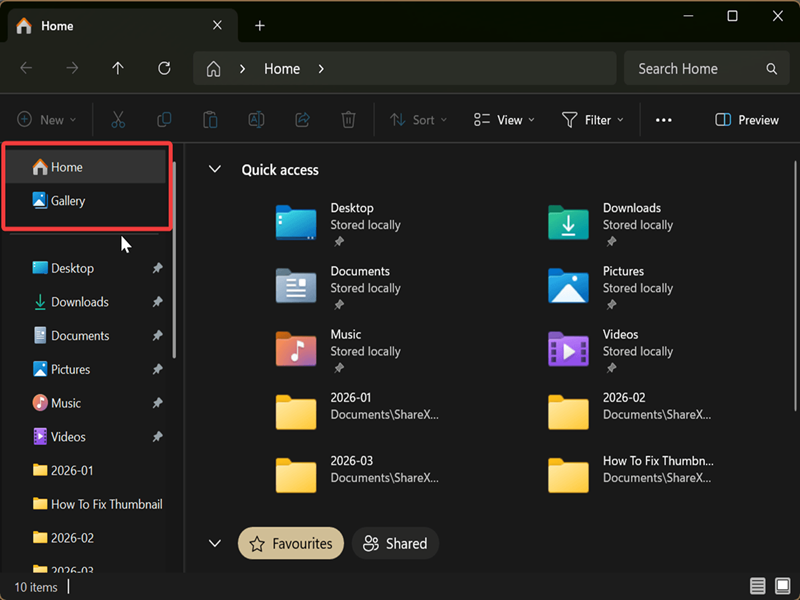
To undo it, just type 1 in the same field and click OK. That's the default value anyway.
If, for some reason, you can't find the DWORD value mentioned in step 3, you can create it yourself. Right-click an empty spot in the {018D5C66-4533-4307-9B53-224DE2ED1FE6} sub-key, and select New > DWORD (32-bit) Value. Name it System.IsPinnedToNameSpaceTree, and then follow the rest of the guide.
This change applies to the current user account, not all users. Additionally, if you turn on Show all folders (right-click an empty spot on the navigation pane and check Show all folders), OneDrive will still show up, so keep that in mind.
For more peace of mind, I recommend you also disable folder backup syncing if you have a free OneDrive account. It's limited to 5GB of cloud storage, so it's not exactly useful in the long run.

|
selma citakovic
Selma is a gamer, geek and gremlin hunter with a passion for cyber security and smashing Windows bugs before they bite. She’s IBM-certified, loves real freeware, despises bloatware, and powers most of her troubleshooting with an unhealthy amount of coffee. |
comments powered by Disqus
