


How to Reset PowerShell and Command Prompt in Windows
By Timothy Tibbettson 06/28/2023 |
Both Windows PowerShell and the Command Prompt can be customized or modified; however, there is no visible option or menu to reset to the default settings if problems occur; until now.
Video tutorial:
1: Reset PowerShell or Command Prompt to Default Settings
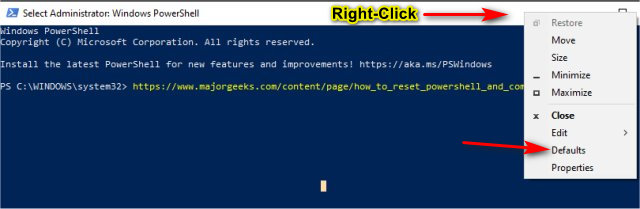
If you know what setting you changed, you can revert by right-clicking on the top of a Powershell or Command Prompt window and click on Properites. Look for the setting you want to change.
If you're not sure what was changed, click on Defaults.
Note: Download Reset PowerShell and Command Prompt. There is a registry file that's optional for Step 2 and four shortcuts you might need for Step 3
2: Reset PowerShell or Command Prompt With a Registry File
Resetting the Command Prompt or PowerShell can be done with a registry file.
Download the registry file here.
Double-click on Command Prompt Default.reg, and you're all set.
This tweak is included as part of MajorGeeks Windows Tweaks.
3: Reset PowerShell or Command Prompt Manually
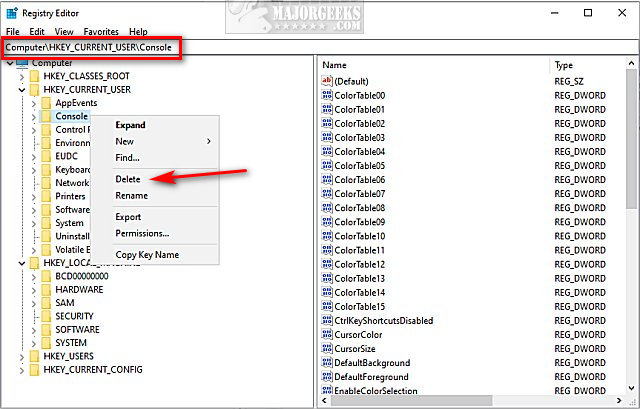
Open the registry editor and go to HKEY_CURRENT_USER\Console.
Right-click on Console and click Delete.
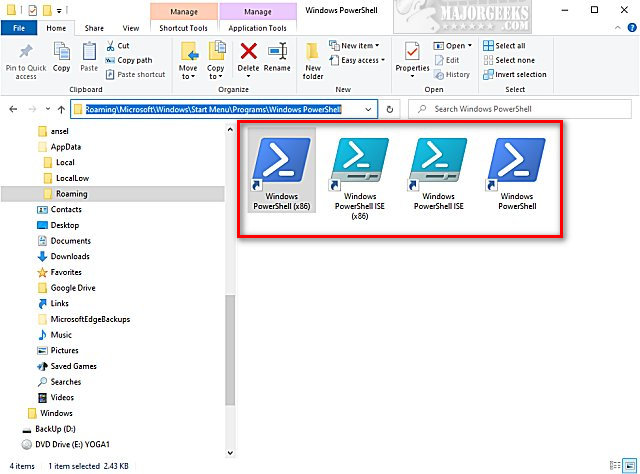
If your shortcuts for Powershell are now missing or not working, we provided them in the download mentioned above.
Open File Explorer and navigate to:
C:\Users\USERNAME\AppData\Roaming\Microsoft\Windows\Start Menu\Programs\Windows PowerShell
Replace USERNAME with the name of your account.
Note: AppData is a Hidden Folder.
Copy and paste all of the shortcuts you downloaded in Reset PowerShell and Command Prompt.
Similar:
How to Switch Between Command Prompt or PowerShell on Win+X Menu
How to Customize Fonts, Colors, Window Size and More With Powershell or Command Prompt
PowerShell and Command Prompt 101
How to View, Save, and Clear Your PowerShell and Command Prompt History
How to Add 'Open PowerShell Window Here' as Administrator Context Menu
comments powered by Disqus
1: Reset PowerShell or Command Prompt to Default Settings
If you know what setting you changed, you can revert by right-clicking on the top of a Powershell or Command Prompt window and click on Properites. Look for the setting you want to change.
If you're not sure what was changed, click on Defaults.
Note: Download Reset PowerShell and Command Prompt. There is a registry file that's optional for Step 2 and four shortcuts you might need for Step 3
2: Reset PowerShell or Command Prompt With a Registry File
Resetting the Command Prompt or PowerShell can be done with a registry file.
Download the registry file here.
Double-click on Command Prompt Default.reg, and you're all set.
This tweak is included as part of MajorGeeks Windows Tweaks.
3: Reset PowerShell or Command Prompt Manually
Open the registry editor and go to HKEY_CURRENT_USER\Console.
Right-click on Console and click Delete.
If your shortcuts for Powershell are now missing or not working, we provided them in the download mentioned above.
Open File Explorer and navigate to:
C:\Users\USERNAME\AppData\Roaming\Microsoft\Windows\Start Menu\Programs\Windows PowerShell
Replace USERNAME with the name of your account.
Note: AppData is a Hidden Folder.
Copy and paste all of the shortcuts you downloaded in Reset PowerShell and Command Prompt.
Similar:
comments powered by Disqus
