


Is Your Windows 10 PC Now a Security Risk?
By selma čitakovićon 07/04/2026 |
![{$insert['content_title']](/content/file/6131_image1.jpg
)
Windows 10 officially reached its end of support last year, on October 14. This means no new features, no bug fixes, and, most importantly, no security updates. Still, it's not the end of the world for Windows 10 machines. Many people still use it safely (including some of my geekiest friends who generally know their stuff). Additionally, Microsoft is keeping it alive with the Extended Security Updates program.
So, what's the truth: How risky is it to still use Windows 10?
It is a security risk, but it's not as bad as you might think. Despite all the fearmongering, there's a lot that you can do as a user to keep it running safely. So, let's take a critical look at the potential threats and how you can mitigate them, without having to upgrade.
What are the dangers?
Obviously, Windows 10 didn't get flooded with malware as soon as support stopped. In fact, Microsoft Defender Antivirus will continue to get Security Intelligence Updates through October 2028. This means its known malware database will stay up-to-date, and you can rely on Defender as your primary antivirus through 2028. That's good news!
However, malware is one thing; security vulnerabilities are another. Windows bugs and unpatched security flaws can create openings for hackers to exploit. Usually, it's Windows Update's job to patch those, but with the end of support, that is no longer the case. Still, you can sign up for the Extended Security Updates (ESU) program and keep getting these patches until October 2026 as a consumer. (We'll talk more about this in the next section.)
You may notice some mixed signals here. "No more security updates!" - except, wait, what's that about Defender and the ESU program? Contradictions aside, no one can say with certainty what kind of security exploits may target Windows 10, or when exactly. It may not happen for years. It may happen this week. Nobody knows.
Still, that's the worst-case scenario. A more realistic problem is the eventual lack of software and driver support. It will happen with Microsoft, Adobe, most SaaS, and apps with online components. You'll have to find alternatives if you want to keep using Windows 10.
What can you do?
Your user behavior and security habits play a deciding role in how safe Windows 10 can be. If you're the adventurous sort that likes to open suspicious .exe files, you will have an equally bad time in Windows 11 and Windows 10. It's up to you how secure your operating system will be. So, try to be extra careful about links, attachments, and downloads, and brush up on the usual cybersecurity advice. This alone will significantly mitigate the risks.
Now, about Extended Security Updates:
You can continue getting security updates until October 2026 for free (if eligible) or a one-time fee of $30. It's free for consumers in the European Economic Area and Windows Backup users. Alternatively, you can redeem 1,000 Microsoft Rewards points. You can find the link to enroll in Settings > Update & Security > Windows Update.
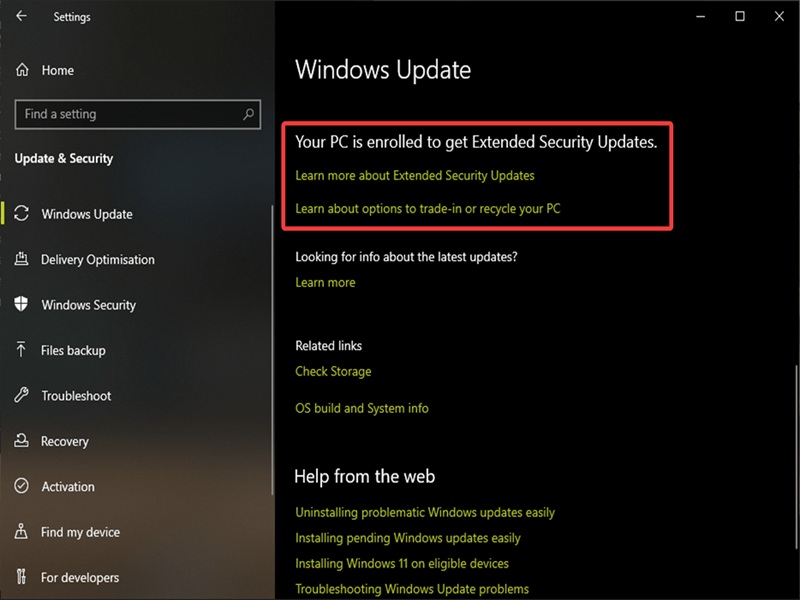
More security updates do sound good, but I'm not a fan of the selective pricing. However, there's one more reason why you should consider ESU (if you haven't signed up already). The security certificates that enable Secure Boot are about to expire in June this year. Secure Boot protects you against boot-time malware, an uncommon but dangerous sort that can embed itself into UEFI/BIOS. Windows 11 and Windows 10 ESU users will automatically get the updated certificates.
Last but not least, I recommend getting a reputable third-party antivirus and keeping it up-to-date. Thanks to the extended Security Intelligence Update period, Defender is still a viable option for the time being. But after 2028, you're on your own, so you'd better start looking for alternatives.
When all is said and done, this isn't the first time an operating system "died." The same happened with Windows 7 and XP, with similar risks, and yet people kept using them until they were ready to move on. You can do the same, as long as you take responsibility for your security.

|
selma citakovic
Selma is a gamer, geek and gremlin hunter with a passion for cyber security and smashing Windows bugs before they bite. She’s IBM-certified, loves real freeware, despises bloatware, and powers most of her troubleshooting with an unhealthy amount of coffee. |
comments powered by Disqus
