


How to Limit or Modify the Bandwidth Used by OneDrive
By Timothy Tibbettson 06/15/2023 |
OneDrive allows you to back up and share your files and folders easily in the cloud. However, backing up can be time-consuming and take bandwidth away from other applications. To avoid this, we can limit the amount of bandwidth OneDrive can use.
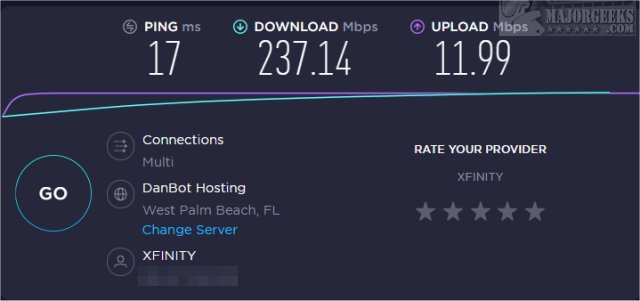
Before you get started, it's a good idea to know your upload and download speeds. You can type speed test into Google and click on Run Speed Test.
You can also try Speedtest.Net, one of the most popular speed tests available. Our tests found the servers on Speedtest.net to be closer than the Google test, providing more accurate results.
You need this information because Dropbox asks you to limit by entering a number in KB/s, but speed tests will show you Mbps.
All you need to know is that 1 MBps = 125 KB/s.
For example, in my speed test, I am showing 12 MBps. I can use 125 KB/s to use 1 MBps or 1\12th of my bandwidth. You might also consider multiplying by six (750 KB/s) to use half of your upload bandwidth.
Apply the same numbers to your download speeds.
Keep in mind that most cable-based internet providers have limited upload speeds and generous download speeds. If you're having problems with bandwidth, upload speeds might be the first thing to try.
Open OneDrive by right-clicking on the System Tray and click Settings.
Click on the Network tab.
Click on Download rate or Upload rate.
Click on Limit to and change the KB/s as described above.
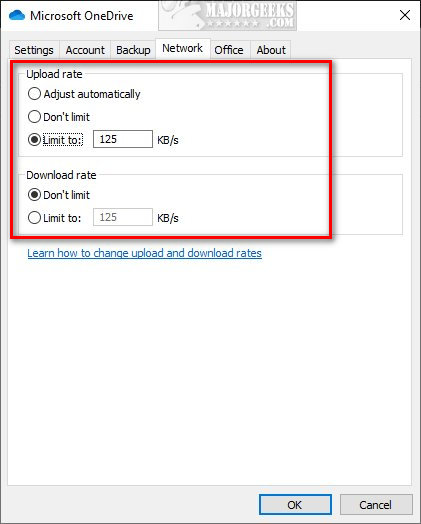
As you might have noticed, you can also use unlimited download and upload speeds and additionally automatically limit upload speeds.
Similar:
How to Limit or Modify the Bandwidth Used by Dropbox
How to Reset or Reinstall Windows 10 Using the Cloud
How to Back Up Google Drive
comments powered by Disqus
Before you get started, it's a good idea to know your upload and download speeds. You can type speed test into Google and click on Run Speed Test.
You can also try Speedtest.Net, one of the most popular speed tests available. Our tests found the servers on Speedtest.net to be closer than the Google test, providing more accurate results.
You need this information because Dropbox asks you to limit by entering a number in KB/s, but speed tests will show you Mbps.
All you need to know is that 1 MBps = 125 KB/s.
For example, in my speed test, I am showing 12 MBps. I can use 125 KB/s to use 1 MBps or 1\12th of my bandwidth. You might also consider multiplying by six (750 KB/s) to use half of your upload bandwidth.
Apply the same numbers to your download speeds.
Keep in mind that most cable-based internet providers have limited upload speeds and generous download speeds. If you're having problems with bandwidth, upload speeds might be the first thing to try.
Open OneDrive by right-clicking on the System Tray and click Settings.
Click on the Network tab.
Click on Download rate or Upload rate.
Click on Limit to and change the KB/s as described above.
As you might have noticed, you can also use unlimited download and upload speeds and additionally automatically limit upload speeds.
Similar:
comments powered by Disqus
