


Low Latency Profile in Windows 11: Worth the Hype?
By selma čitakovićon 08/01/2026 |
![{$insert['content_title']](/content/file/6176_image2.jpg
)
The June Patch Tuesday update (KB5094126) is here, with an ...interesting new addition: the Low Latency Profile (LLP). It's designed as a performance boost that speeds up opening native apps and UI elements in Windows 11. For example, if clicking on Windows Search generally feels choppy and slow, this is meant to fix it and make it snappier.
In theory, that doesn't sound so bad. It might even seem that Microsoft is actually keeping its word to focus more on performance improvements in 2026. Still, users are rightfully sceptical of these promises. With updates routinely breaking things (just look at last month), it's no wonder. Many are already arguing that LLP is just a band-aid fix - the deeper underlying issues with Windows 11 are still unaddressed.
So, let's take a closer look at the Low Latency Profile and see what we can expect from it.
How it works
Low Latency Profile briefly boosts your CPU's frequency during certain tasks to speed them up. So, as soon as you open the Start menu, Search, or the right-click context menu, it ramps up your CPU frequency to the max for a couple of seconds, then drops it to idle. As a result, the shell element loads more swiftly.
The effect is more noticeable on older and mid-range hardware, though. If you already have a decent PC, it won't be as dramatic.
But what about the fact that LLP is pushing your CPU speeds to the max for something as trivial as opening Search? You may be concerned about your laptop battery, thermal impact, or even CPU degradation. Fortunately, that shouldn't be an issue since the CPU spikes are so brief. The feature has been tested before wider release, with no reported battery or overheating issues. Of course, we have yet to see how well it holds up in the coming months.
Additionally, Windows is hardly the first operating system to use this tech. Mac and Linux both have similar methods of improving interactive responsiveness.
How to get it
Low Latency Profile is part of the KB5094126 Security Update. However, it's a gradual rollout - so even if you install the update now, you may not get the feature immediately. All you need to do is go to Settings > Windows Update, and hit the Check for updates button. Install the update, restart, and that's it.
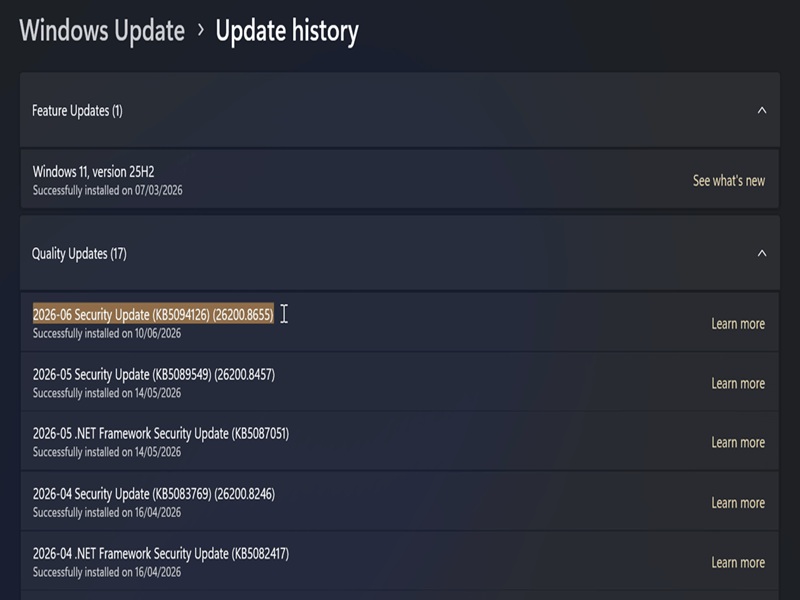
If you have LLP, it will be automatically enabled. The annoying part is that there will be no indicators for it.
The only way you'll know it's active is by monitoring your CPU performance. To do so, I recommend using HWiNFO - a free system information and diagnostics tool. It's quicker than Task Manager, which struggles to reliably catch the short CPU spikes.
Once you install it:
- Open it, select Full mode, and click on Start.
- You'll see a bunch of sensor windows, but only one is important here. It's usually in the top-right corner - a smaller window that monitors all your CPU cores. Keep it in sight, since you'll need it in a bit.
- Leave your PC idle for a little while, and you will notice that the detected speeds are relatively low, without any big fluctuations. The indicator bars are also green. But if you press the Windows button to bring up the Start menu, the CPU clock frequency may dramatically spike. The bars may also turn yellow. (You may have to push the window to the side to be able to see anything from the huge Start menu.)
- If you notice these spikes as soon as you open the Start menu (or Search, or the notification area, for example), LLP is active. If there are no changes, LLP isn't active yet.
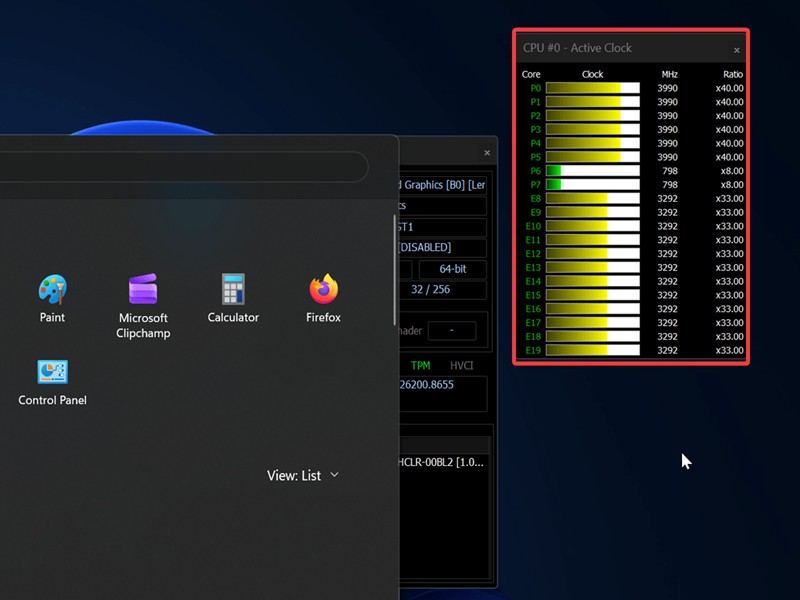
Additionally, depending on your hardware, you may notice the UI elements are popping up quicker and more smoothly than they used to. In my case, I noticed they're just slightly faster - nothing too crazy. If I wasn't already informed about the update, I probably wouldn't have even noticed it.
Overall, LLP is obviously not the definitive fix to Windows 11's slow UI. For that to happen, the bloated UI architecture has to change as well. The Start menu, for example, is slow because of all the web components that introduce latency. There has been some talk of moving to native WinUI3 code, which sounds much more promising. We've yet to see it implemented, though!

|
selma citakovic
Selma is a gamer, geek and gremlin hunter with a passion for cyber security and smashing Windows bugs before they bite. She’s IBM-certified, loves real freeware, despises bloatware, and powers most of her troubleshooting with an unhealthy amount of coffee. |
comments powered by Disqus
