


Managed Disk Cleanup is an Alternative to Windows Disk Cleanup
By Timothy Tibbettson 07/21/2023 |
Managed Disk Cleanup was designed to provide you with a portable alternative to Disk Cleanup program in Windows.
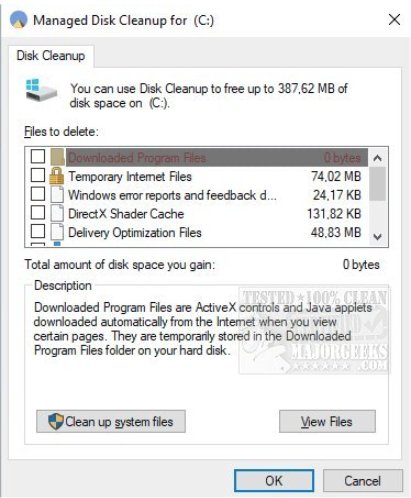
The interface of Managed Disk Cleanup is identical to the what you are used to in Windows including all the features allowing for basic disk cleanup to remove Temp Files, Downloaded Program Files, Error Reporting files, empty the Recycle Bin among many others.
If you prefer to use the Windows Disk Cleanup utility and are looking for an app to replace it (Disk Cleanup is now deprecated and featured as Storage Sense in Windows 10) then this app may be just what you need.
If this app interests you be sure to check out these similar articles: Video: Remove Unnecessary Files With Windows Disk Cleanup, How to Use Storage Sense to Delete Junk Files in Windows 10 Automatically, and How to Prevent Storage Sense from Deleting Downloaded Files.
Download @ https://www.majorgeeks.com/files/details/managed_disk_cleanup.html
comments powered by Disqus
The interface of Managed Disk Cleanup is identical to the what you are used to in Windows including all the features allowing for basic disk cleanup to remove Temp Files, Downloaded Program Files, Error Reporting files, empty the Recycle Bin among many others.
If you prefer to use the Windows Disk Cleanup utility and are looking for an app to replace it (Disk Cleanup is now deprecated and featured as Storage Sense in Windows 10) then this app may be just what you need.
If this app interests you be sure to check out these similar articles: Video: Remove Unnecessary Files With Windows Disk Cleanup, How to Use Storage Sense to Delete Junk Files in Windows 10 Automatically, and How to Prevent Storage Sense from Deleting Downloaded Files.
Download @ https://www.majorgeeks.com/files/details/managed_disk_cleanup.html
comments powered by Disqus
