


What Is Regid.1991-06.Com.Microsoft and Can You Delete It?
By Timothy Tibbettson 06/15/2023 |
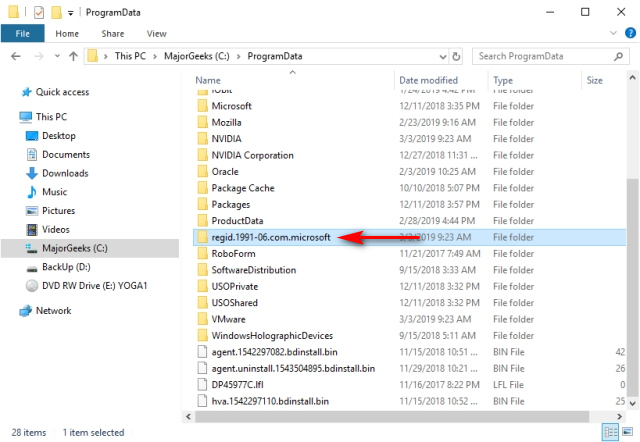
Recently while cleaning house on our Windows 10 computer, we found a folder in ProgramData called regid.1991-06.com. Naturally, we wanted to delete it. But, what is it and can it be deleted?
There's a good bit of vague information about this folder out there, and it appears to be related to Windows Updates. The folder is usually small, as little as 4KB, so there's not much to gain by deleting the regid.1991-06.com folder.
But, this is MajorGeeks, so we deleted it. The folder was restored after a reboot confirming there is no point in deleting this folder.
We've posted many guides on fixing broken Windows Updates, and many of the solutions require deleting Windows Update files. This is because if you remove files for an upcoming Windows Update, Windows will redownload the next time Windows Updates runs. Of course, we'd create a System Restore point to be safe.
Similar:
Best Drive Cleaner? CCleaner VS Wise Disk Cleaner VS PrivaZer
How-To Delete Pending Windows Updates
How to Clean Up the WinSxS folder (Component Store) in Windows 10
What Is the $Windows.~Bt Folder and Can I Delete It?
What Is the $SysReset Folder and Can I Delete It in Windows 10?
What Are the $GetCurrent and $WINDOWS.~BT Folders and How to Delete Them
comments powered by Disqus
There's a good bit of vague information about this folder out there, and it appears to be related to Windows Updates. The folder is usually small, as little as 4KB, so there's not much to gain by deleting the regid.1991-06.com folder.
But, this is MajorGeeks, so we deleted it. The folder was restored after a reboot confirming there is no point in deleting this folder.
We've posted many guides on fixing broken Windows Updates, and many of the solutions require deleting Windows Update files. This is because if you remove files for an upcoming Windows Update, Windows will redownload the next time Windows Updates runs. Of course, we'd create a System Restore point to be safe.
Similar:
comments powered by Disqus
