


Where to Find Your Device Setup Region in Windows 11
By selma čitakovićon 10/25/2026 |
![{$insert['content_title']](/content/file/6460_image4.jpg
)
During device setup, you're asked to select a country or region. Windows 11 will remember that as your device region. Once you pick it, you can't change it later unless you go through the whole Windows setup process again. On the other hand, you can freely pick and change your account region and country. Both are often referred to as your GeoID, so it's easy to confuse them, but they're not the same.
So, if you specifically need to check out your device region, we've got you.
Via Settings
This is the easiest way to find this info:
- Go to Settings > Time & language > Language & region.
- Under Region, look for Device setup region.
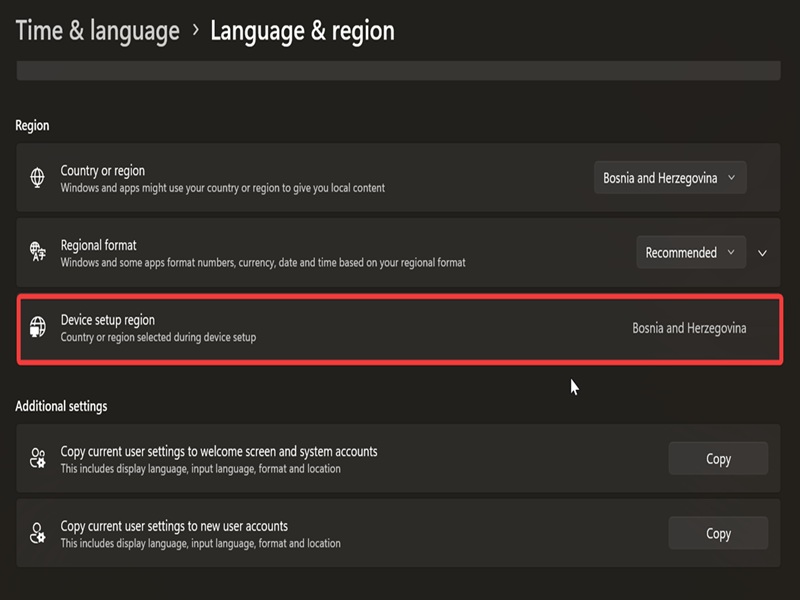
And if you scroll down a bit further, you'll see options to copy your current region settings to new user accounts and system accounts. These are useful if you want to speed up the setup process for new accounts.
Via PowerShell
Alternatively, you can find your device region with a command:
- Type PowerShell in Windows Search and open it.
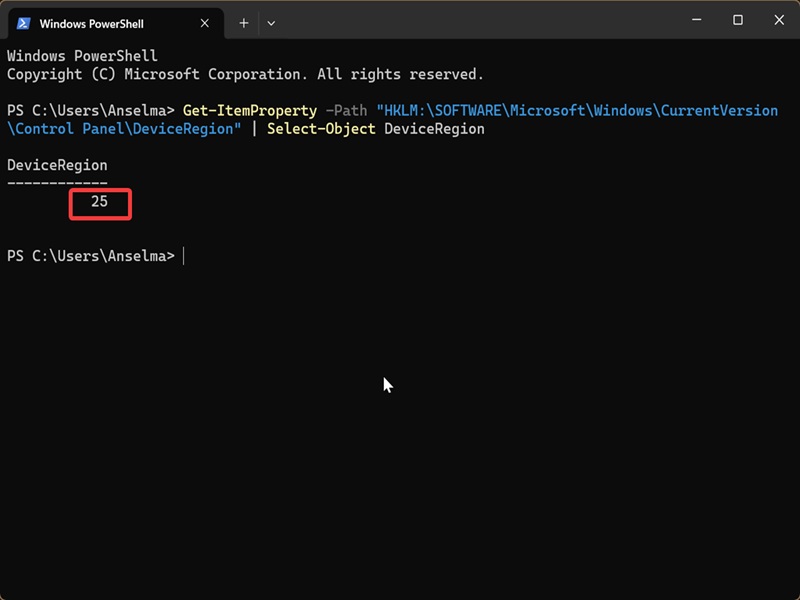
- Paste the following command and press Enter: Get-ItemProperty -Path "HKLM:\SOFTWARE\Microsoft\Windows\CurrentVersion\Control Panel\DeviceRegion" | Select-Object DeviceRegion
- You'll see a number output under DeviceRegion. Check the table of geographical locations and find the county/region that has the same number under Geographical location identifier (decimal).
Via Registry Editor
You can also look up your device setup region in the registry. You won't be making any changes to it; it's just a quick check.
Here are the steps:
- Press Win + R, type regedit, and hit Enter.
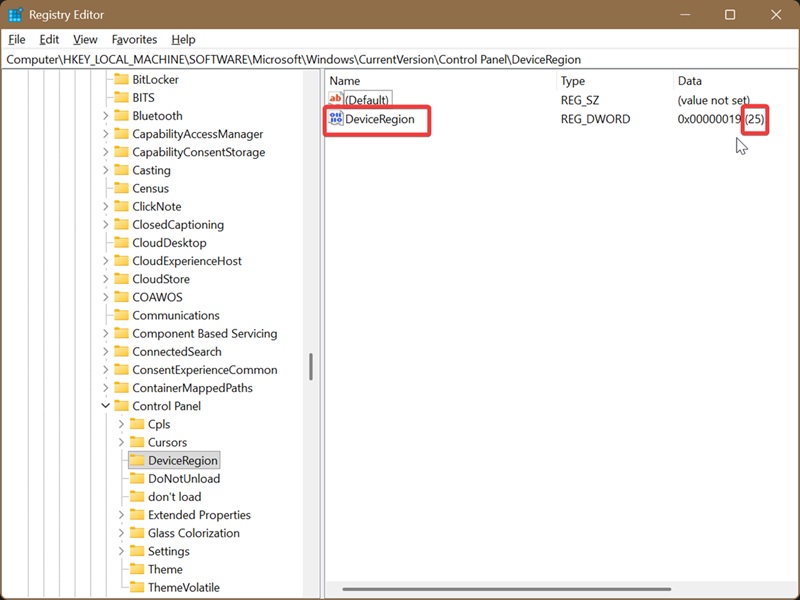
- Navigate to HKEY_LOCAL_MACHINE\SOFTWARE\Microsoft\Windows\CurrentVersion\Control Panel\DeviceRegion.
- While in the DeviceRegion key, look for the DeviceRegion DWORD Value on the right. You'll see a decimal data value next to it. For example: 25.
- Look up this number in the official table of geographical locations. So, in my case, the number 25 stands for Bosnia and Herzegovina.
We hope this helps with your search!

|
selma citakovic
Selma is a gamer, geek and gremlin hunter with a passion for cyber security and smashing Windows bugs before they bite. She’s IBM-certified, loves real freeware, despises bloatware, and powers most of her troubleshooting with an unhealthy amount of coffee. |
comments powered by Disqus
